Unconstrained method
Constrained decoding is deterministic. It gives structured outputs with 100% schema adherence.
On the other hand, the non-deterministic, unconstrained method involves writing a prompt specifying our schema, and letting the LLM freely produce output without interfering in the sampling process. We already tried this in our chatbot example, and saw 20% of the LLM outputs violated our schema. This begs the question:
Why use it?
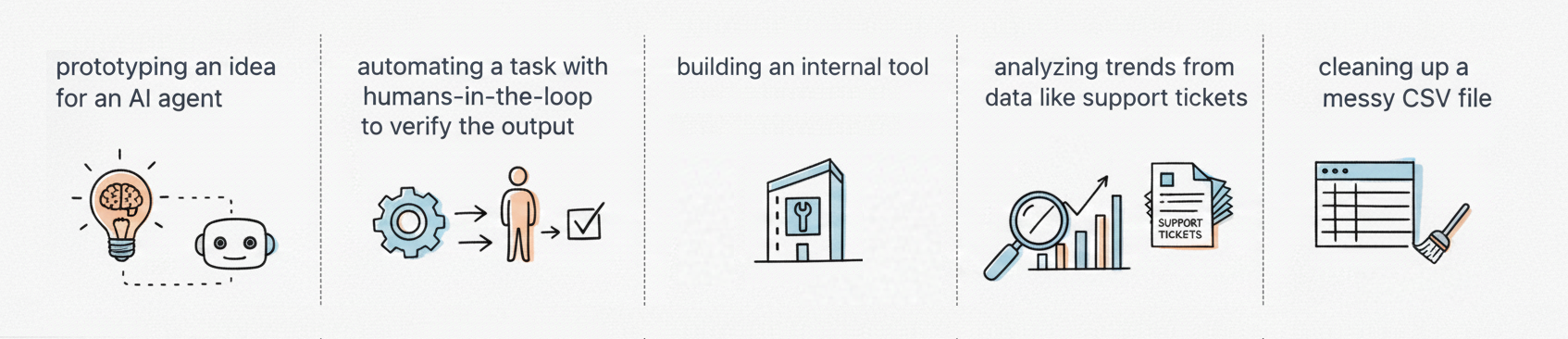
- Constrained decoding takes time and effort to implement. Sometimes we want a quick and easy setup, even if it means we get a few errors.
-
Constrained decoding can sometimes degrade the quality of output within the schema, especially when tasks require deep reasoning. If constrained outputs are bad, it is worth trying out the unconstrained method.
-
Our implementation of the unconstrained method in the chatbot example was bad. We can lower the error rate with a better implementation.
Many believe LLMs will soon get so good at predicting the right tokens, that they'll be able to produce structured outputs with near-perfect schema adherence with just a simple prompt.
How to Implement
The chatbot isn't the right place to use unconstrained methods. It is a critical production app that records customer transactions, and demands deterministic constrained decoding.
We'll think of a more suited example: Say we want an internal Slack app to submit expenses for reimbursement. Employees write a Slack message and the app records an expense in a database. This is an internal app that will probably have a human in the loop to verify outputs.
We'll use the unconstrained method in this app. A good implementation needs:
- a good prompt
- code to clean up bad outputs
Prompt engineering
Read this prompt carefully:
You are an expense auditing engine.
You output only valid JSON. You do not output conversational text.
### INSTRUCTIONS
Analyze the expense report below.
1. Extract "billable_items" (transport, lodging). Ignore personal items (food, entertainment).
2. Calculate "total_claim" by summing the cost of only the billable items.
3. Calculate "trip_duration_days" by counting the days between the start and end dates (inclusive).

Output valid JSON matching this schema:

{
	"billable_items": ["string", "string", "string", ...],
	"total_claim": number,
	"trip_duration_days": number
}

### EXAMPLES
Input: "Flew to London on March 1st ($300). Stayed at Marriott until March 3rd ($150). Dinner was $50."

Output:
{
	"billable_items": ["Flight ($300)", "Marriott Hotel ($150)"],
	"total_claim": 450,
	"trip_duration_days": 3
}

Input:
"Rental car from June 10 to June 15 ($200). Bought snacks ($20)."

Output:
{
	"billable_items": ["Rental Car ($200)"],
	"total_claim": 200,
	"trip_duration_days": 6
}

Input:
"Rental car from June 10 to June 15 ($200). Bought concert tickets ($100)."

Output:
{
	"billable_items": ["Rental Car ($200)"],
	"total_claim": 200,
	"trip_duration_days": 6
}

### DATA
[expense_message].       <-- We insert the actual message here.

### RESPONSE
JSON Output:
This is a good prompt because:
-
System Role: It sets the role to "expense auditing engine", giving context to the LLM before it sees the user prompt. It tells the LLM to output JSON and avoid chatty intros.
-
Explicit Schema: It defines our schema at the start of the prompt. The LLM knows the exact JSON format before it sees examples or input.
-
Logic Transfer: It gives examples to reinforce format and logic. The LLM catches patterns in the examples matching the explicit schema instructions:
$300+$150equals450June 10toJune 15equals6March 1sttoMarch 3rdequals 3dinnerandconcert tickets(personal) are excludedflightandrental car(billable) are included
-
Priming: It ends with
JSON Output:to nudge the LLM to start immediately with the brace{.
Parse-and-repair code
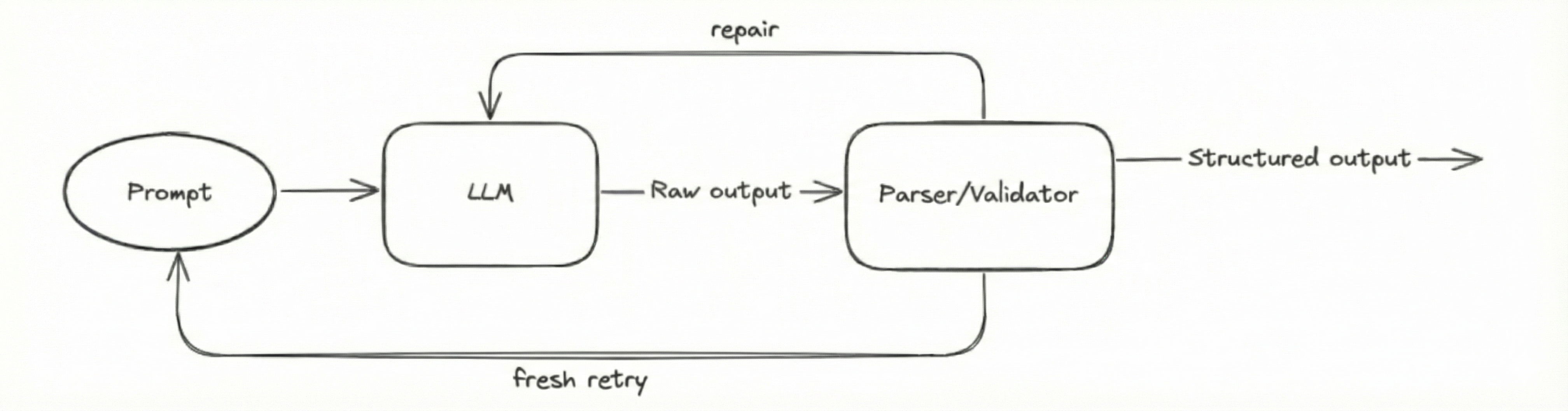
Now we need to handle bad outputs. We'll feed the LLM outputs to a parse-and-repair pipeline:
-
Cleaning
To remove noise, we extract the substring between the first
{and the last}.def clean_text(text):
# Remove Markdown fences
text = text.replace("```json", "").replace("```", "")
# Extract only the JSON object
start = text.find("{")
end = text.rfind("}")
if start != -1 and end != -1:
return text[start : end + 1]
return text -
Parsing
We use a lenient parser like
ast.literal_evalinstead of the standardjson.loads(). It will handle outputs that deviate from strict JSON format. (single quotes, trailing commas, etc.)import json
import ast
def parse_json(text):
# Try standard JSON first
try:
return json.loads(text)
except json.JSONDecodeError:
pass
# Fallback
try:
return ast.literal_eval(text)
except (ValueError, SyntaxError):
return None # Parsing failed -
Validating
The LLM often invents fields and hallucinates data types.
- We filter the keys against an allow-list.
- We cast all the values to their expected data types.
def sanitize_data(data):
    allowed_keys = ["billable_items", "total_claim", "trip_duration_days"]

    # 1. Remove extra keys
    clean_data = {k: v for k, v in data.items() if k in allowed_keys}

    # 2. Fix Types
    if "total_claim" in clean_data:
        try:
            clean_data["total_claim"] = int(clean_data["total_claim"])
        except ValueError:
            bad_val = clean_data["total_claim"]
            raise ValueError(f"Field 'total_claim' must be a number, not '{bad_val}'")

    if "trip_duration_days" in clean_data:
        try:
            clean_data["trip_duration_days"] = int(clean_data["trip_duration_days"])
        except ValueError:
            bad_val = clean_data["trip_duration_days"]
            raise ValueError(f"Field 'trip_duration_days' must be a number, not '{bad_val}'")

return clean_data -
Feedback Loop
Many issues (missing keys, broken syntax, etc.) cannot be fixed with code, and outputs with these issues will throw errors.
- We feed the error message back to the LLM and ask it to repair the output.
- If we know the error, we send a custom message.
- If we don’t know the error, we send the system error.
- If repaired output throws error as well, we clear the message history and generate a fresh output again.
def reliable_extract(prompt):
    max_fresh_retries = 3
    max_repair_attempts = 3

    for fresh_attempt in range(max_fresh_retries):
        # start a new conversation history for each "fresh output"
        messages = [
            {"role": "system", "content": "You are an expense auditing..."},
            {"role": "user", "content": prompt}
        ]

        for repair_attempt in range(max_repair_attempts):
            try:
                response = llm.chat(messages)
                text = response.content

                # 1. Cleaning
                clean_text_snippet = clean_text(text)
                if not clean_text_snippet:
                    raise ValueError("Could not find JSON in the output.")

                # 2. Parsing
                data = parse_json(clean_text_snippet)
                if not data:
                    raise ValueError("Could not parse JSON. Check syntax.")

                # 3. Validating
                data = sanitize_data(data)

                return data  # Success!

            except Exception as e:
                # 4. Repair Loop Logic
                error_msg = f"Error: {str(e)}. Please fix the JSON and return only the valid object."

                # We append the bad output and the error message to the conversation history
                messages.append({"role": "assistant", "content": text})
                messages.append({"role": "user", "content": error_msg})

                print(f"Repair attempt {repair_attempt + 1} failed for Fresh Retry {fresh_attempt + 1}")
                continue

        # If we exit the inner loop, it means all 3 repairs failed.
        # The outer loop will clear the message history and start over.
        print(f"Fresh retry {fresh_attempt + 1} exhausted. Wiping history and starting fresh...")

raise Exception(f"Failed after {max_fresh_retries} fresh attempts and {max_repair_attempts} repairs each.") - We feed the error message back to the LLM and ask it to repair the output.
This is a better implementation of the unconstrained method.
Libraries
Libraries like BAML, Inspector, Pydantic AI have prompt engineering and parse-and-repair built-in. We'll cover them shortly.