Amazon Textract vs LLM/VLM based OCR
Newer LLM/VLM based APIs beat Amazon Textract in document extraction tasks on accuracy, features, price. We’ll evaluate Textract against these LLM/VLM based APIs, and also other kinds of alternatives.
Do you need an Amazon Textract alternative?
There are six aspects most teams evaluate in a document extraction setup:
- Does it match or exceed accuracy goals?
- Does it have all the required parsing and extraction features?
- Does it match latency requirements?
- Is it cost effective?
- Is it compliant to data privacy requirements?
- How much effort is required for setup?
We’ll compare Textract vs alternatives on these fronts, to help you choose according to your needs.
1. Accuracy
This depends on the nature of your documents. If your documents are clean, typed, simple - basically if they look like standardized scantrons, and you need to extract simple tables and forms, Textract gives you 80-85% accuracy.
For documents more complex, extraction beyond basic forms and tables, accuracy beyond 90%, there are glaring differences between Textract and state-of-the-art APIs.
Simple tables and forms
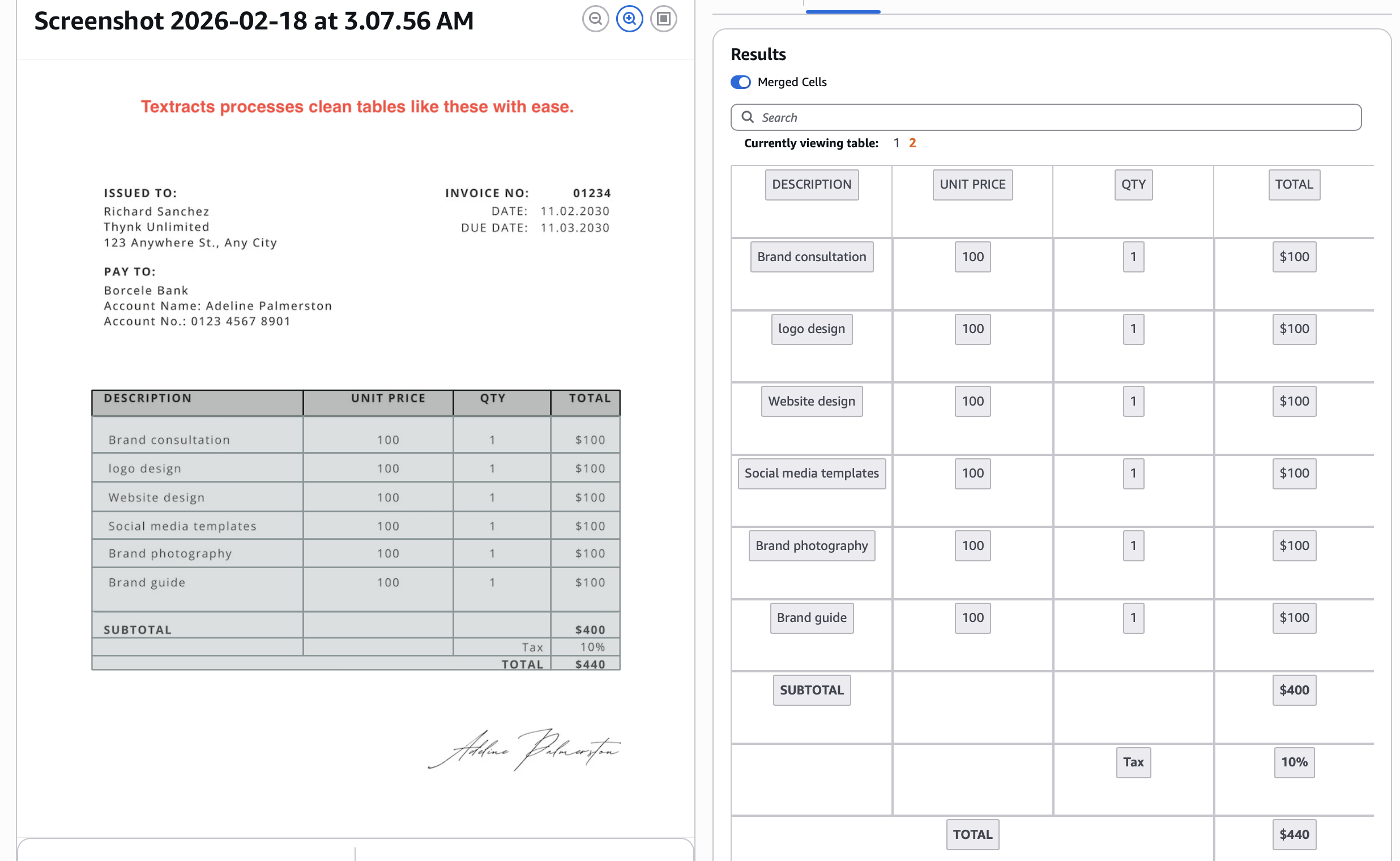
This is Textract’s bread and butter today. We’ll look at some outputs.
Extraction of tables:
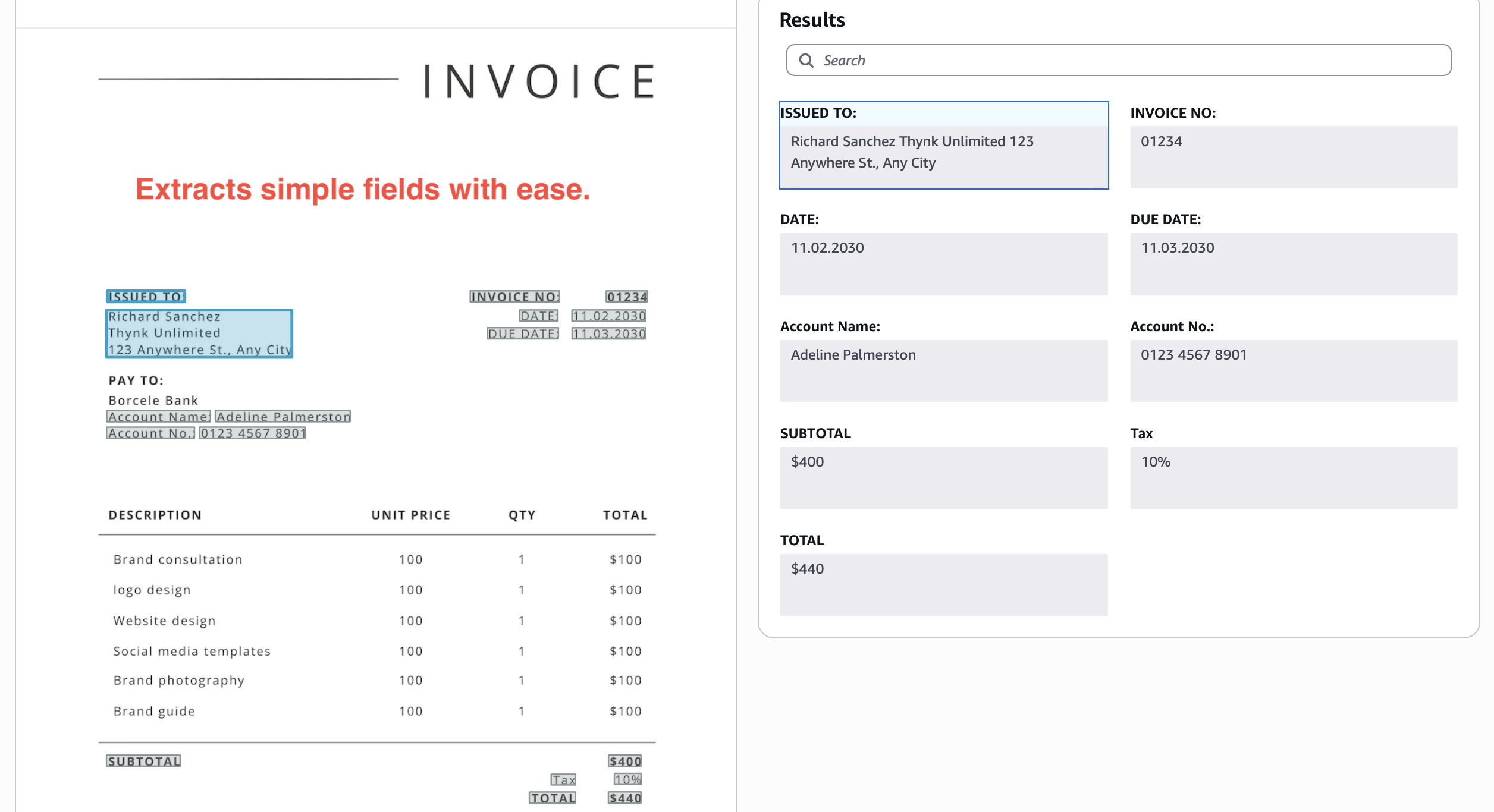
Extraction of key-value pairs:
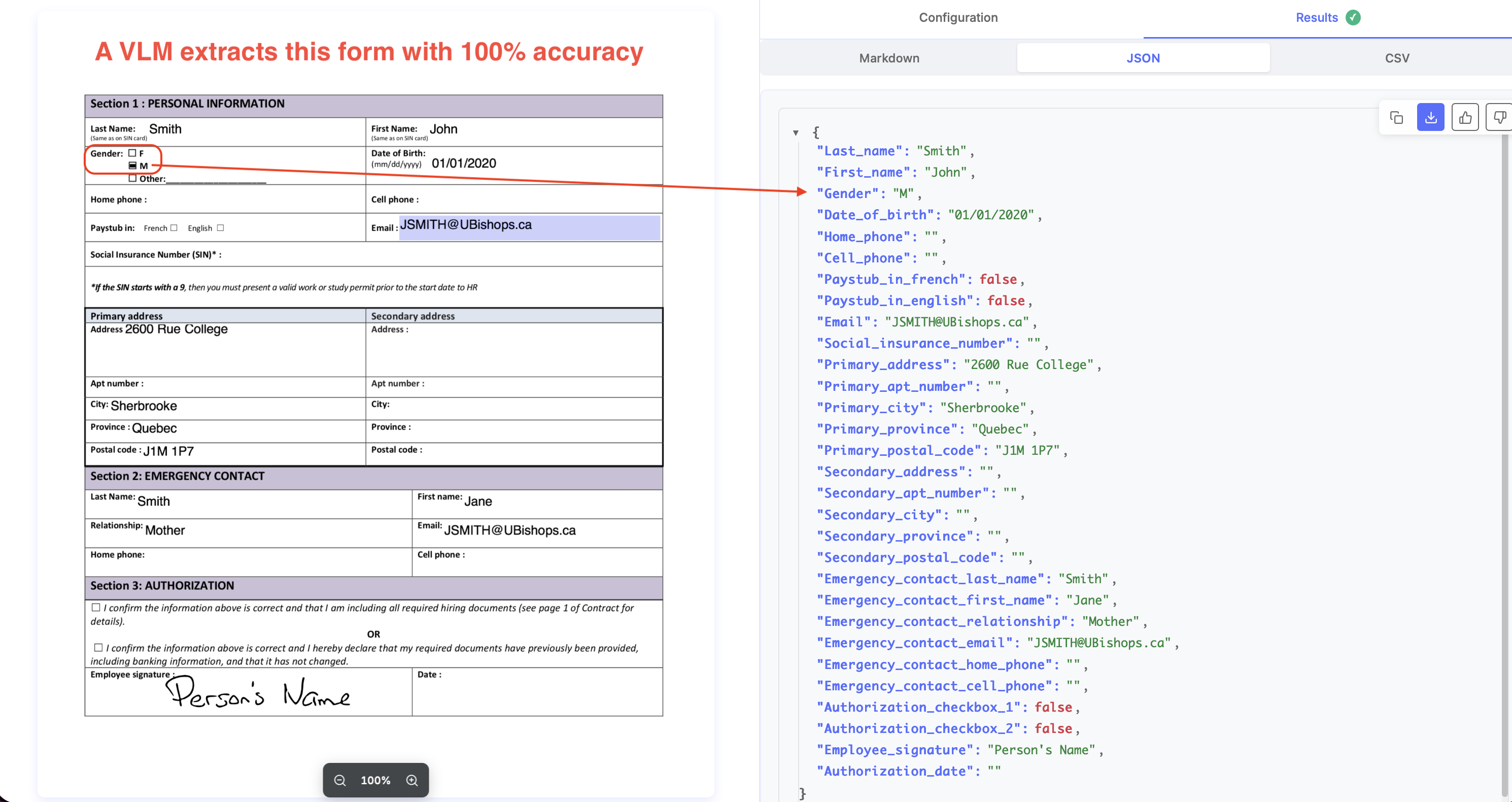
Extraction of forms:
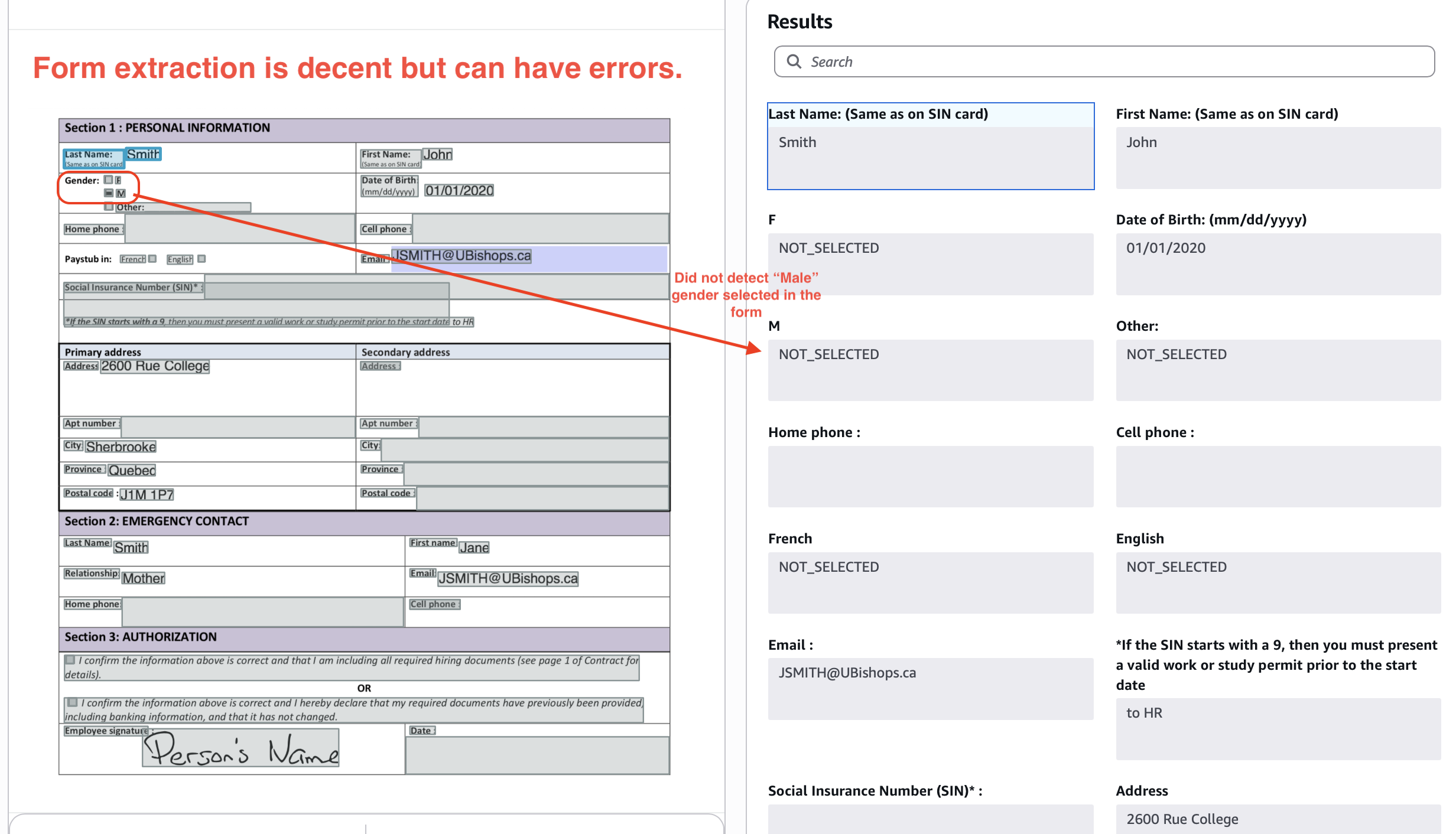
Out-of-the-box, Textract typically gives you 80-85% accuracy on these kinds of tables and forms. To move the needle on accuracy, you typically need to train Textract "adapters".
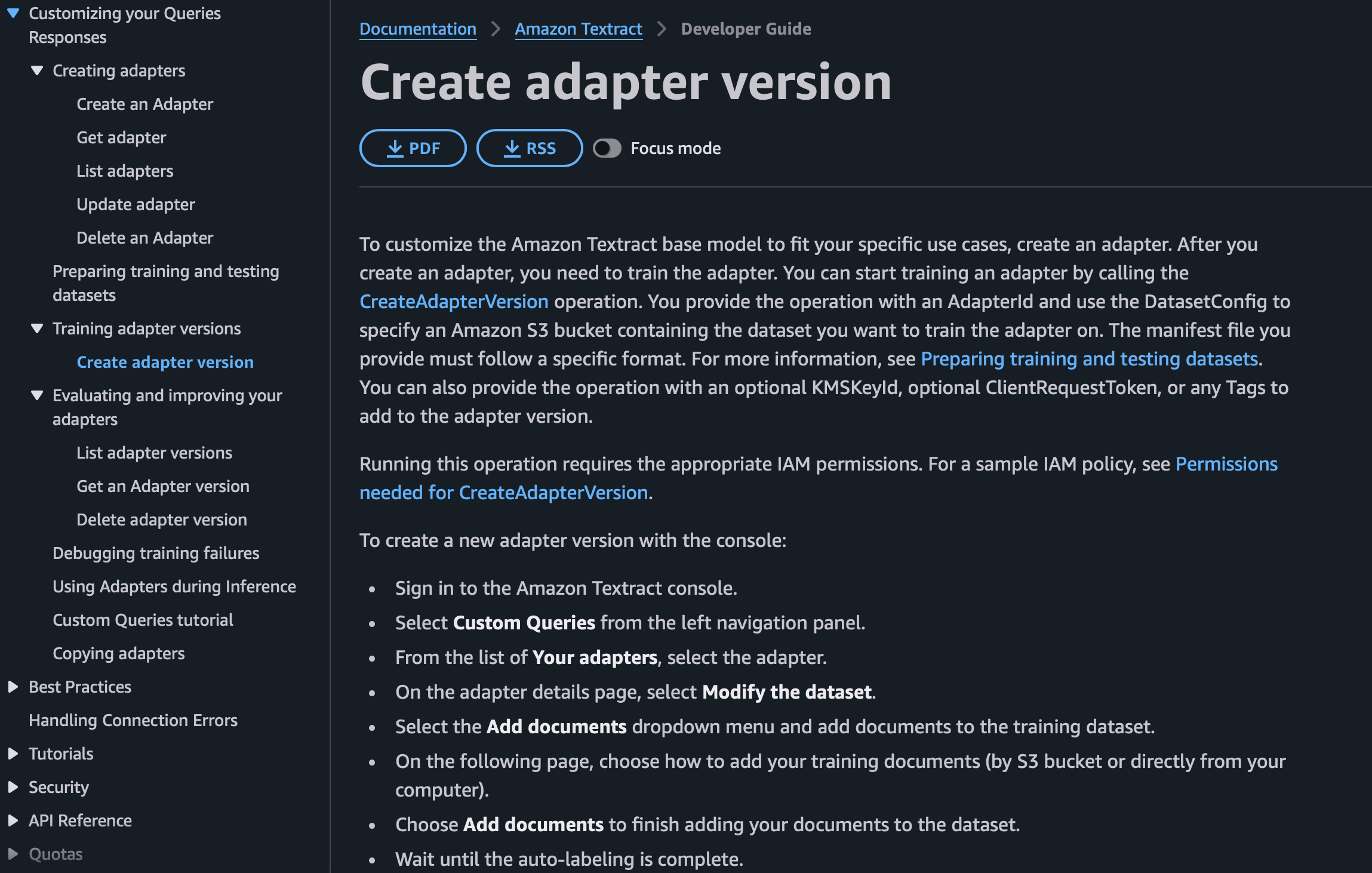
This is a cumbersome process, you need large well-annotated datasets of your documents, and even then, Textract often caps at 85-90% accuracy after a few training iterations.
If you are looking for higher accuracy from your doc extraction setup, the difference between Textract and LLM APIs like Nanonets starts to really show. Nanonets typically offers >97% accuracy out-of-the-box on documents with simple tables, key-value pairs, forms.
Complex tables
We’ll stress test now.
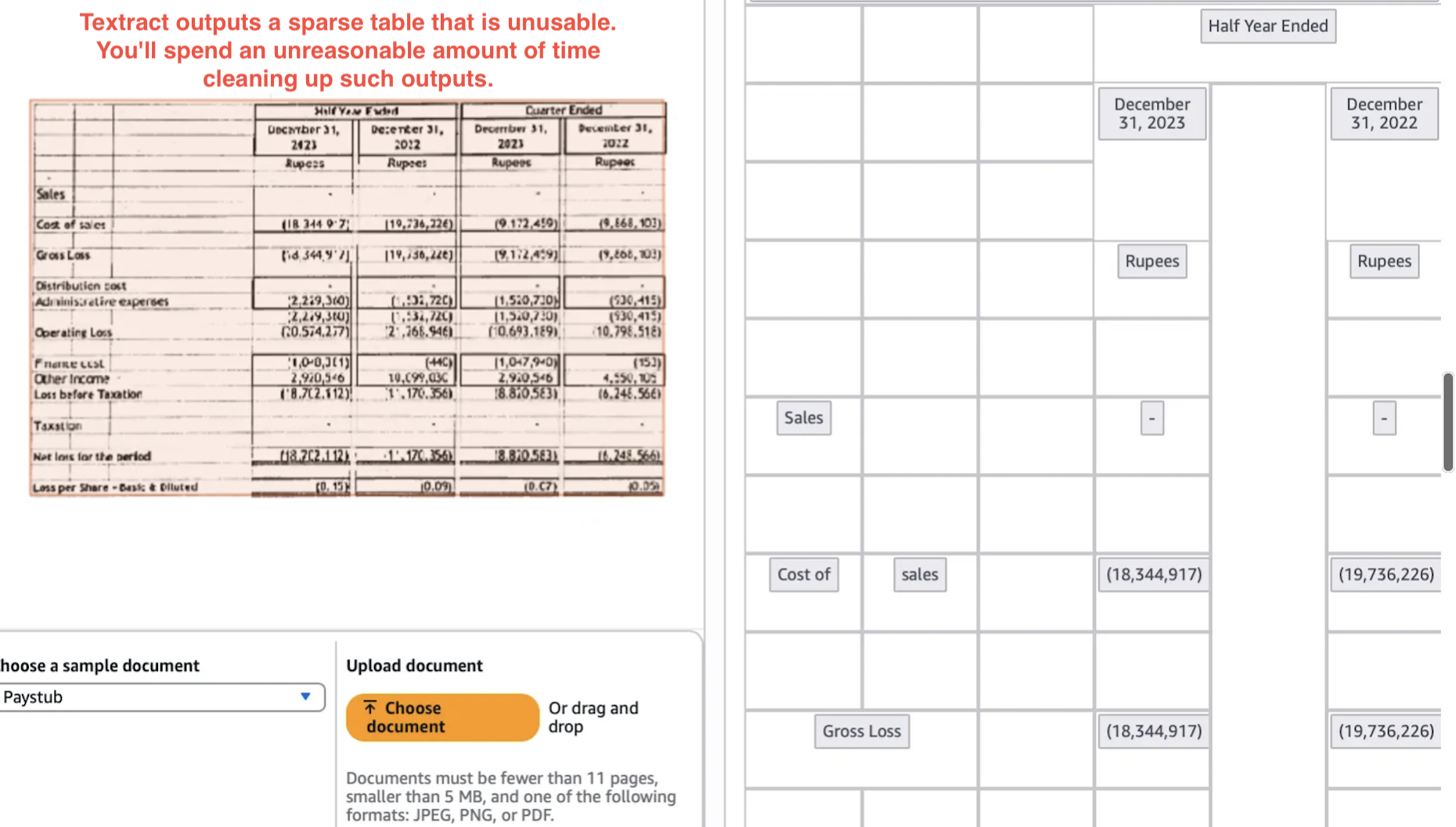
We saw above Textract can extract tables when they are uniform, digital, and presented well. But often, documents from multiple sources follow their own table layouts, and your downstream processes/tasks are very sensitive to erroneous or illogical representations of tables commonly seen in Textract outputs.
For example, below Textract output certainly isn’t the best representation of the table shown.
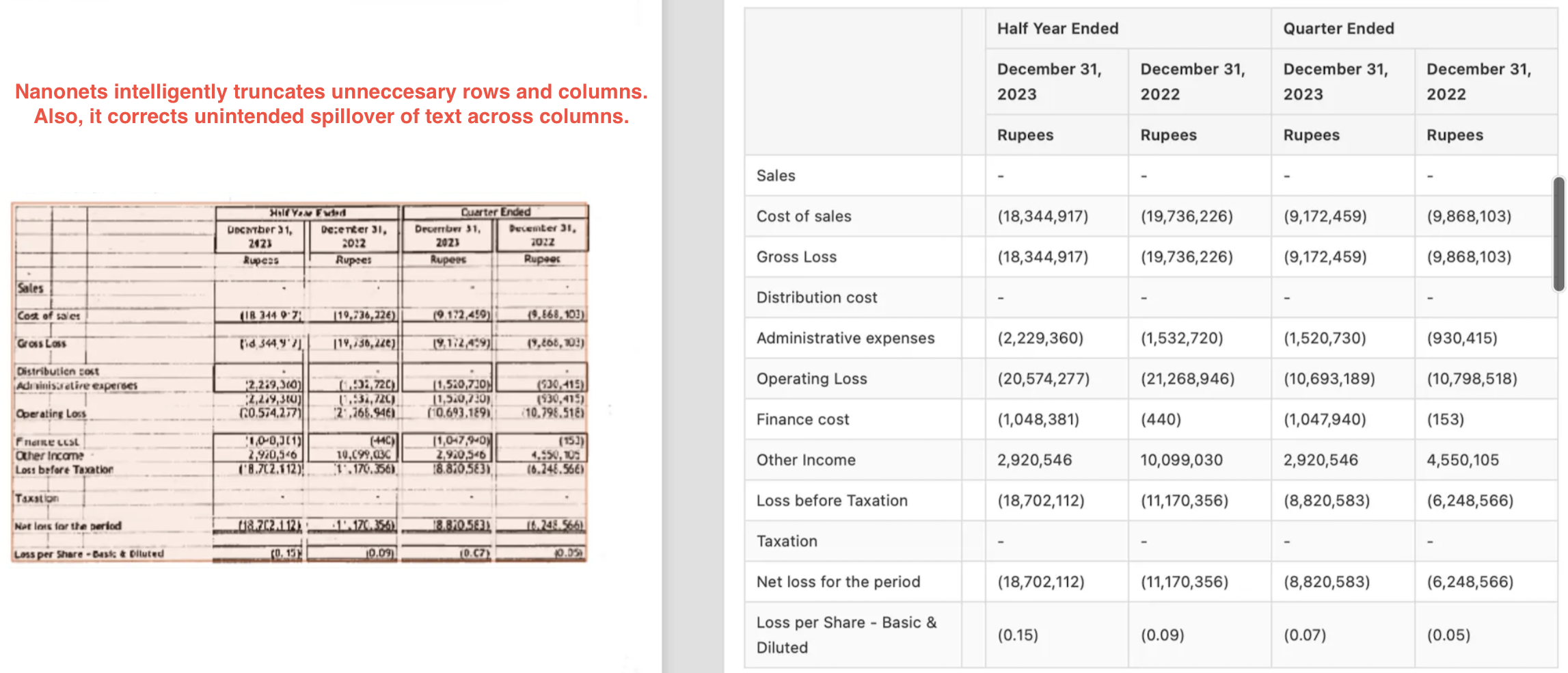
Nanonets gives a much better output here, with intelligent truncation of rows and correction in unintended spillover of columns.
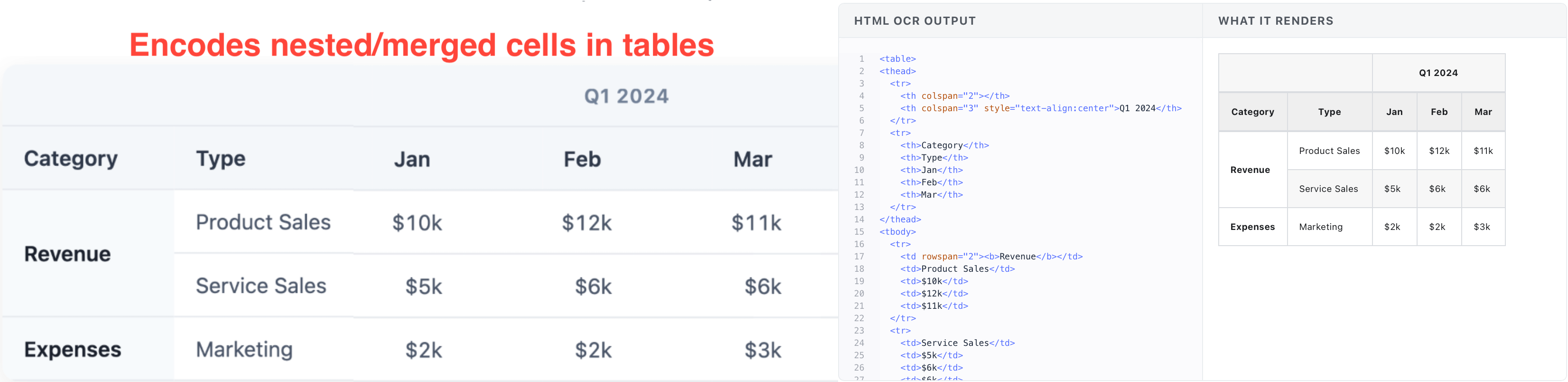
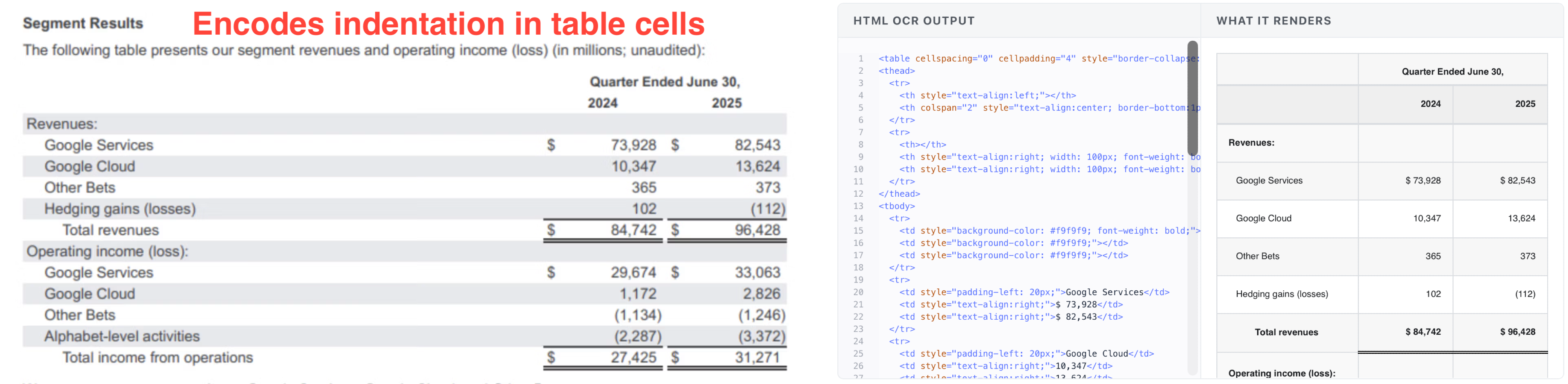
Nanonets also supports rich HTML outputs for tables with nesting or hierarchy. These outputs respect the original table’s indentation, formatting, nested rows/columns.
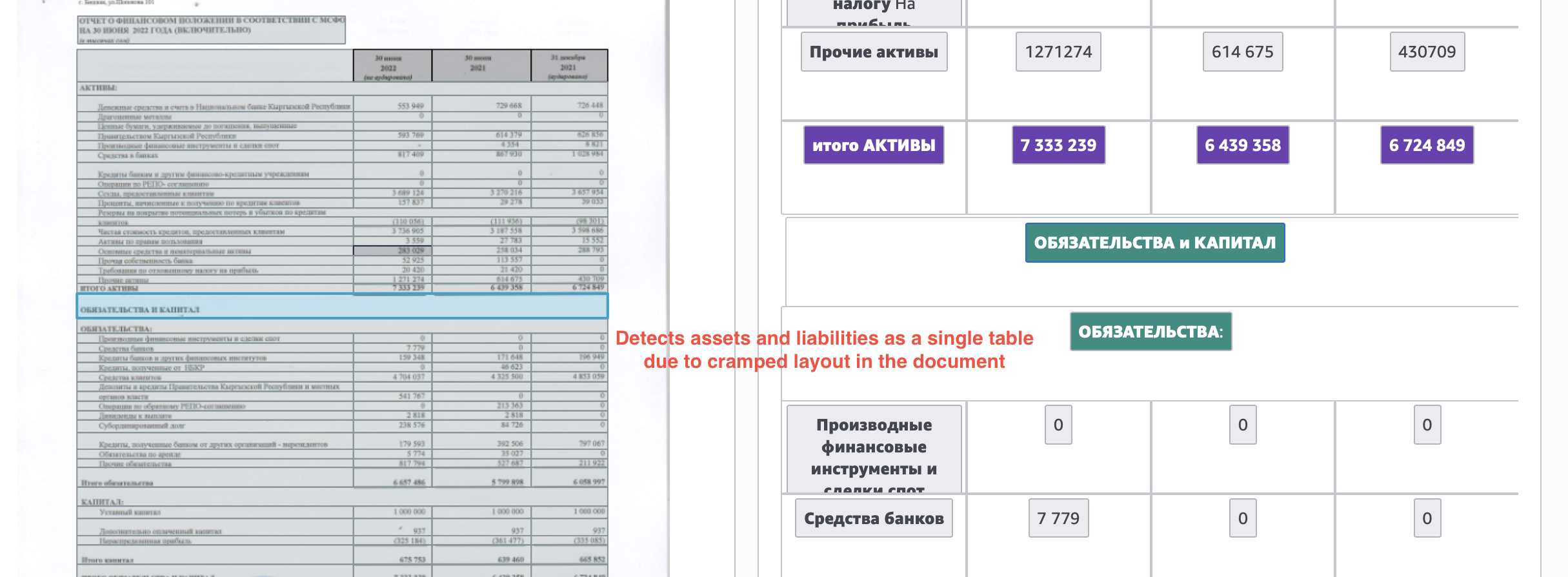
Here's one more example, where Textract output combines the assets and liabilities tables, only separating them as “different sections in the same table”.
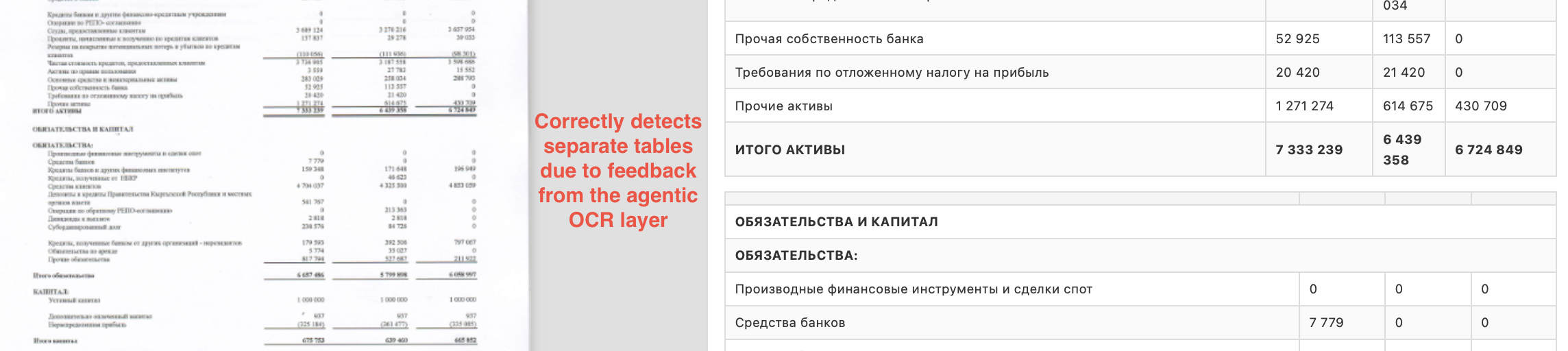
Nanonets output extracts these cleanly as separate tables.
Layout extraction
If layout extraction is important for you, the debate actually closes pretty fast. We’ll look at some examples.
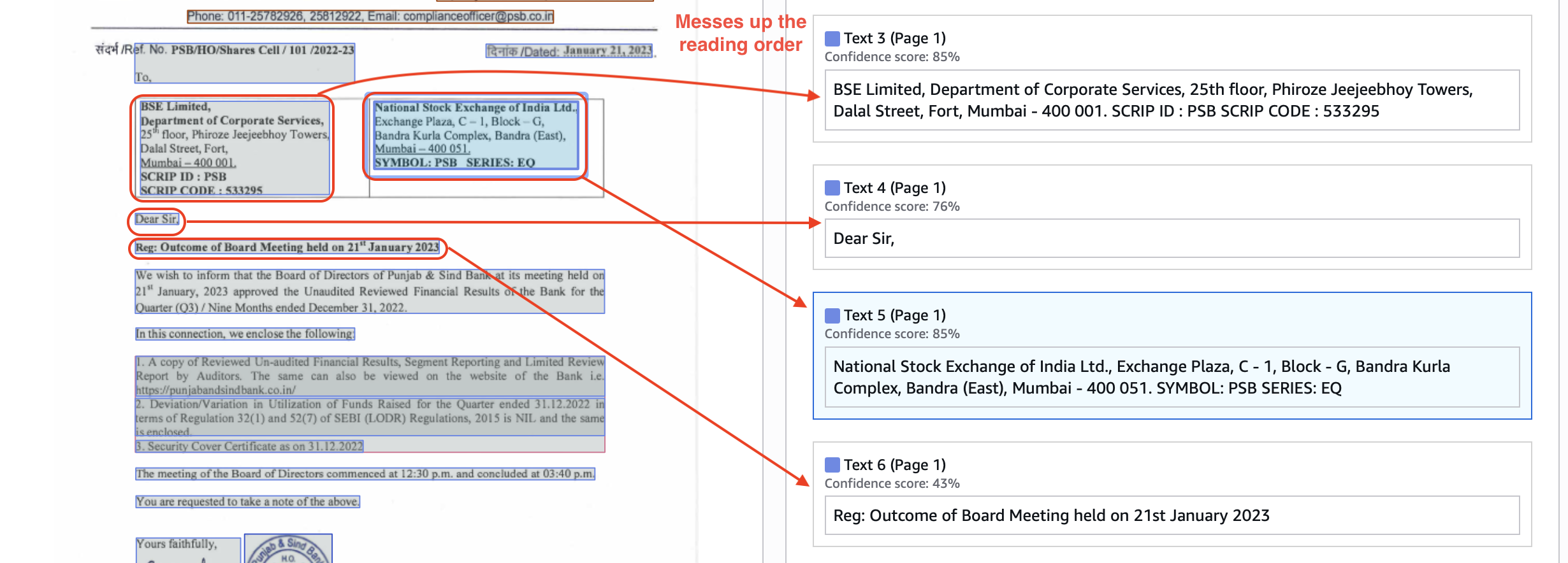
Here’s a layout output from Textract. It messes up the reading order (text 3→4→5 is wrong reading order).
In constant, Nanonets preserves both the visual layout and reading order well, in markdown blocks.
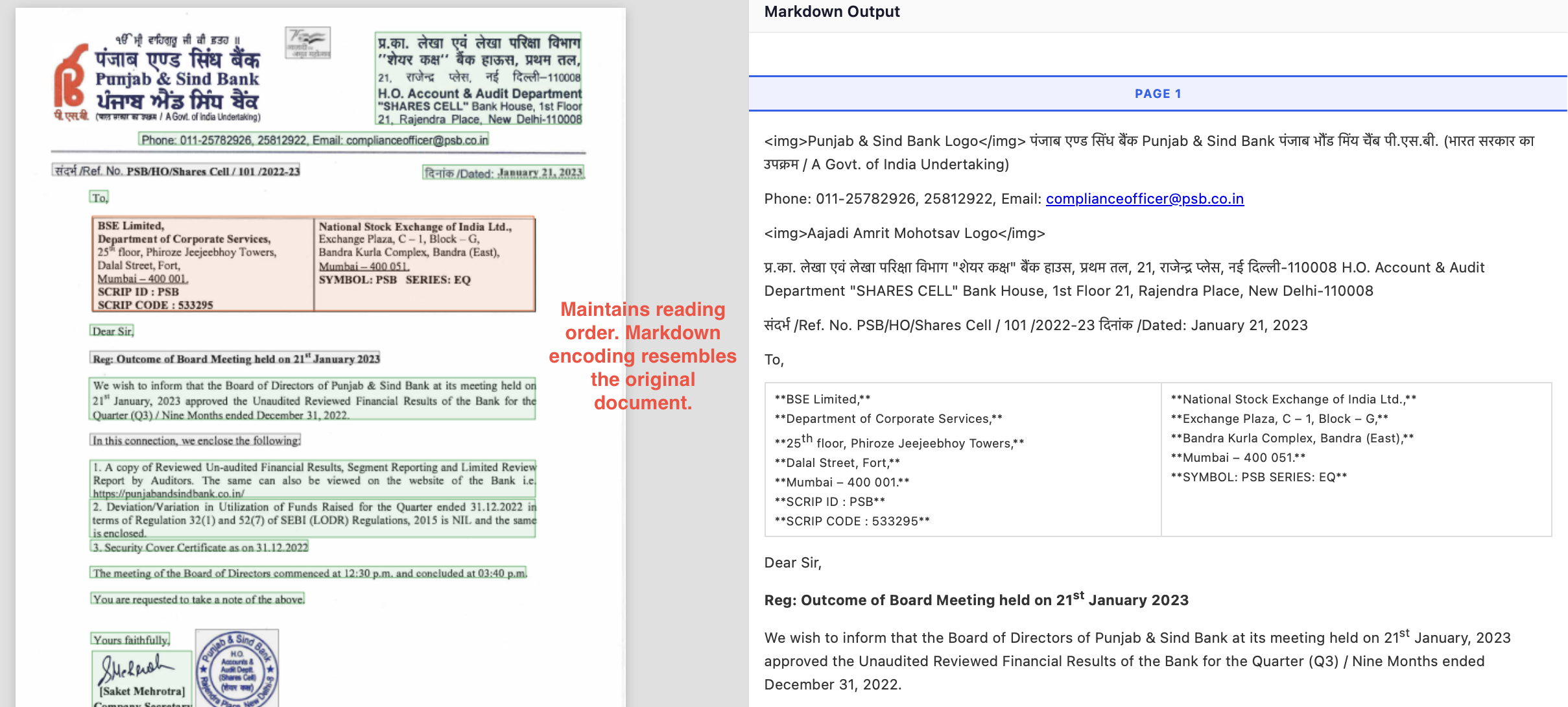
Here, Textract detects footnotes and image caption as plaintext.
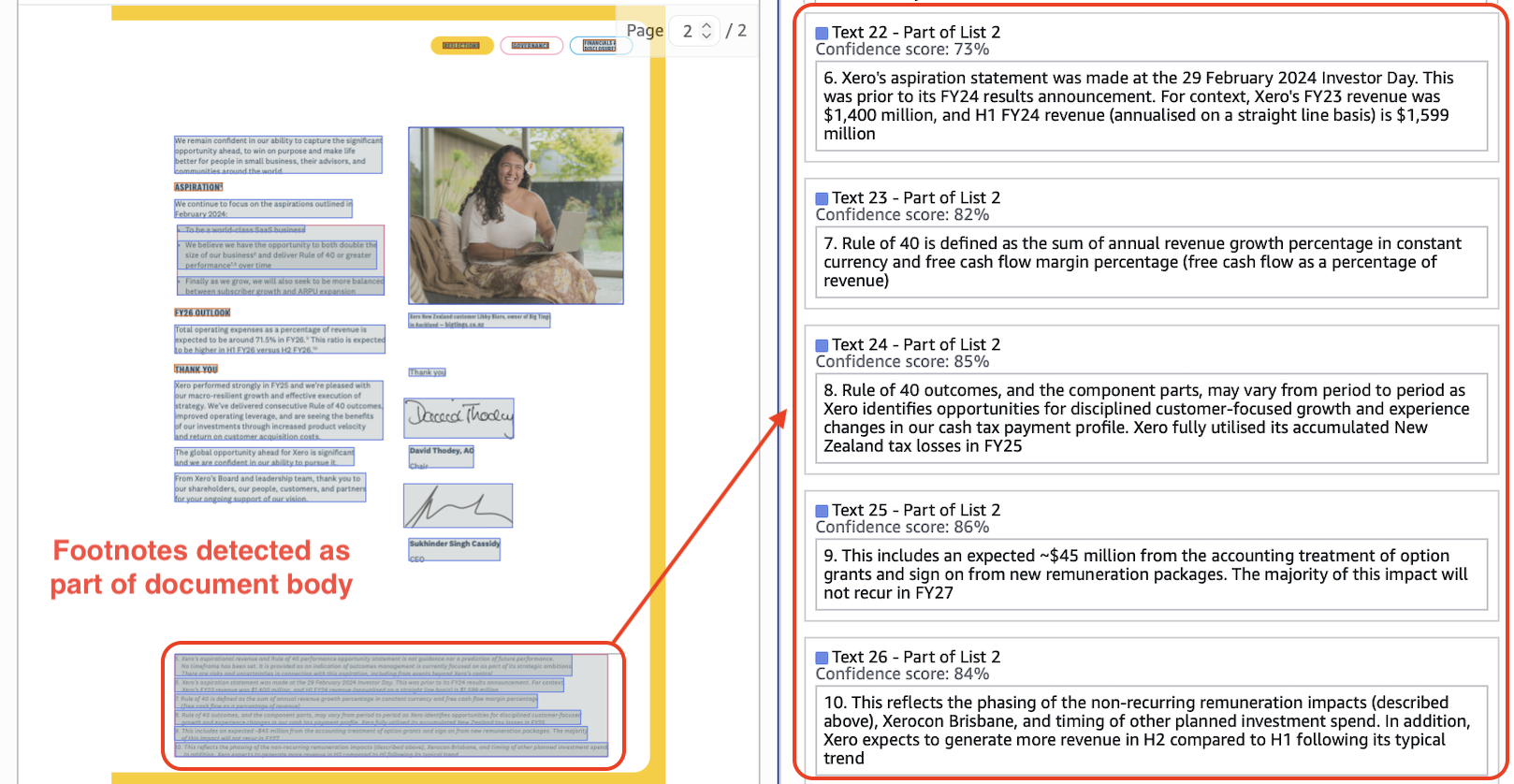
Nanonets extracts footnotes correctly, extracts caption as figure_title to create relation with image, and extracts headers correctly.
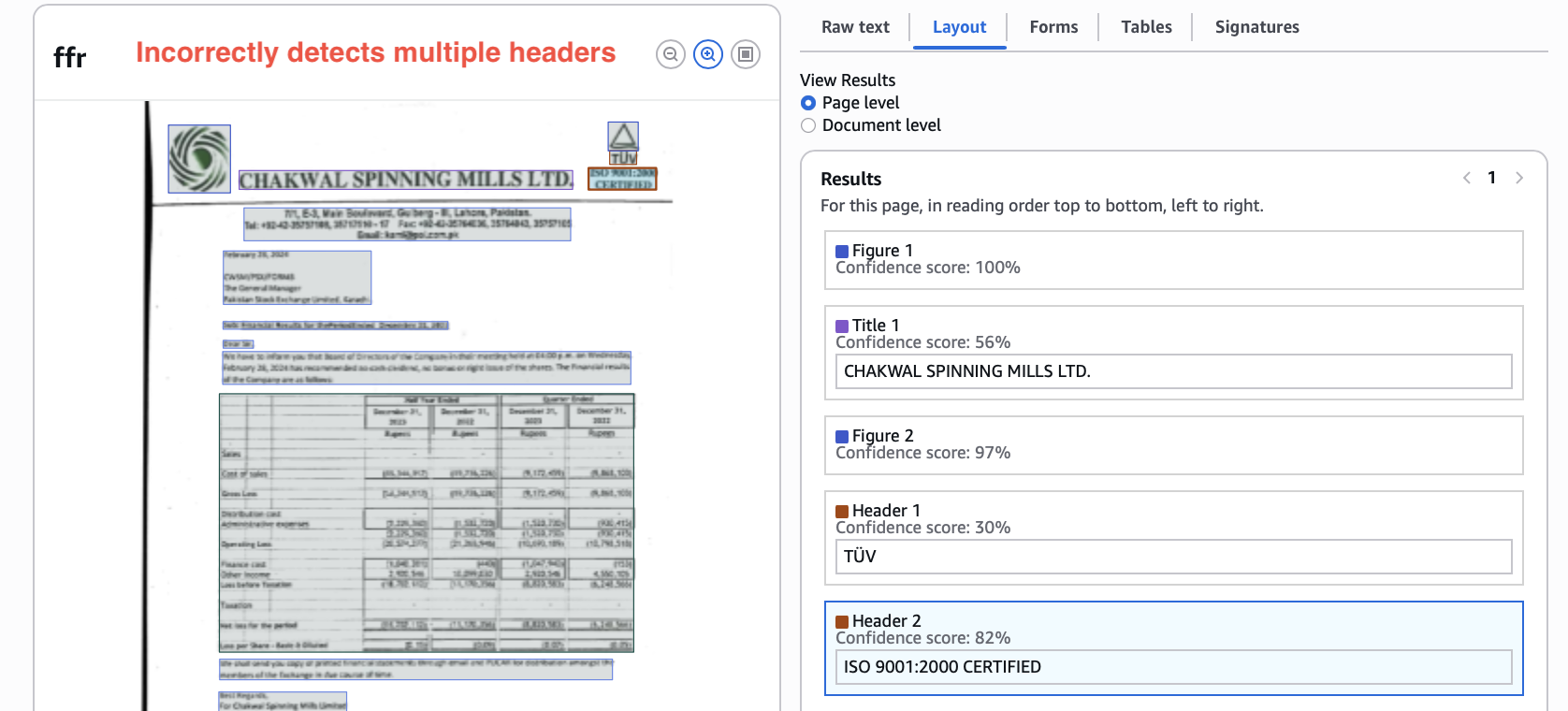
There are many other small error occurrences which add up, like here Textract gives two separate headers which should be one.
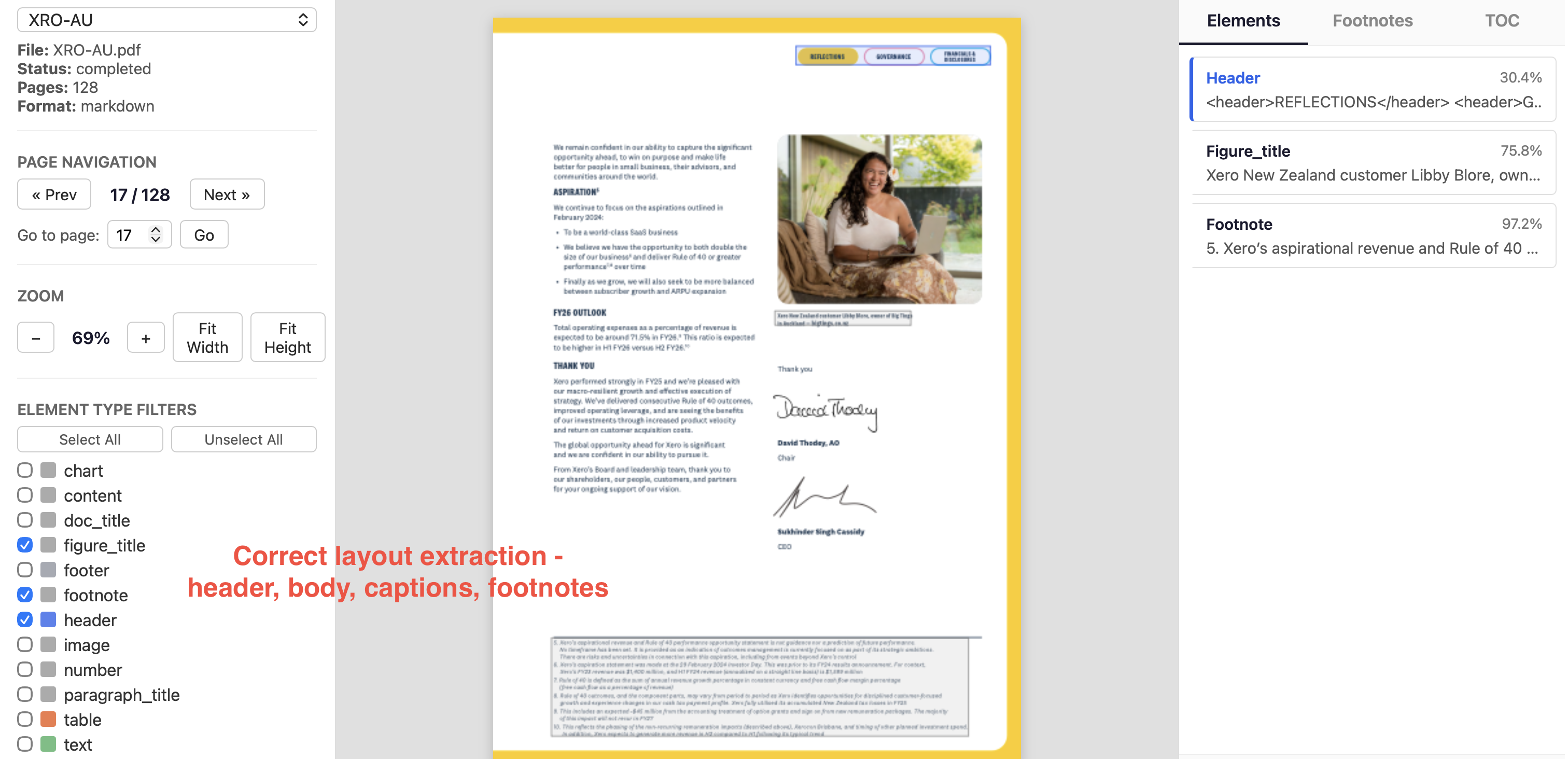
Nanonets correctly assigns the logo image and both lines as one header.
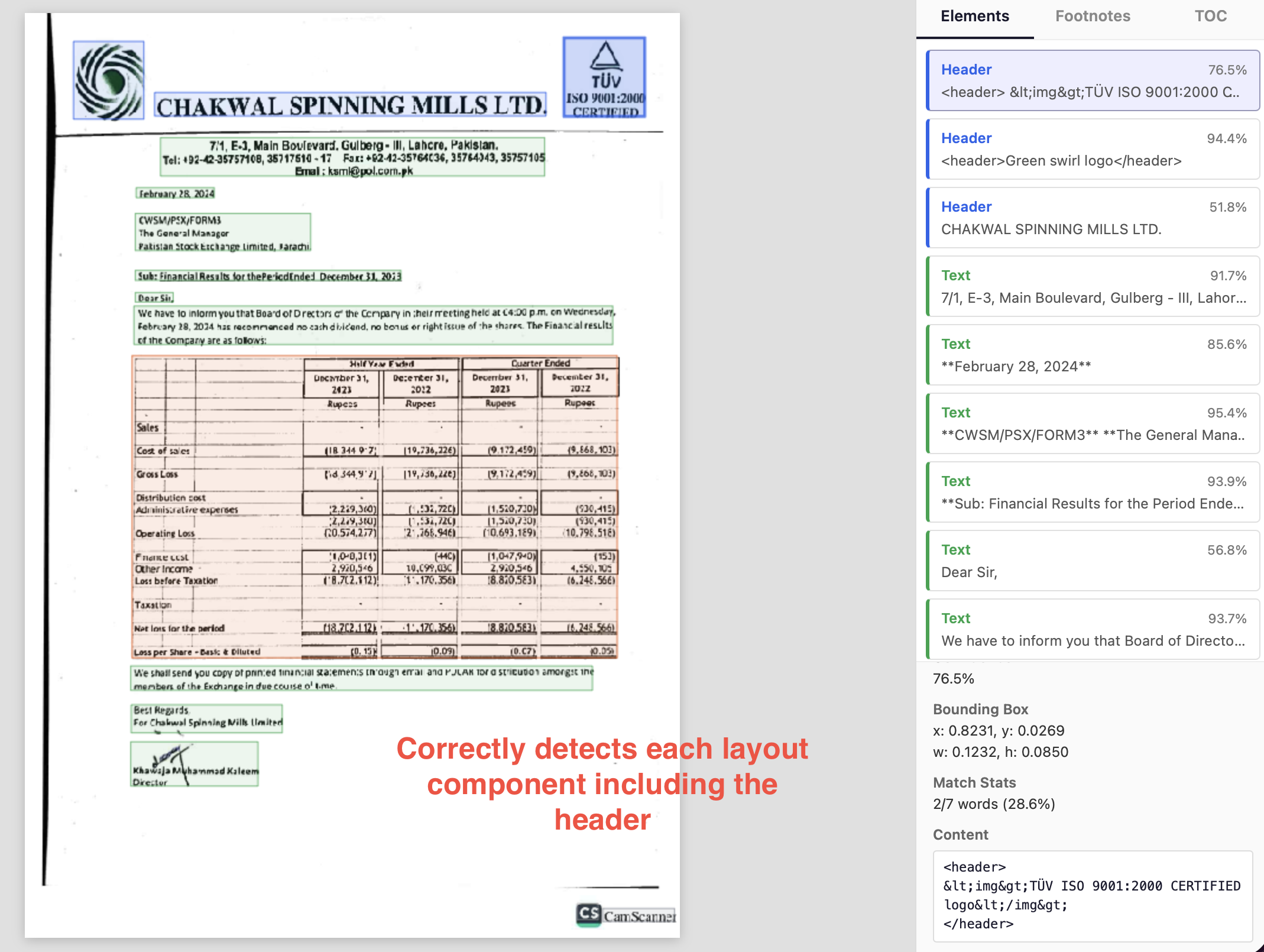
Here, textract detects the section heading as paragraph text.
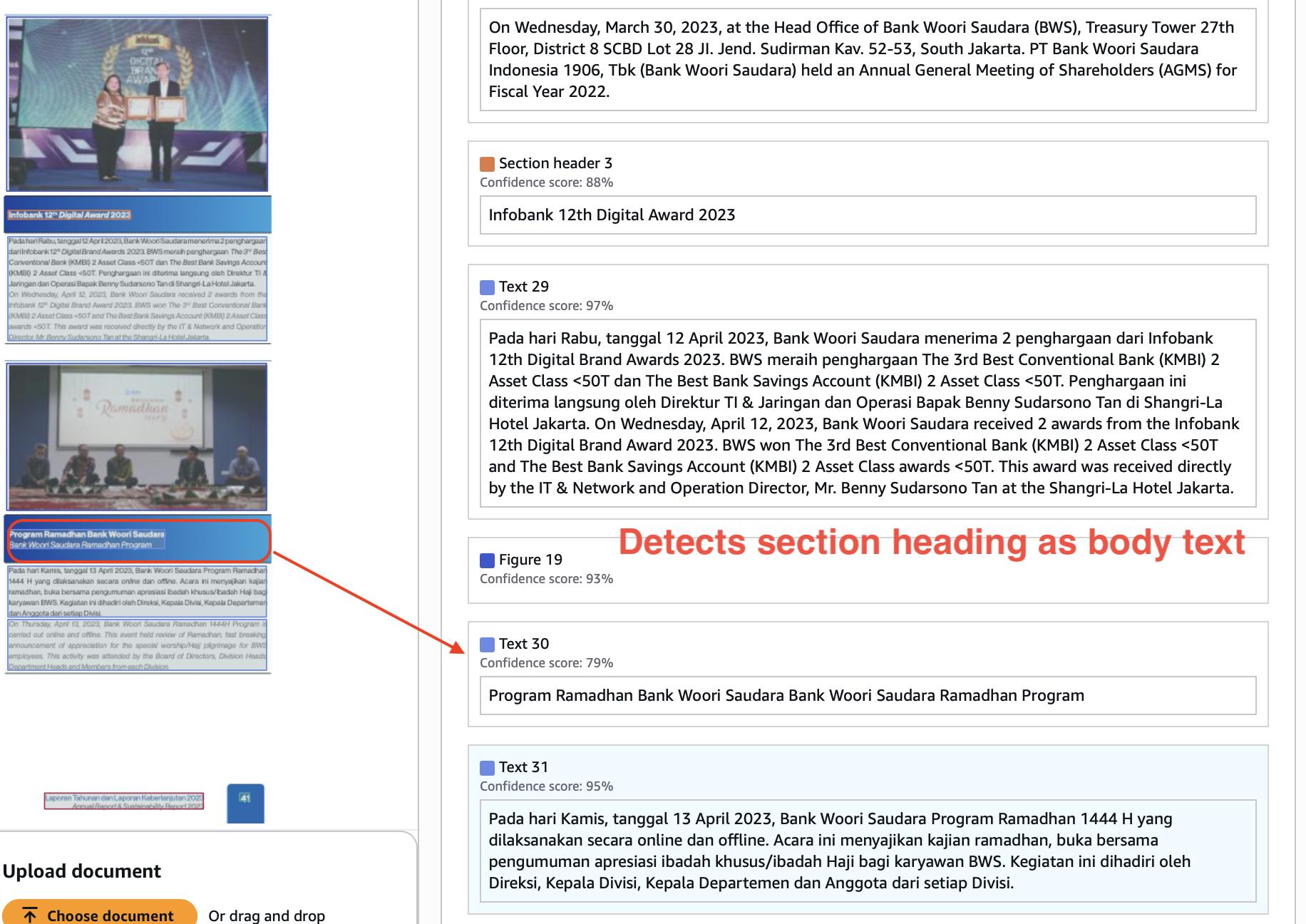
Nanonets gets section headers and paragraph texts right, and preserves the hierarchy and reading order.
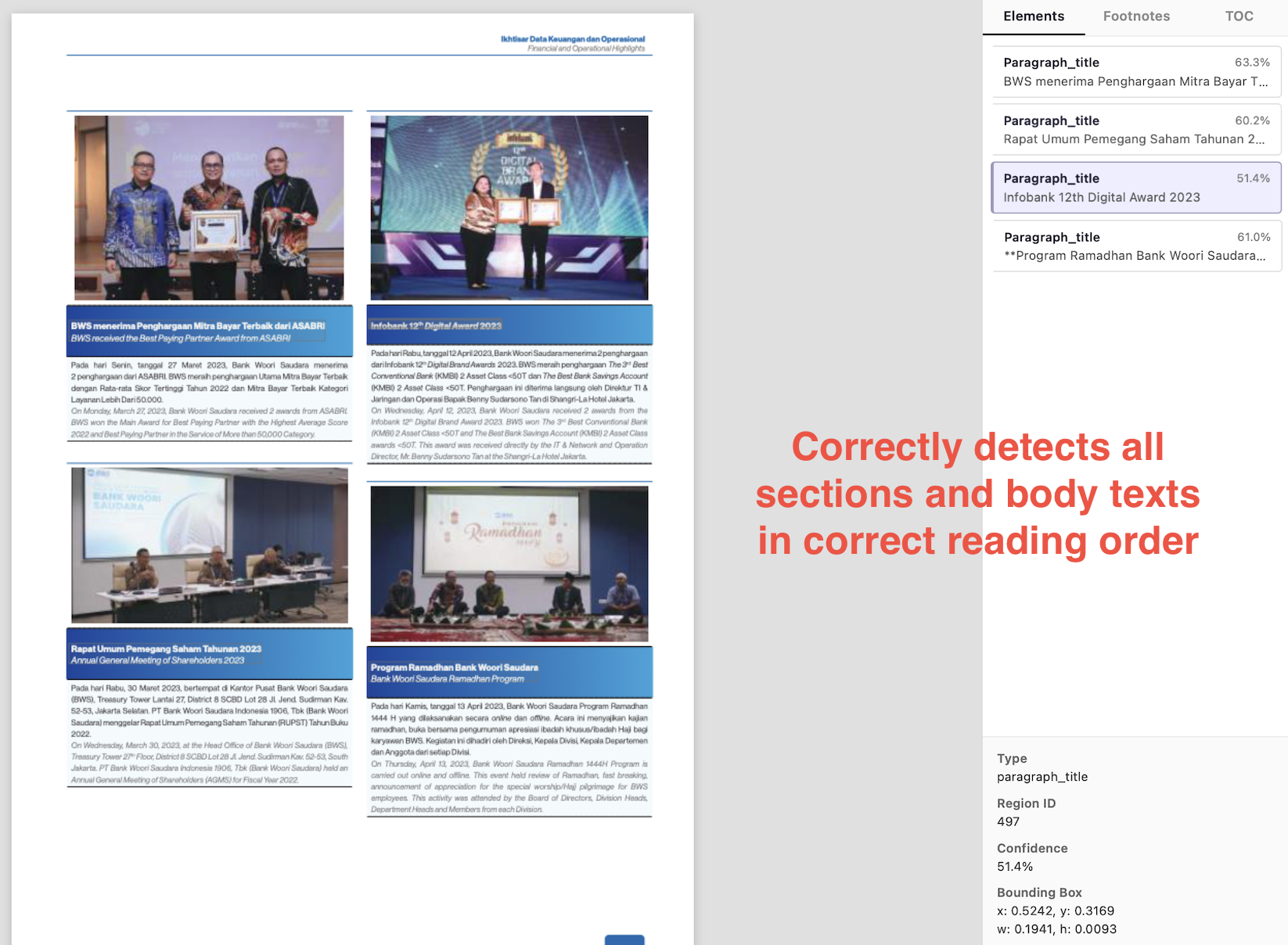
If you are using your document extraction outputs as inputs to downstream LLMs for tool calling, RAG, JSON extraction, etc., your outputs need to preserve layout and reading order well in order to get the best outcomes. LLMs are trained on human text, and it helps when the visual structure of the output accurately resembles natural language docs.
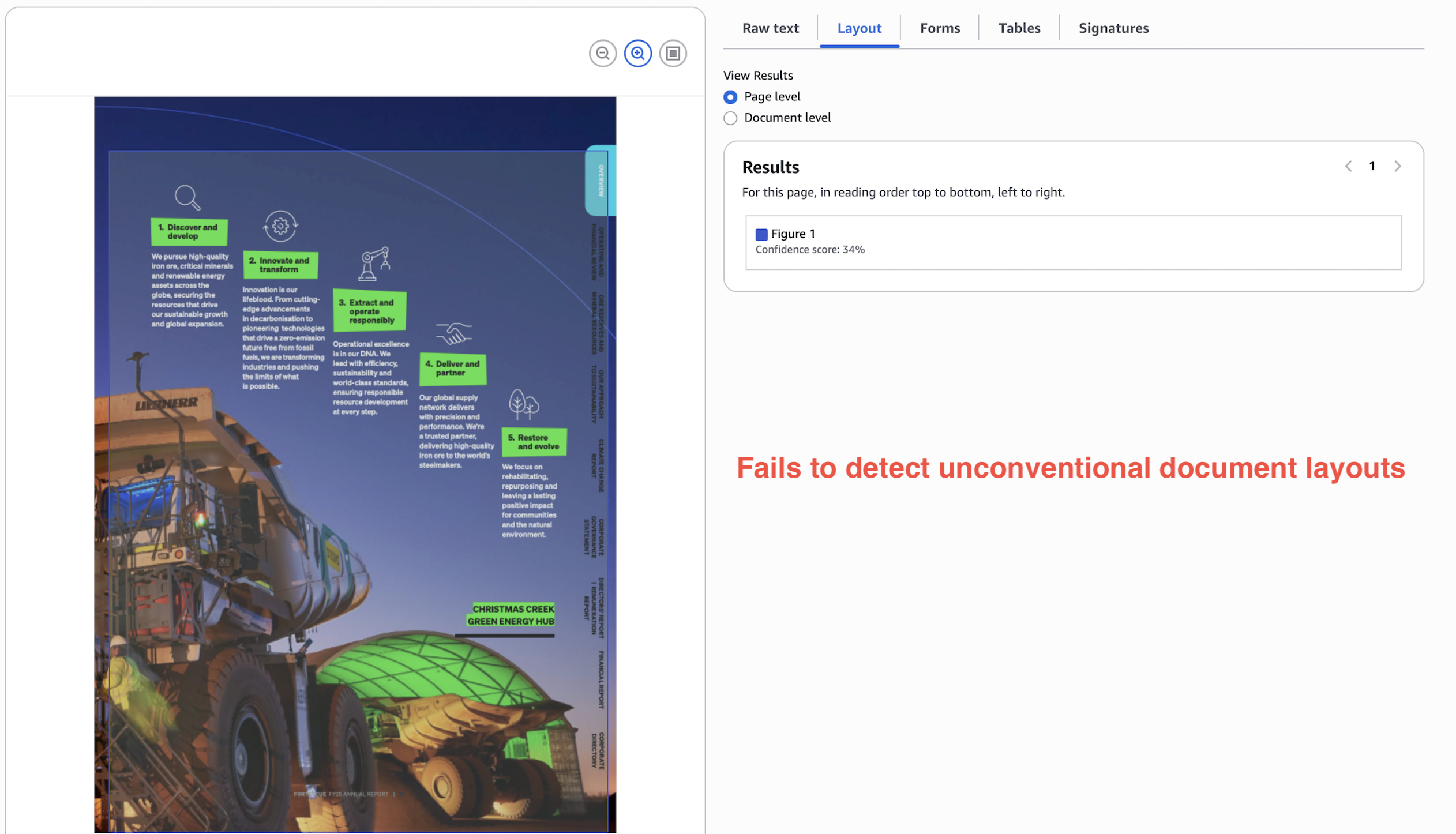
In a stress test, non-trivial document layouts can fail spectacularly on Textract. In the below example, Textract just gives up and extracts the whole page as an image.
Nanonets passes this stress test with flying colors.
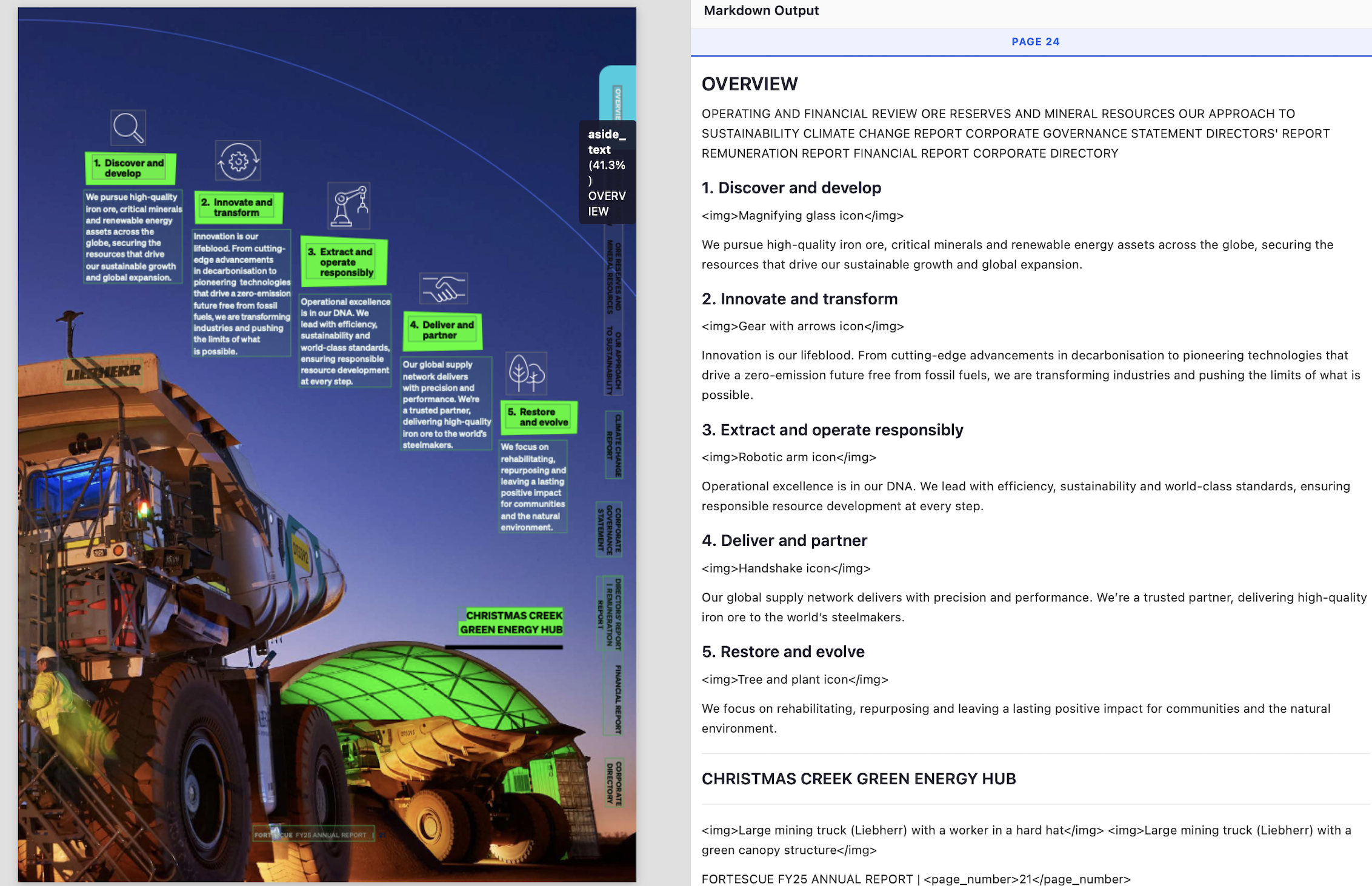
- gets every point/section in the correct reading order
- detects and annotates image
- detects camouflaged page number
- detects 90 degrees rotated text as “aside_text”.
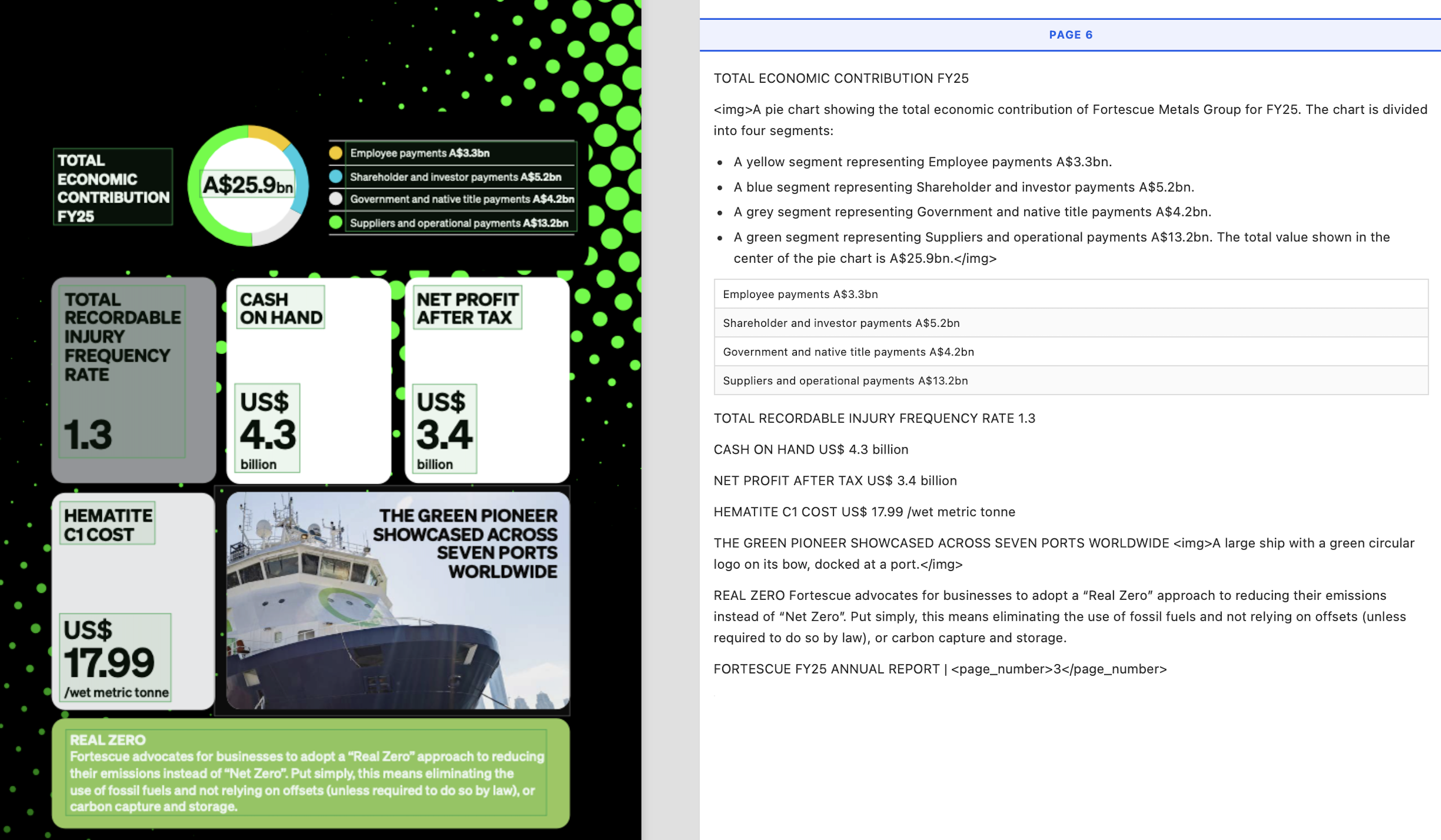
In yet another example, Textract completely corrupts the integrity of the information below by messing up the reading order.
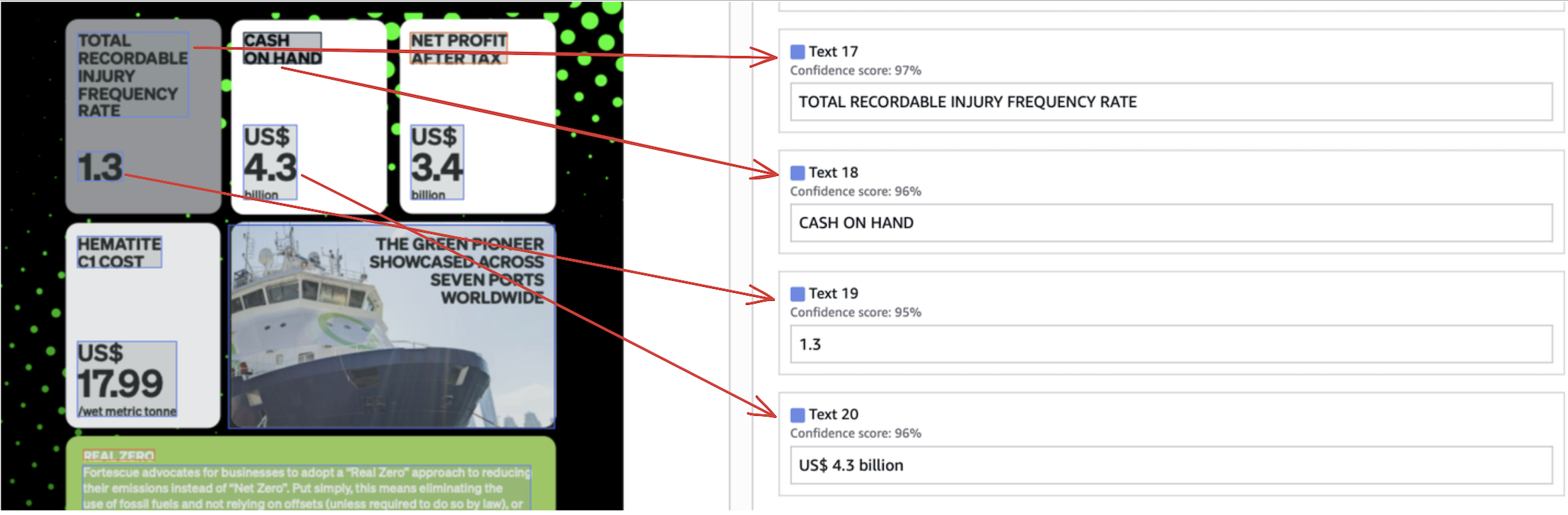
Compare this to the below Nanonets output which preserves the correct reading order, and thus the information, perfectly.
Handwriting and noise
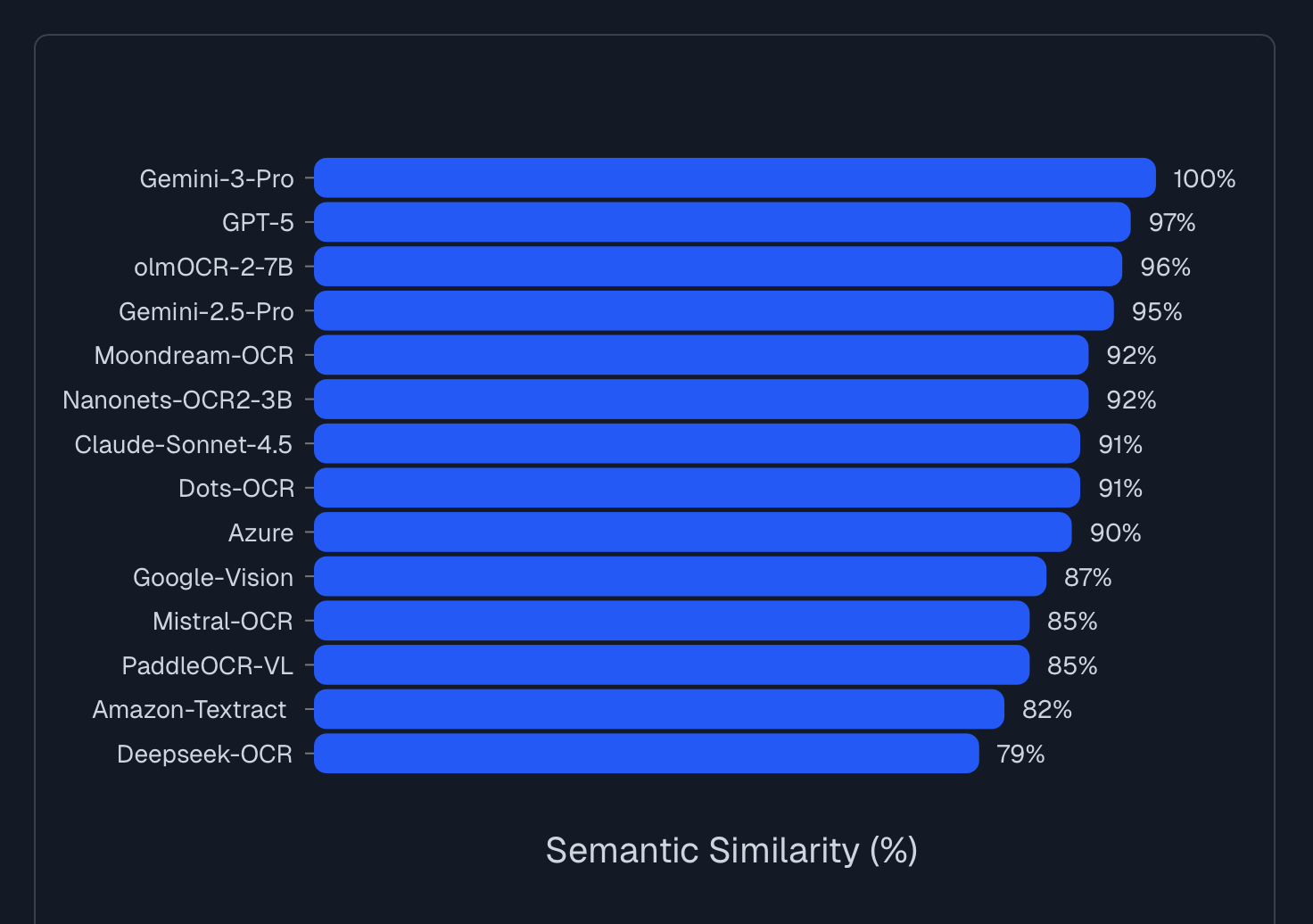
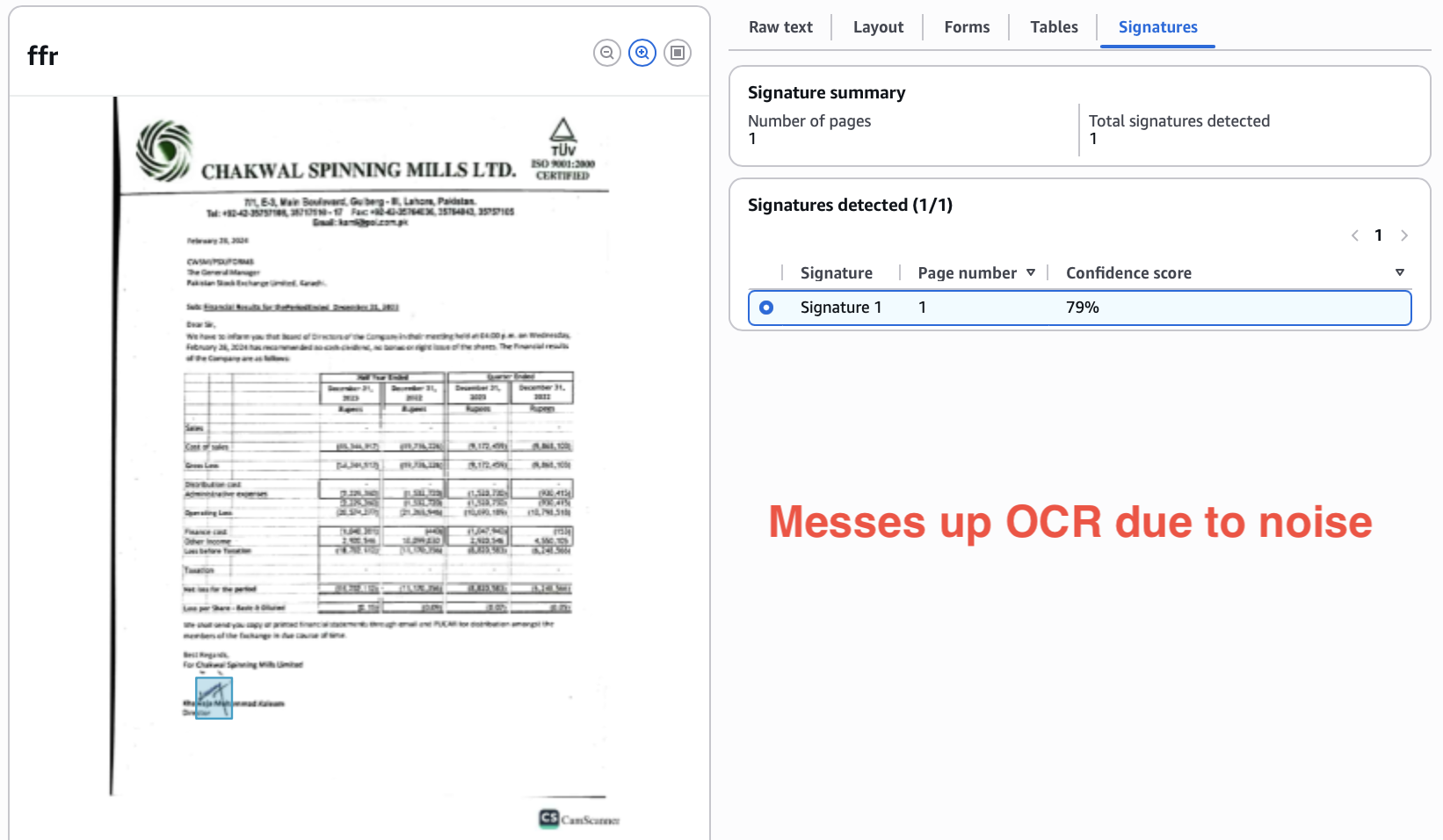
Textract is quite sensitive to noise, meaning text that is handwritten, crumpled, smudged, camouflaged, etc. is difficult to detect accurately. LLM APIs perform significantly better.
Here are results from a third-party pure OCR benchmark on handwritten and noisy text.
Textract misreads the camouflaged footer here and doesn’t read the page number, while Nanonets gets both right.


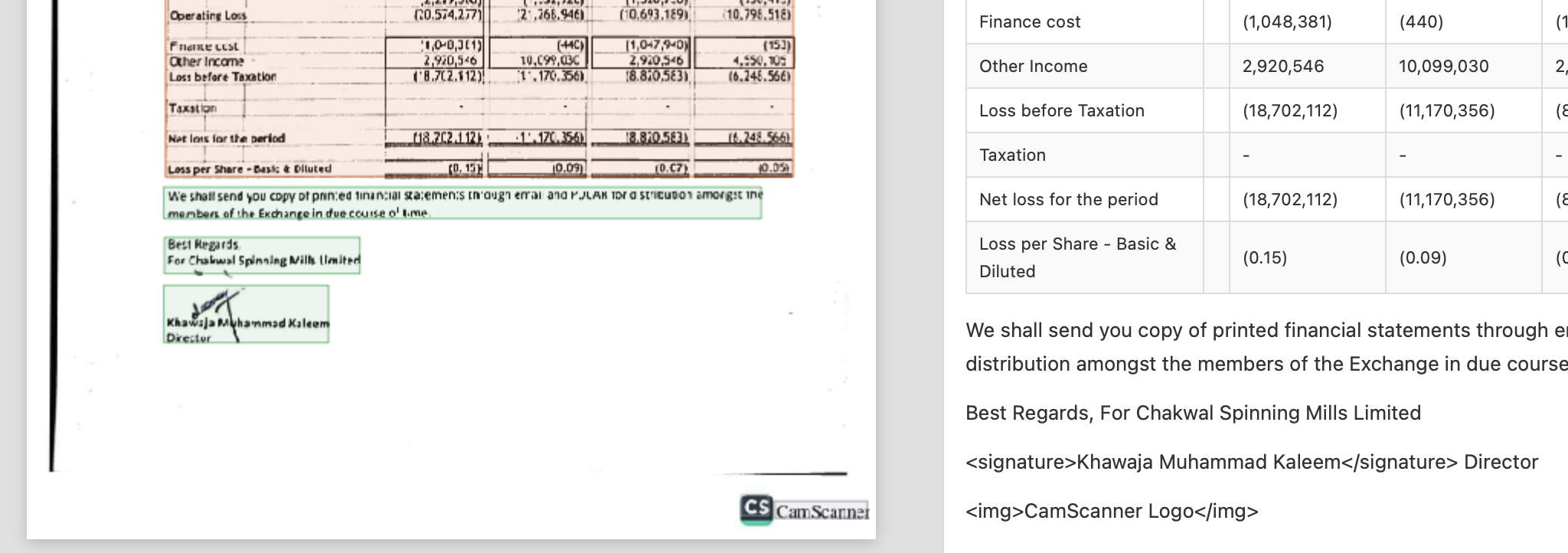
In another example, Textract gets the OCR wrong (hallucinates “in” in-between name) because the signature overlaps the text, adding noise.

Nanonets detects the signature separately, and attaches it to the correct signee text.
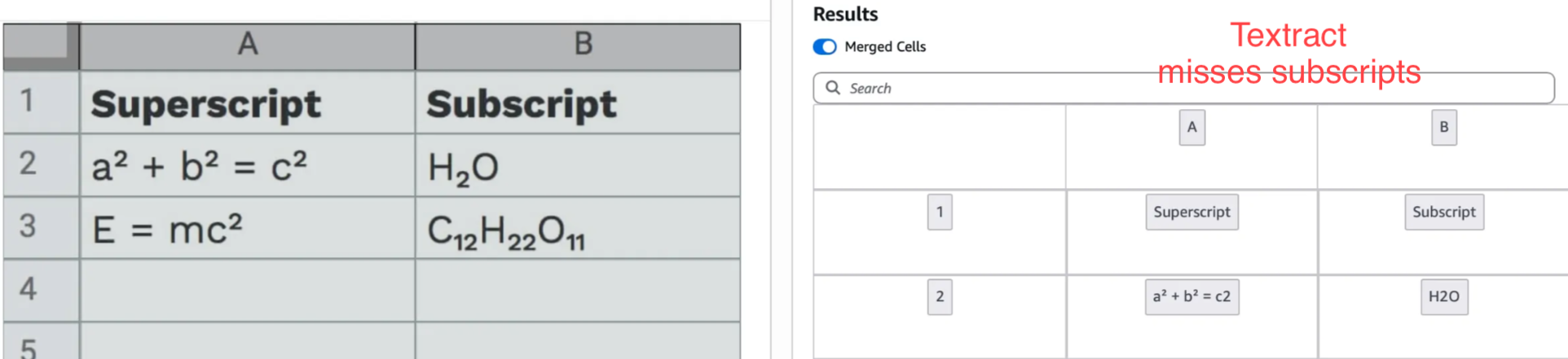
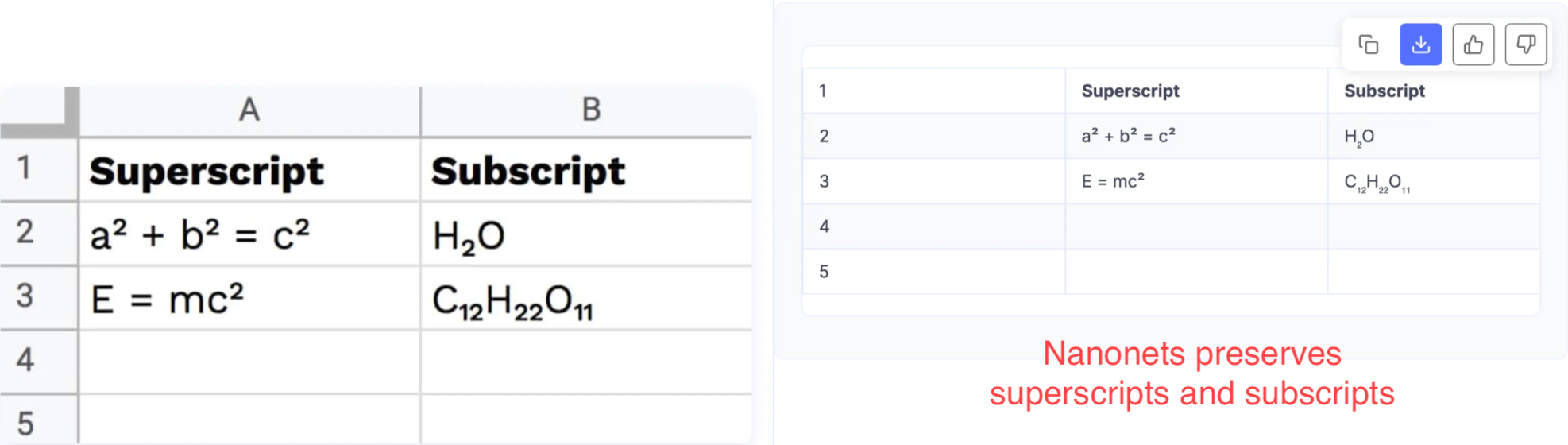
Textract also isn’t tuned well to read superscript and subscript.
These small improvements add up, and Nanonets now gives 15% better accuracy over Textract when you just consider the plain OCR output, on industry benchmarks like Docext and OlmOCR-Bench.
Contextual parsing and extraction
Textract reads characters, but it cannot reason if an ambiguous circular character is the letter "O" or the number "0".
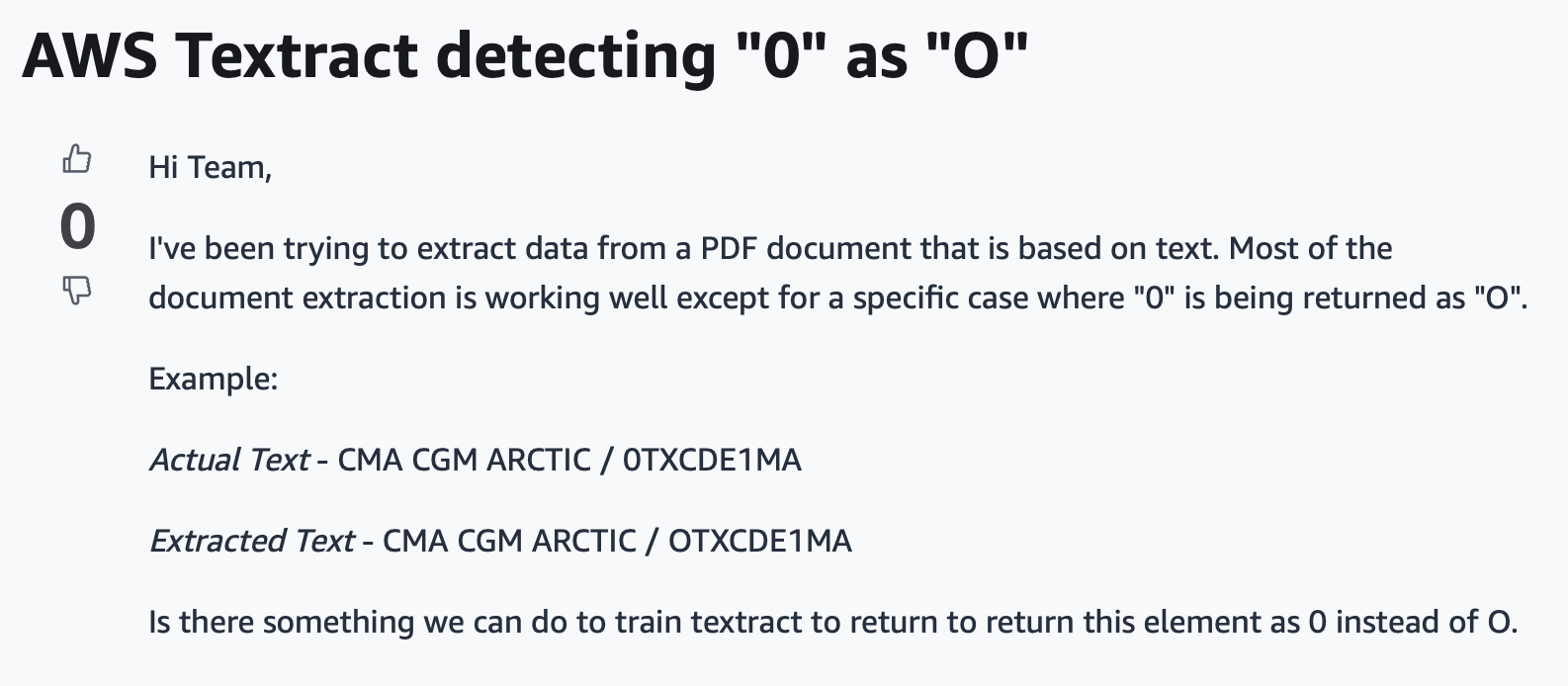
LLMs understand context. If an LLM sees "1O0" in a pricing column, it still knows to output "100".
Consider an invoice OCR pipeline. Under-the-hood, an LLM API generates markdown first and serializes the invoice linearly, i.e., it reads or writes the line items, subtotals, taxes, totals in natural reading order, and uses this context to build the final output.
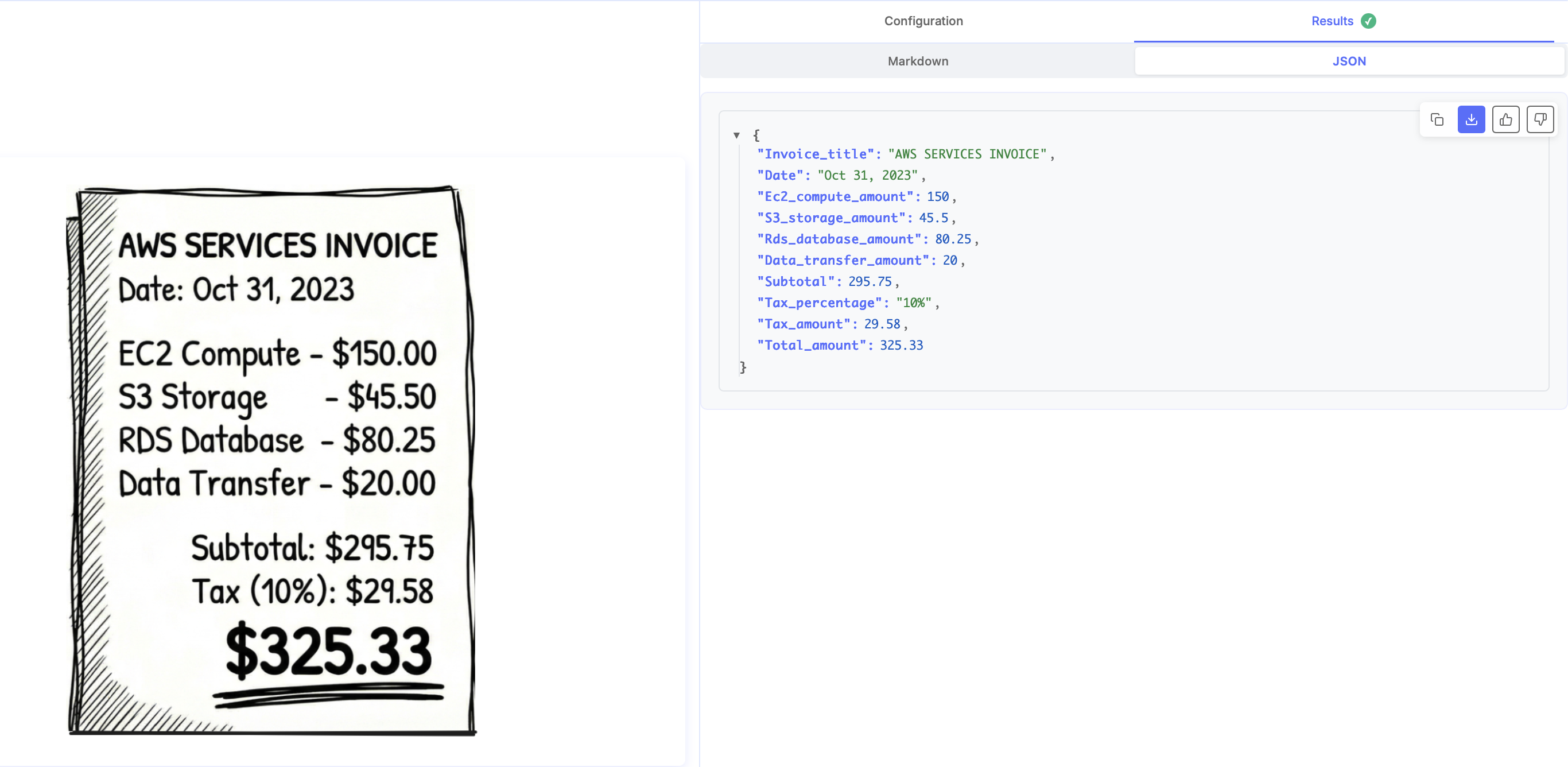
This is essentially chain-of-thought. LLM APIs like Nanonets use an internal "scratchpad" to write tokens that shift its internal probability distributions in the right direction. When the LLM generates the output in the next step, these distributions improve chances of the output being semantically correct.
Similarly, for another example, consider a bank statement. You have sparse tables in them, where one of the credit and debit columns is empty. Let's say a row looks like this:
Date        Description       Debit       Credit       Balance
01/15       Salary                        $25,000      $37,000
It is possible that Textract assumes the first number it encounters belongs to the first numerical column, completely ignoring the context.
{
  "date": "01/15",
  "description": "Salary",
  "debit": 25000,   // <--- This should be Credit
  "credit": 0,
  "balance": 37000
}
The LLM-based API outputs markdown in-between, it draws the table using pipes, and also knows that either debit or credit is always empty in bank statements.
| Date        | Description       | Debit       | Credit      | Balance     |
| ----------- | ----------------- | ----------- | ----------- | ----------- |
| 01/15       | Tech Corp Salary  |             | $5,000      | $12,000     |
2. Features
LLM APIs like Nanonets bring features missing in Textract, which might be useful depending case-to-case.
Images, charts, visualizations
Textract is limited to extraction of text, signatures, tables, forms. But there are other visual cues in docs which hold valuable information. Textract detects them with placeholders, and leaves it at that.
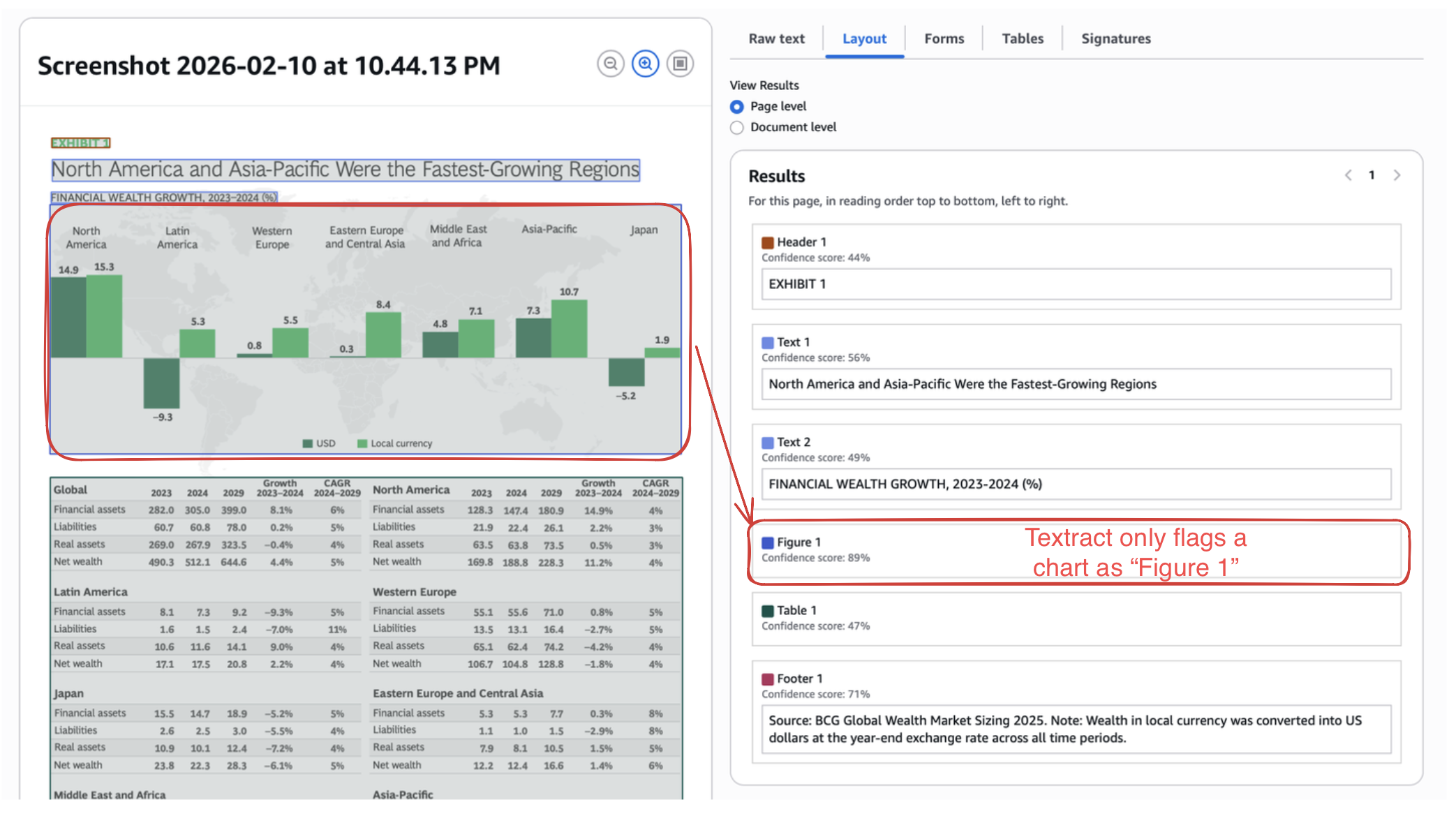
On the other hand, Nanonets can extract accessible, actionable information from practically any visual cue found in a document.
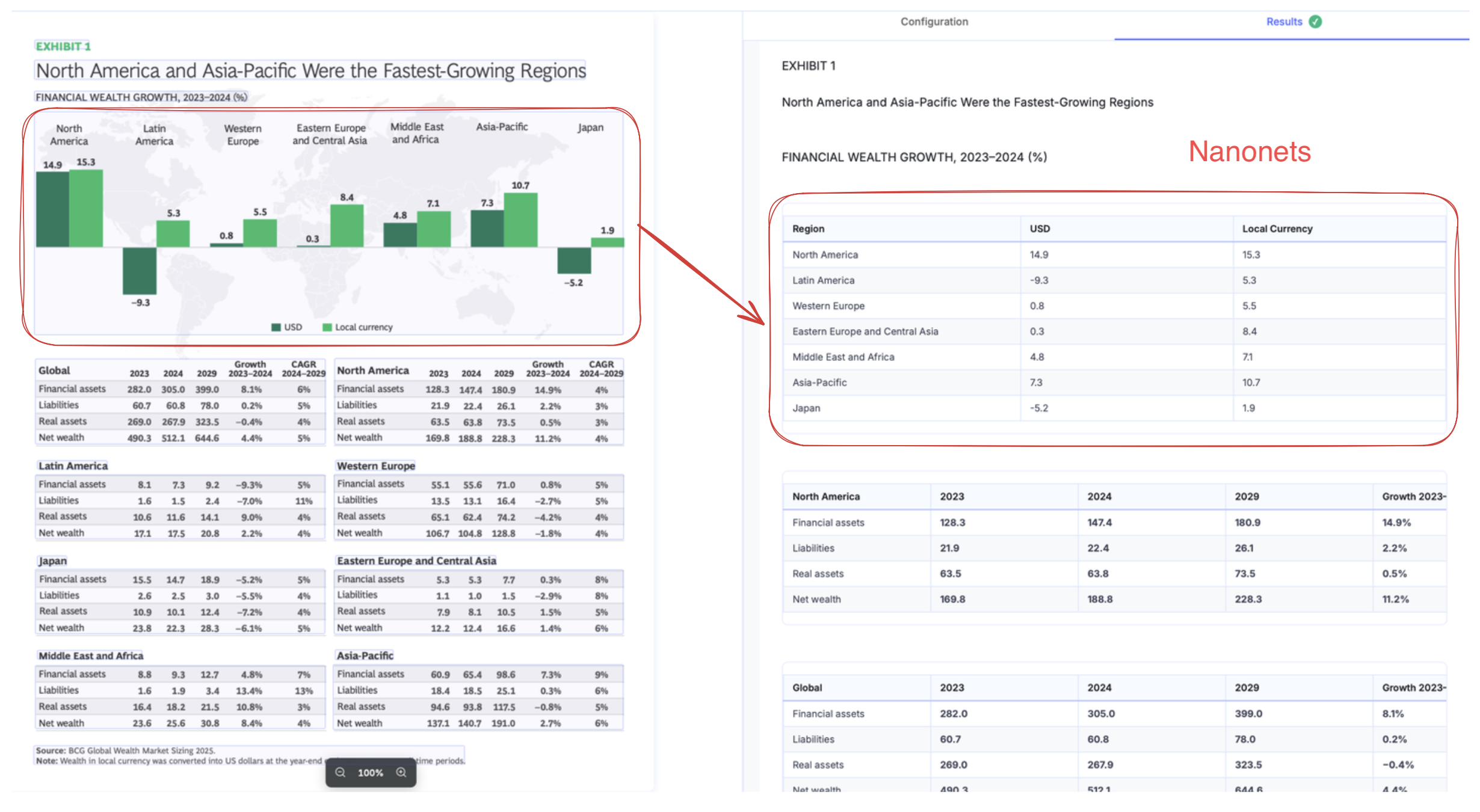
On stress testing, we can see below is an essentially lost page in textract output.
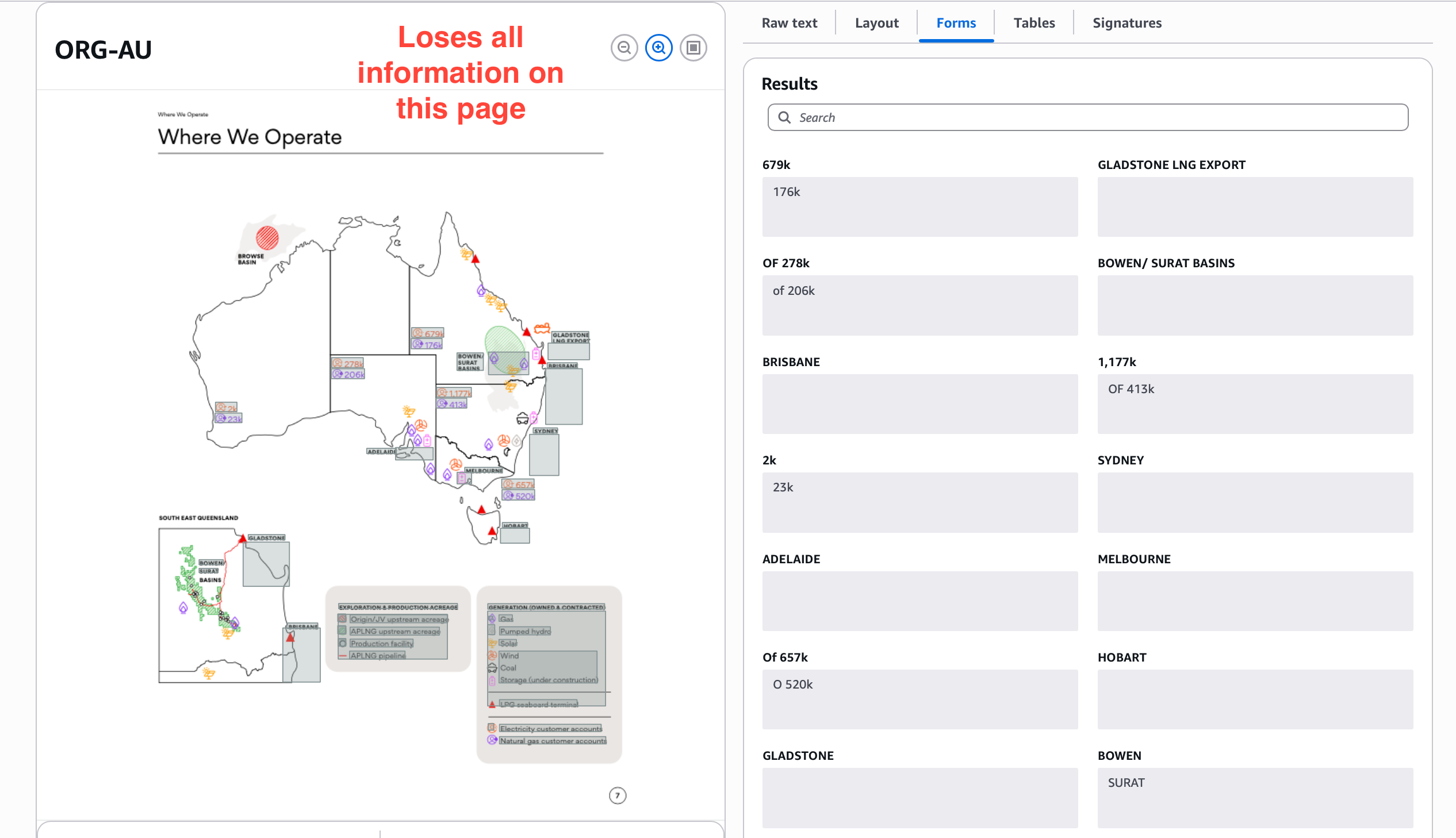
Sub-agents in Nanonets ensure you get meaningful extraction even from non-trivial visualizations.
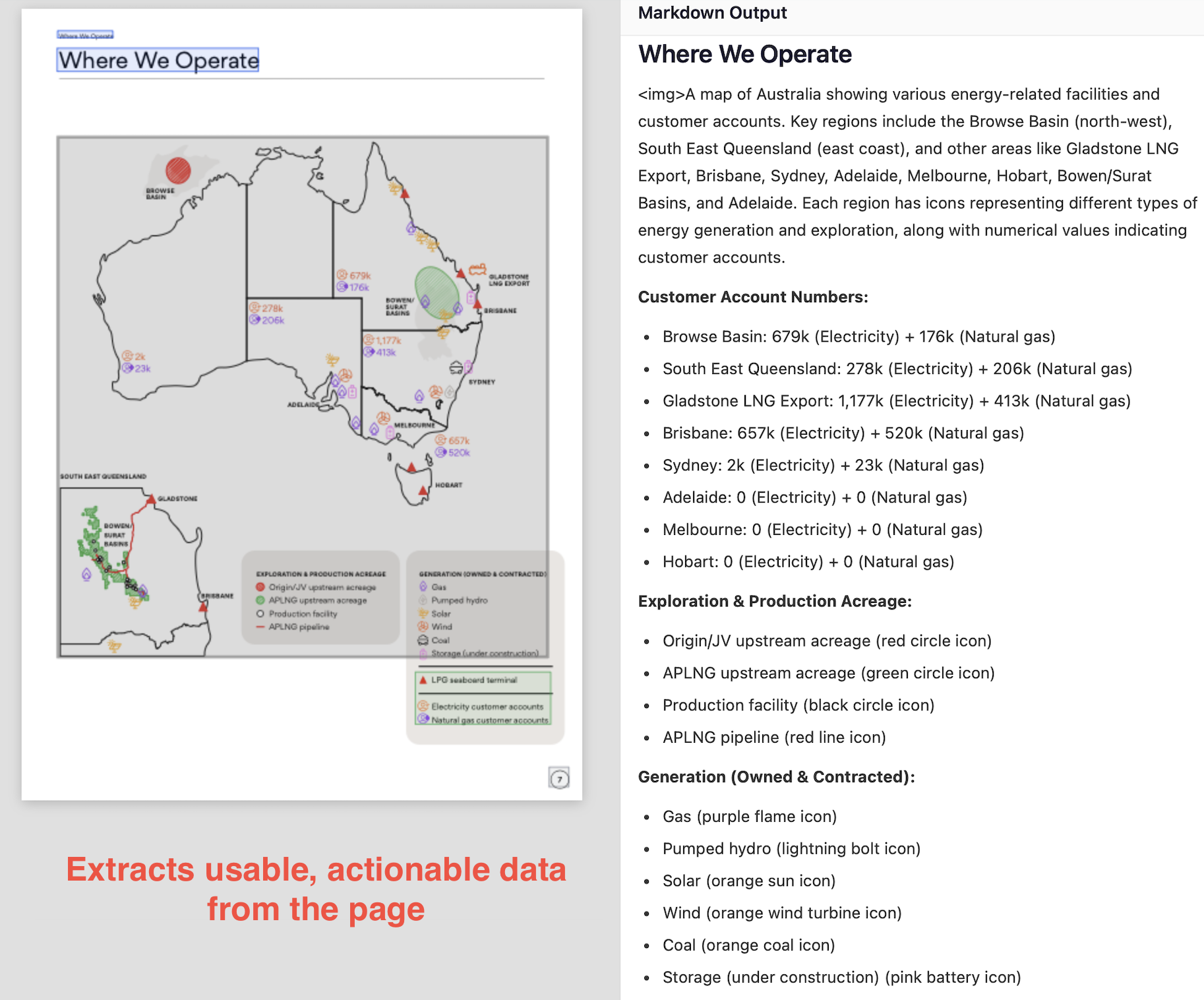
You can even specify formats, like mermaid for chart extraction, which makes it easy to use extracted info in downstream tasks.
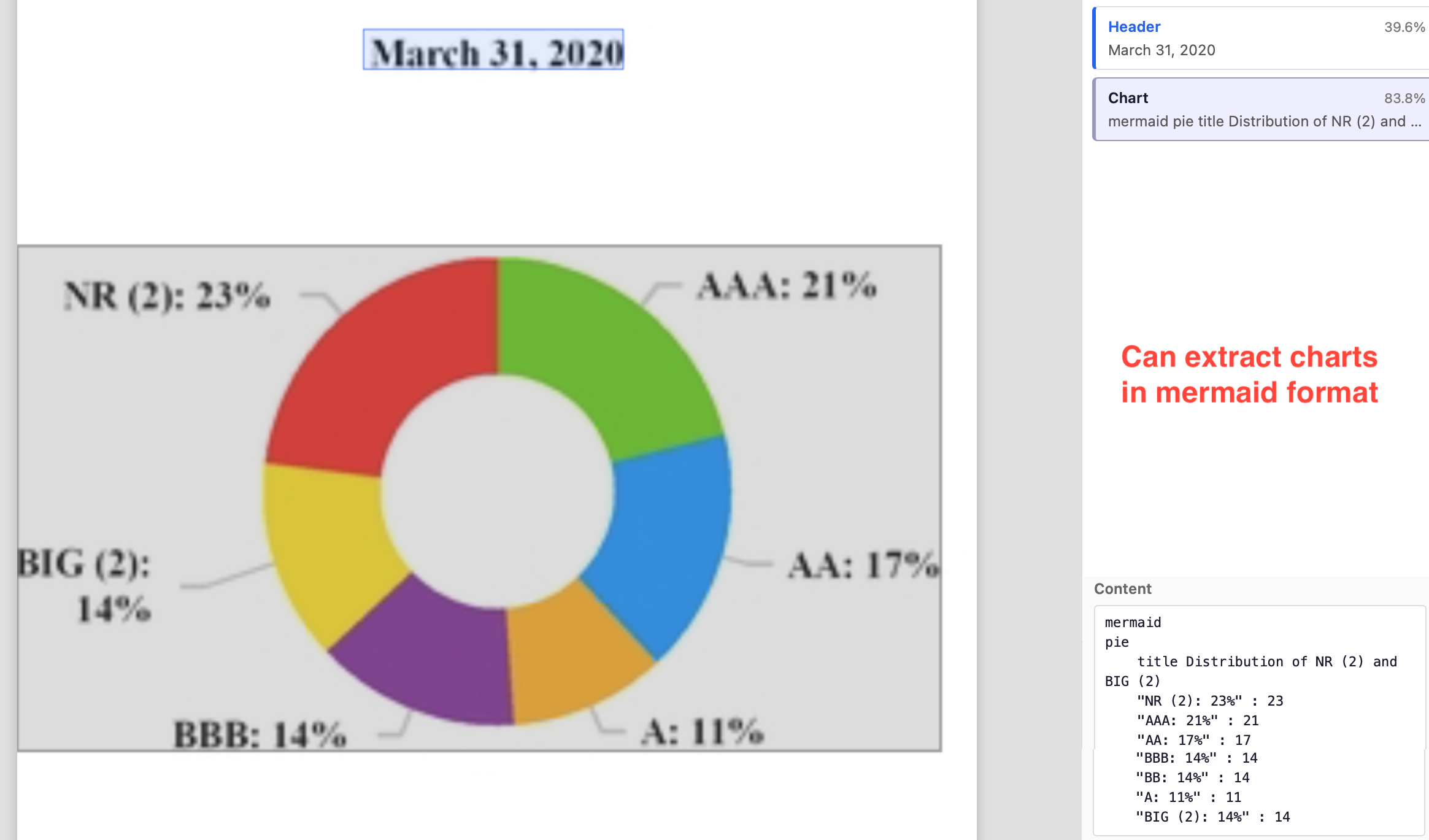
Image extraction features don’t only provide additional information but also improve the OCR accuracy. Lack of it in Textract leads to wrongly OCRed text in complex and confusing regions.
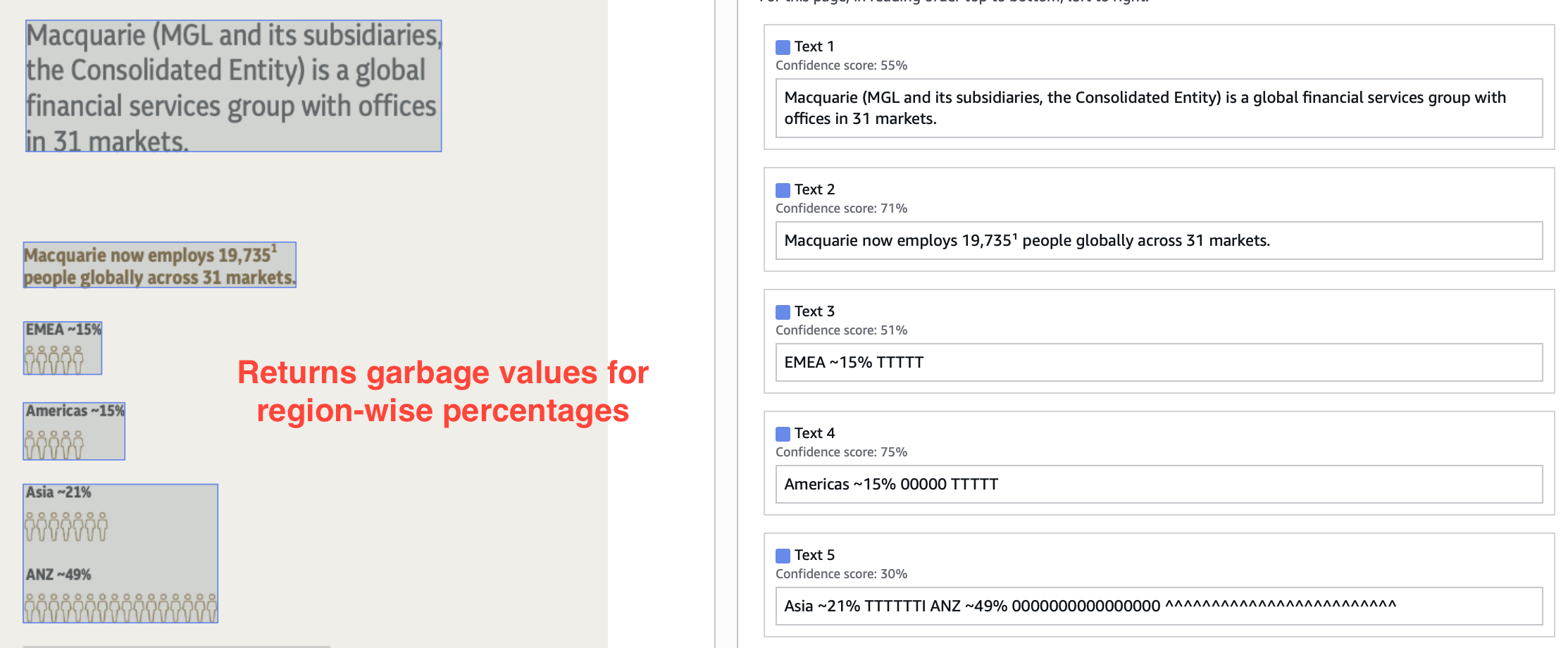
Contrast this with Nanonets output.
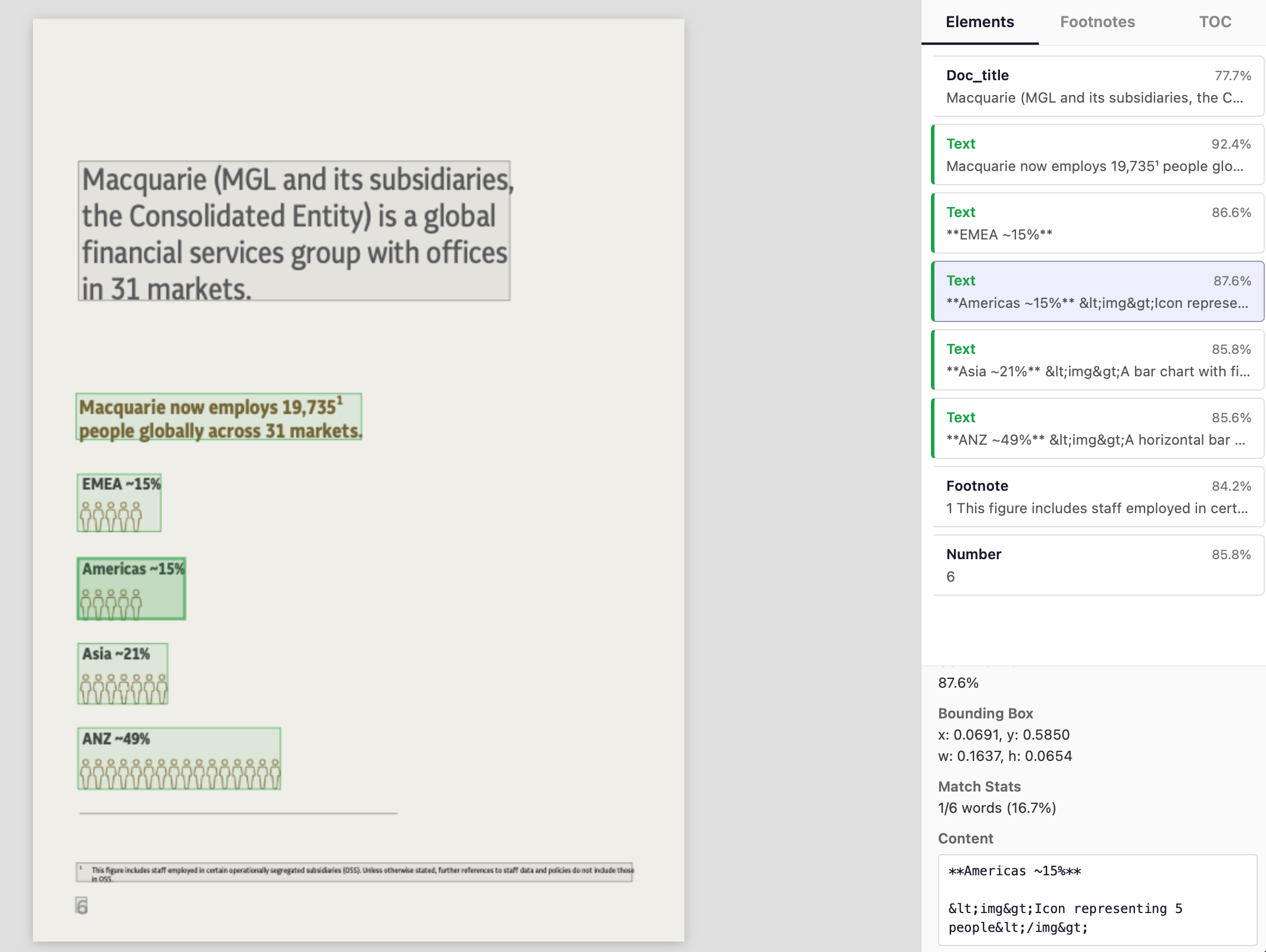
Image extraction paired with accurate layout detection is critical when you are processing complex docs for agents, RAG, other LLM tasks.
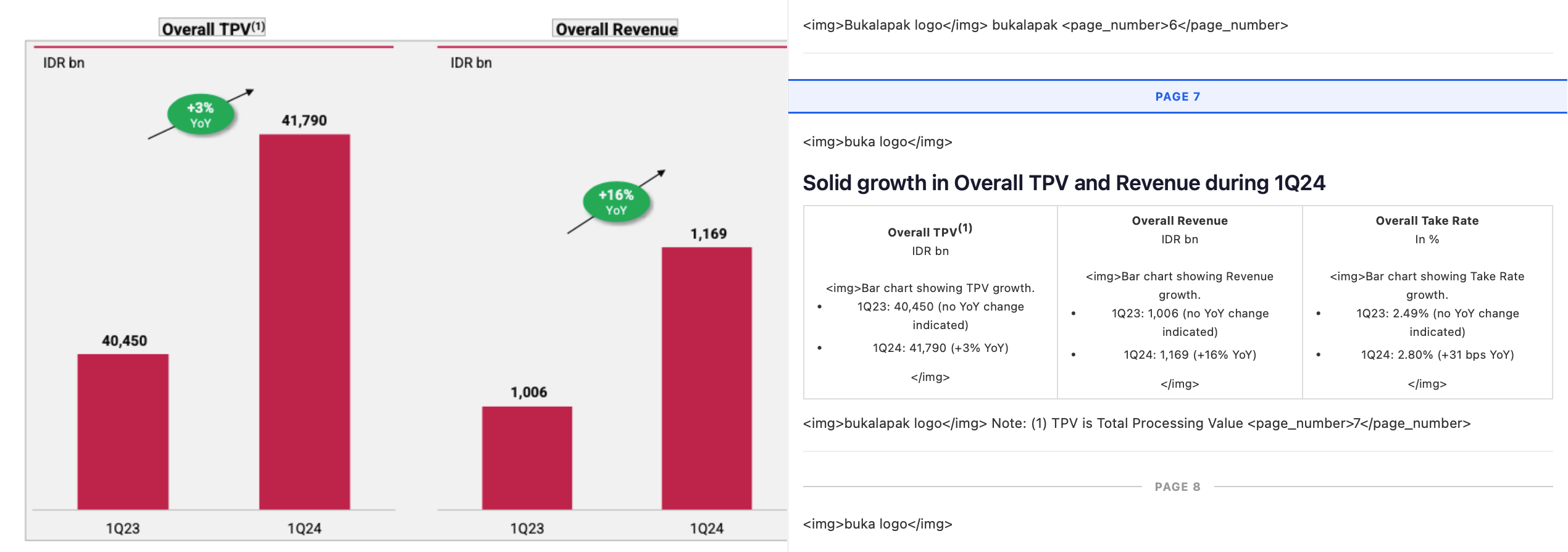
Markdown for agents, RAG, etc
Continuing on the previous point, if you are parsing your documents for agents, RAG, or other LLM tasks, you need markdown outputs. Reasons:
-
Markdown does a good job of preserving most visual cues and structure in a document, which inherently contain information on how to read it.
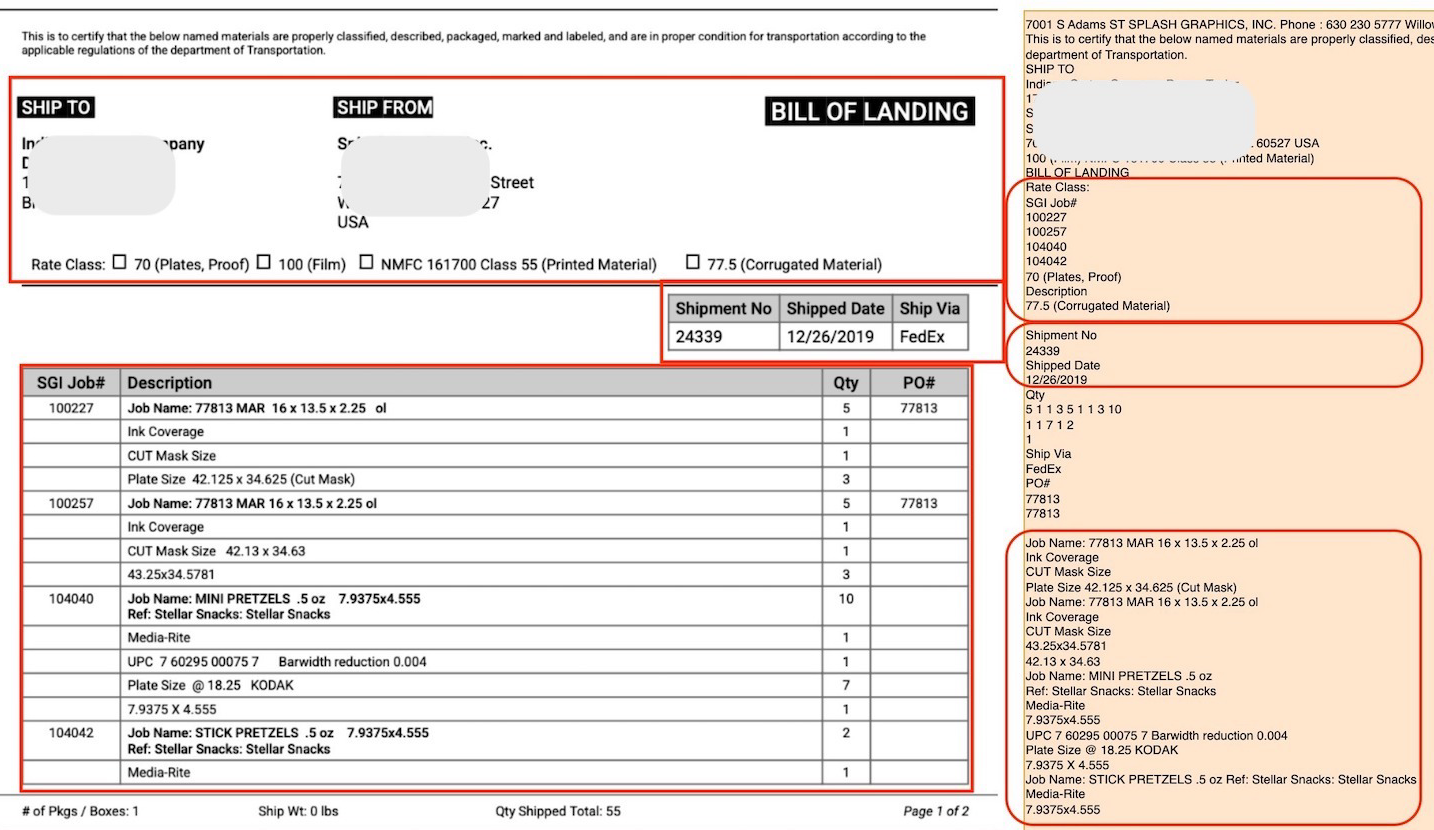
Sections highlighted in red are almost impossible to read without the visual cues. A heading is read with high focus because it anchors everything that follows. A word in bold is read with more weight. A line in a table is read as a relationship between a key and values. An ordered list is read as a collection of sequential points, and an unordered list as a collection of categorical points.
LLMs are trained on natural language (books, articles, websites) and understand these visual cues, and working with markdown outputs that resemble natural language for downstream tasks leads to better performance.
-
In LLM inputs, distance between related tokens is an important heuristic. In JSON, XML, and other formats which retain structure, syntax noise often outweighs actual information. On the other hand, markdown gives structured output that is minimal and compact.
MarkdownHigh signal-to-noise|USB-C Charger|2|$19.99|$39.98|JSONLow signal-to-noise{ "desc": {"text":"USB-C Charger","box":[102, 400, 50, 20],"conf":0.98},"qty": {"text":"2"... }XMLLow signal-to-noise<item><descbox="102 400..."conf="0.98">USB-C Charger</desc><qtybox="500 400..."conf="0.99">2</qty> -
LLMs have limited context window, which means you can only use limited number of tokens in inputs and outputs. You have to fit the input, context, output of your task in those limited tokens.
Also, latency and costs increase linearly with number of input and output tokens.
Markdown is token-efficient while retaining structure.
-
One of the main downstream tasks of OCR today is RAG, which needs chunking at right places so that context is not split between chunks. Ideally, each chunk should be independently sufficient to use.
Let's say you have this employee handbook.
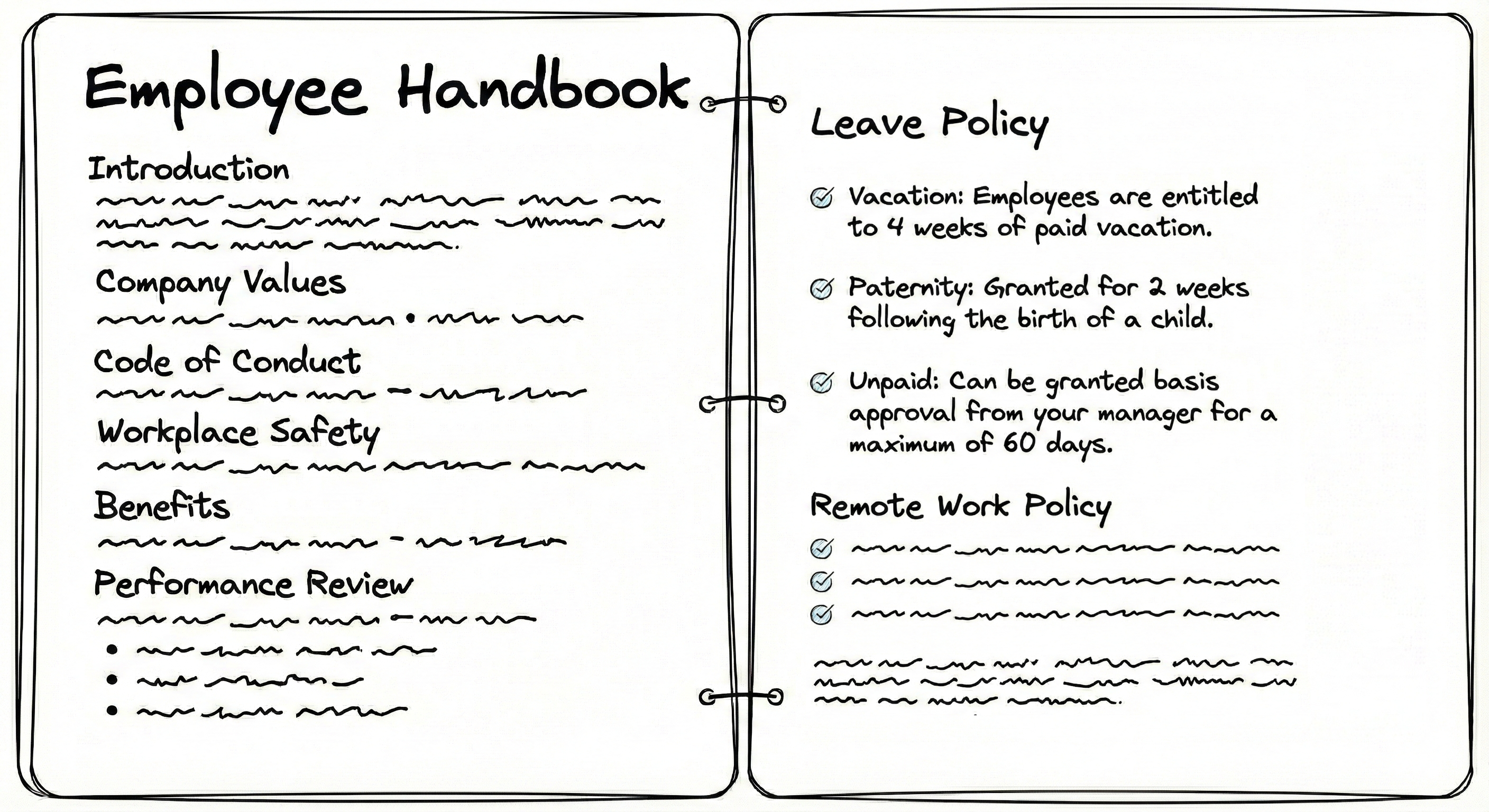
Textract OCR contains no structure, so you have to use random chunking strategies, like splitting text after every n tokens or characters. In these strategies, you risk splitting context into multiple chunks:
...employees are entitled to 4 weeks of paid vacation. Paternity: granted for2 weeks following the birth of a child. Unpaid: can be granted basis approval from your manager for a maximum of 60 days.If a user searches "paternity leave," the RAG system has to retrieve both chunks which is inefficient, or it might retrieve only chunk 1 which lacks the duration or only chunk 2 which lacks the subject. Also, the word "leave" is not present in the text and only implied in handbook by the section heading, so the LLM might fail to even retrieve these chunks. Broken context leads to poor retrieval outcomes. The LLM may misinterpret data, miss relationships, fail to reconstruct original meaning, and retrieve chunks inefficiently.
Unlike plaintext, markdown chunking can use
##as the splitting string to keep each of the sections including the "Leave Policy" intact.# Employee Handbook
## Leave Policy
* **Vacation:** Employees are entitled to 4 weeks of paid vacation.
* **Paternity:** Granted for 2 weeks following the birth of a child.
* **Unpaid:** Can be granted basis approval from your manager for a maximum of 60 days.We also attach the parent context (H1 heading # Employee Handbookin this case) to make the chunk more meaningful.Similarly, consider this invoice with a large number of rows (say 60 rows of SKUs).
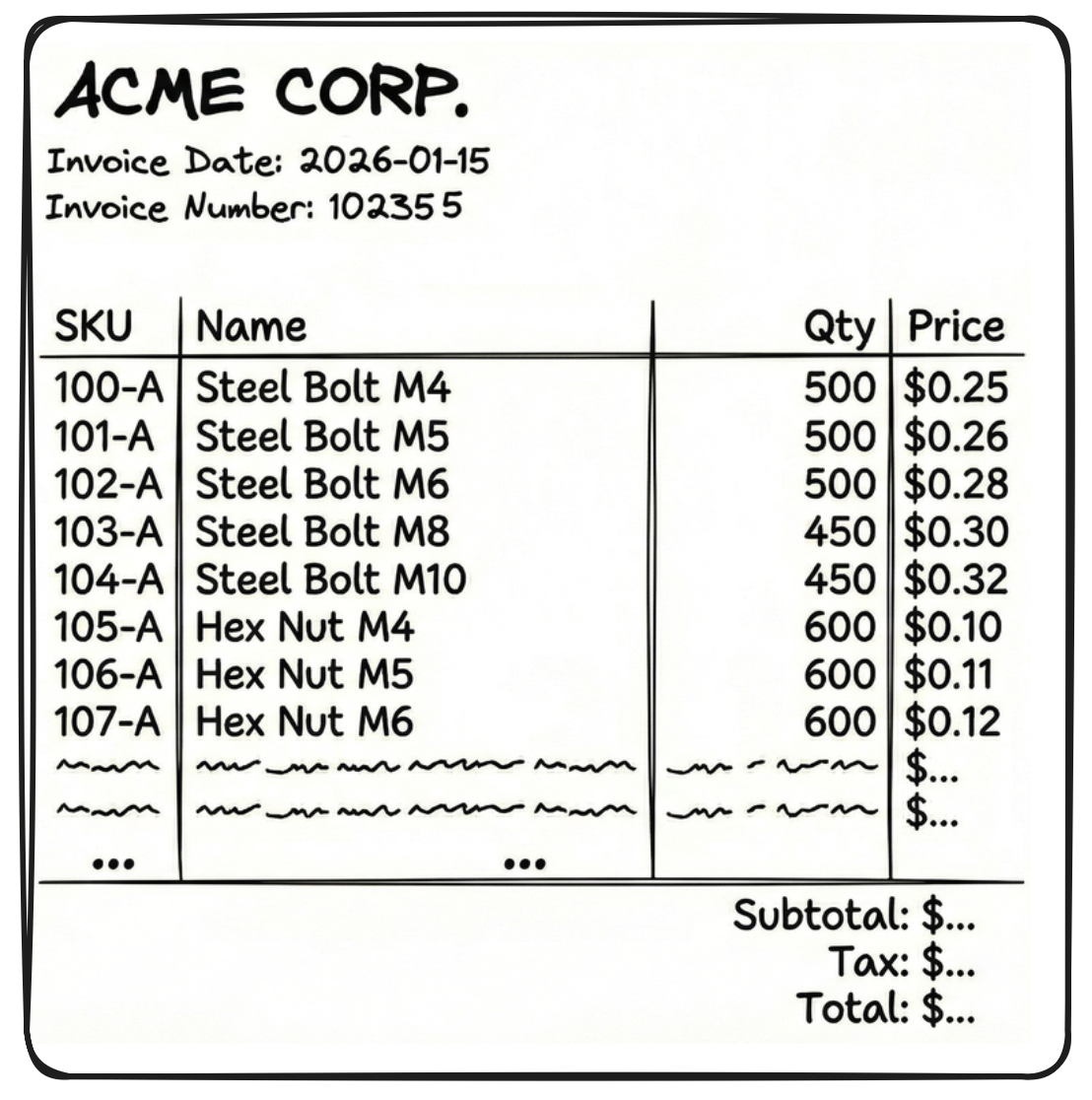
If you get Textract outputs in JSON format, you cannot chunk randomly in-between those outputs as the LLM will be left with incomplete context. Instead, you can try and chunk like this -
[
  { "SKU": "104-A", "Name": "Steel Bolt", "Qty": 500, "Price": 0.25 },
  { "SKU": "104-B", "Name": "Steel Nut",  "Qty": 500, "Price": 0.10 }
  ... (18 more times)
]
But there are two problems with the above chunk:
- It doesn't know who sent the invoice, when it is due, what is the invoice number, etc. These details are in a separate chunk
{"fields": {"sender": "Acme corp", "date": "2026-01-15"... - JSON format is so verbose that a single chunk (like the 20 table rows above) becomes very large.
If we get the same OCR outputs in markdown, these issues are solved. Look at the chunks below.
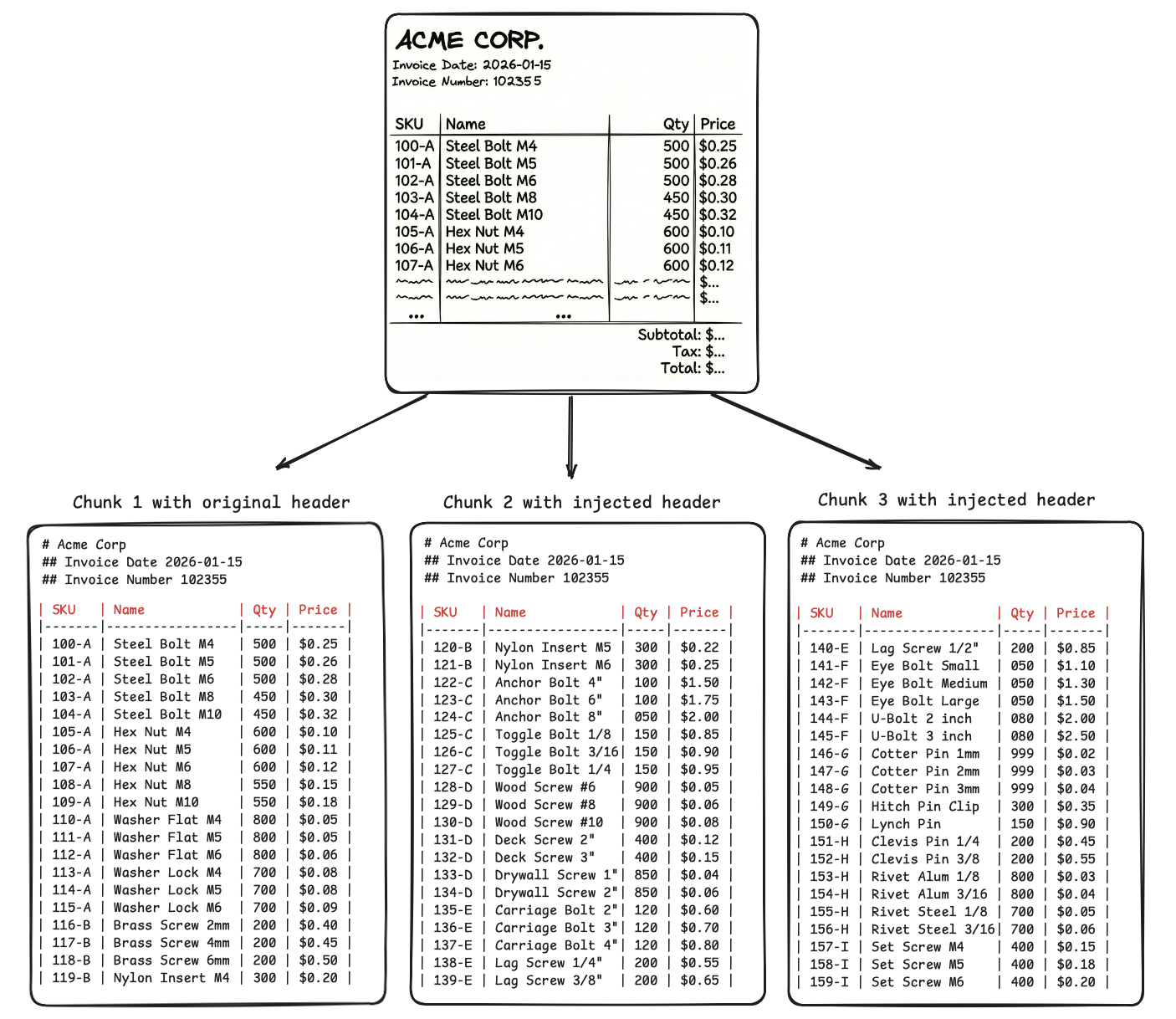
You inject headings and parent table headers in every chunk of 20 SKUs. -
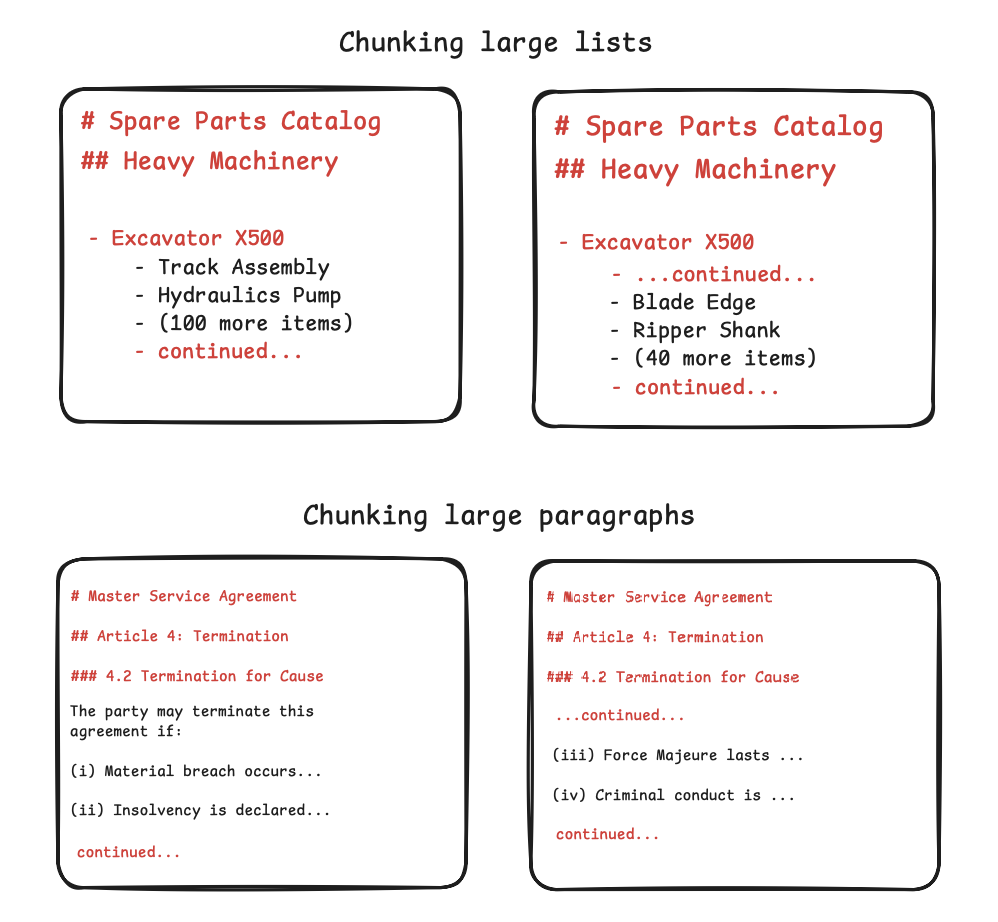
You use visual cues to chunk at boundaries of tables, lists, paragraphs and retain a reference to parent context, so that the LLM connects and make sense of all the chunks when retrieving them.
-
Even if you split one visual cue (like a large table) into multiple chunks, the parent context at the top of the chunk helps the LLM connect the dots.
-
JSON repeats the headers in every single row, i.e., 20 times for 20 SKUs present in each chunk, but markdown will repeat headers only once per 20 SKUs.
Similarly, parent context can be preserved and prove useful for other visual cues.
- It doesn't know who sent the invoice, when it is due, what is the invoice number, etc. These details are in a separate chunk
Nanonets supports optimal document chunking in its API outputs.
Custom schemas, type safety
Often, the end requirement is to extract data in very specific schemas, like -
- XML schemas like UBL, or specific JSON keys, for invoice data going into ERPs like SAP, Oracle
- JSON in FHIR standards for patient medical records.
- CSV outputs that mirror your Excel sheets and their formulas, for financial modeling.
This is extremely cumbersome to set up in Textract. Say you want dates in yyyy-mm-dd format. Textract will simply extract dates the way they appear in the document. You add post-processing which is needlessly time-consuming and not reliable since you can't anticipate every edge case in conversion.
Similarly, say you want a clean ID (123456). Textract might return 123 456, 123-456, #123456 depending on the document. You must write more code to clean the text before your database accepts it.
In theory, you can train custom adapters, but it requires manually annotating training datasets and waiting hours for the model to learn. Even after that, it remains prone to errors. Alternatively, you could send Textract's raw outputs to an LLM to format the data but then you pay twice in costs, latency, effort.
Nanonets supports custom schemas. You define the exact JSON, XML, or CSV structure you want, and the API returns directly usable data in a single step.
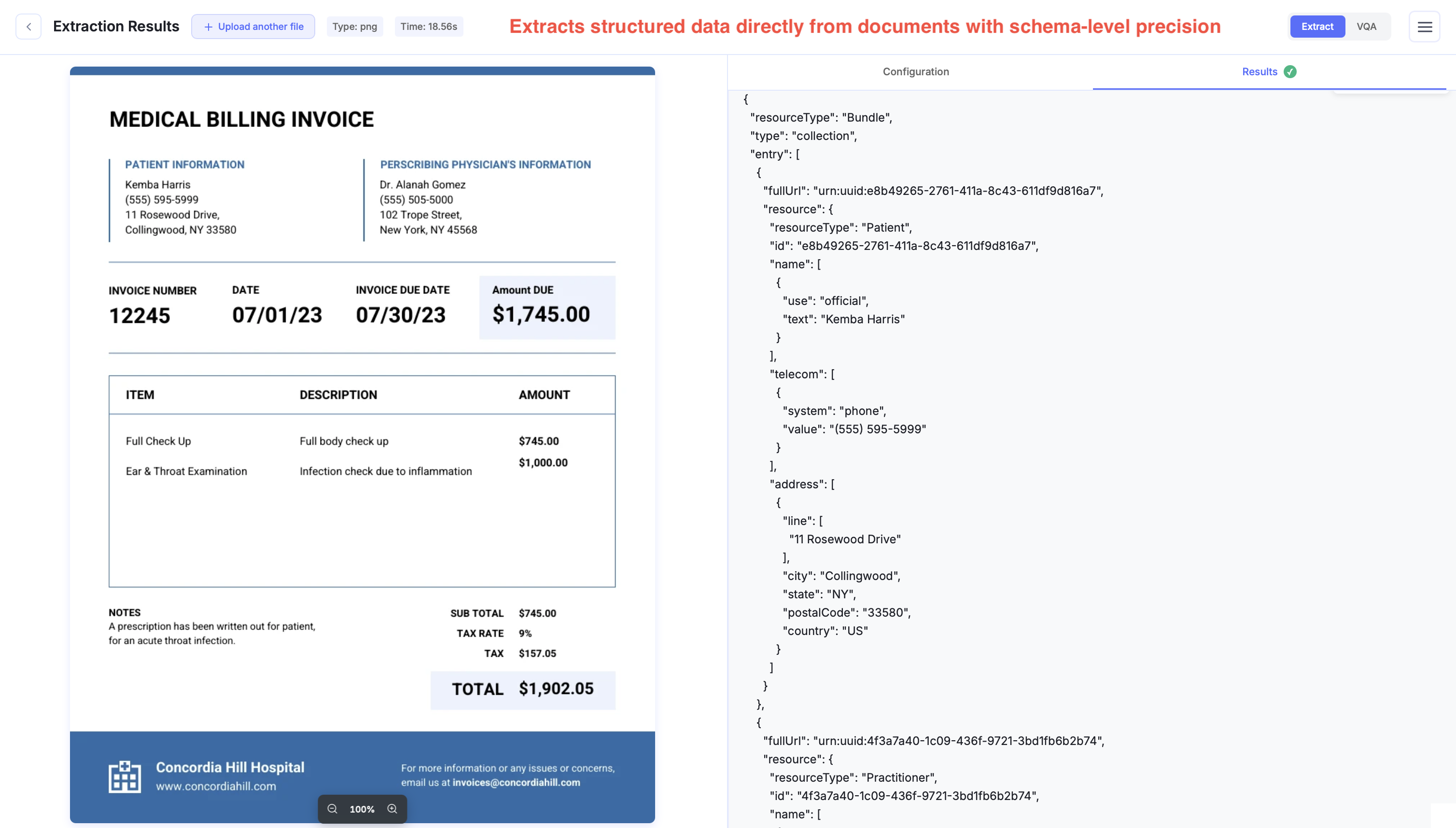
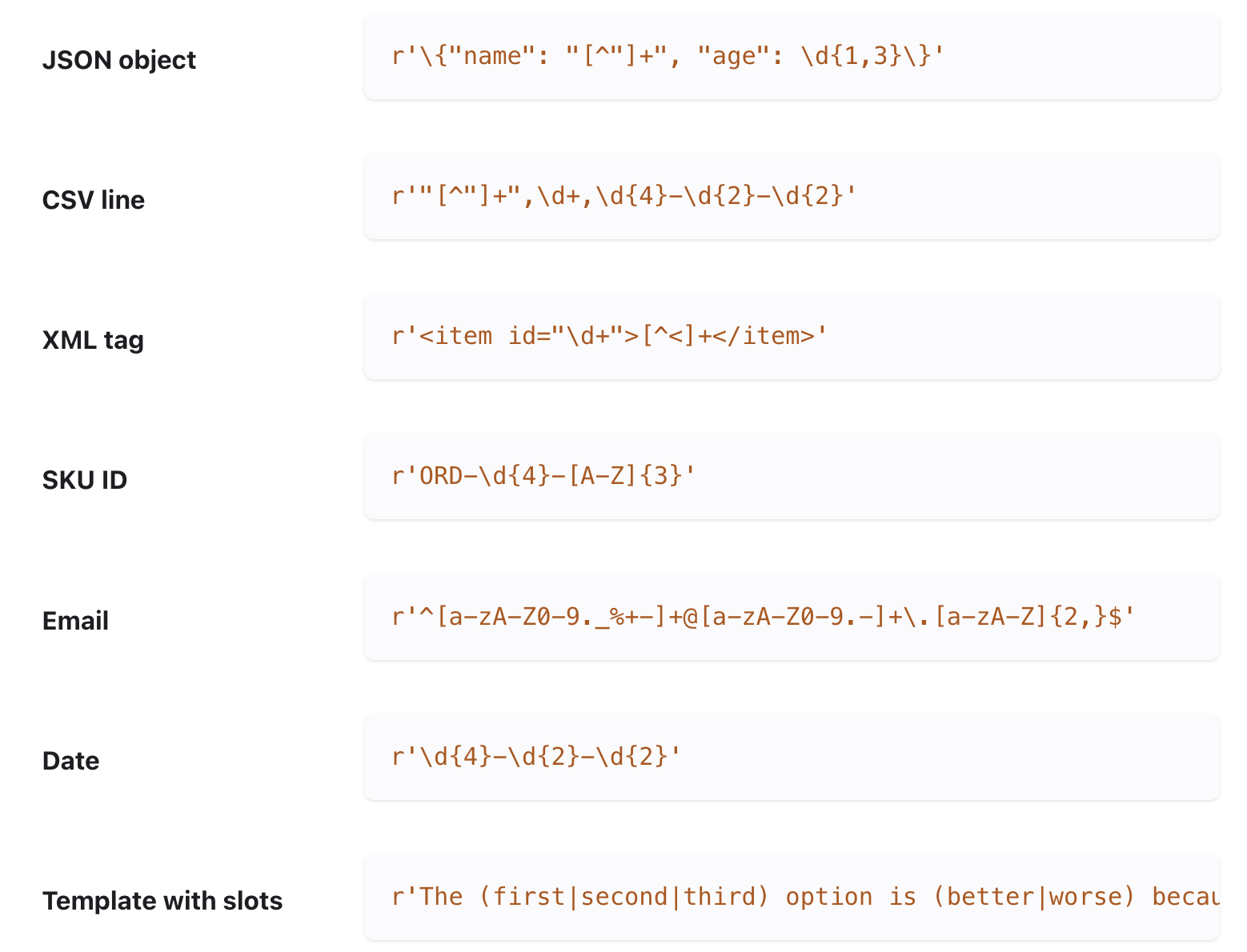
For finer control, our API also supports setting up exact regex / grammars for specific values in the output using constrained decoding.
Multilingual
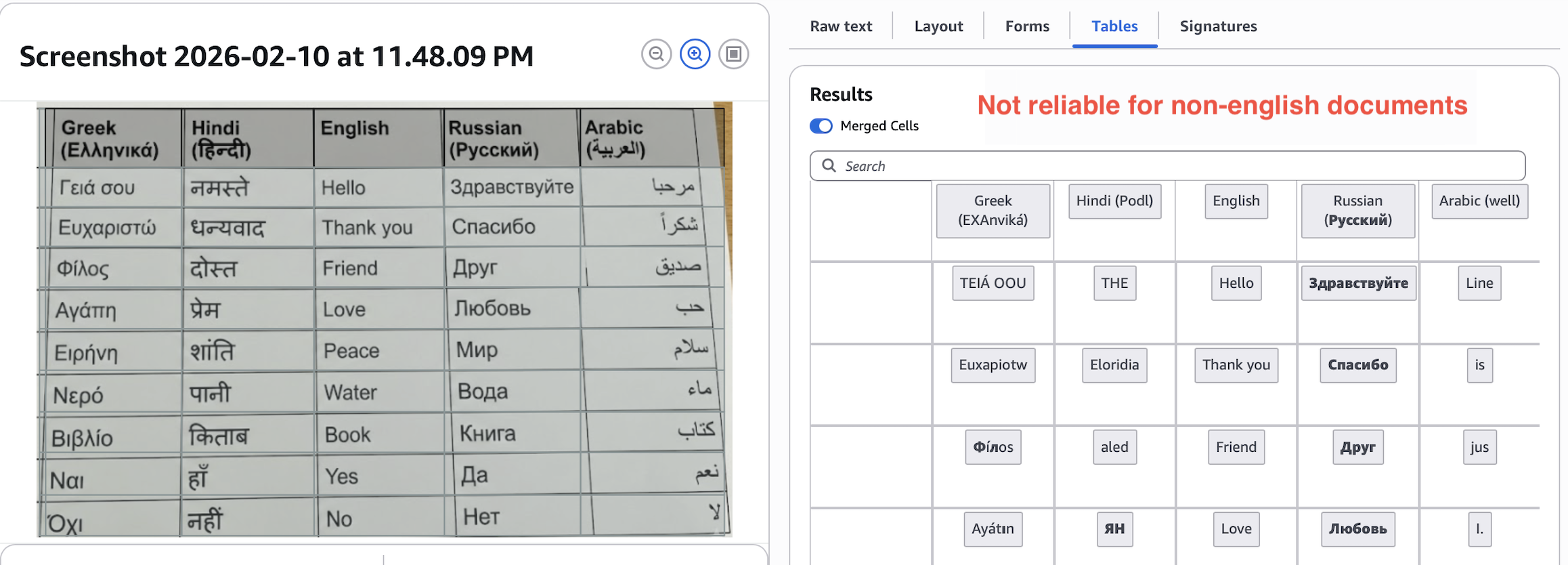
Textract extracts English well, does okay with Russian, Spanish, German, few more, and fails for others.
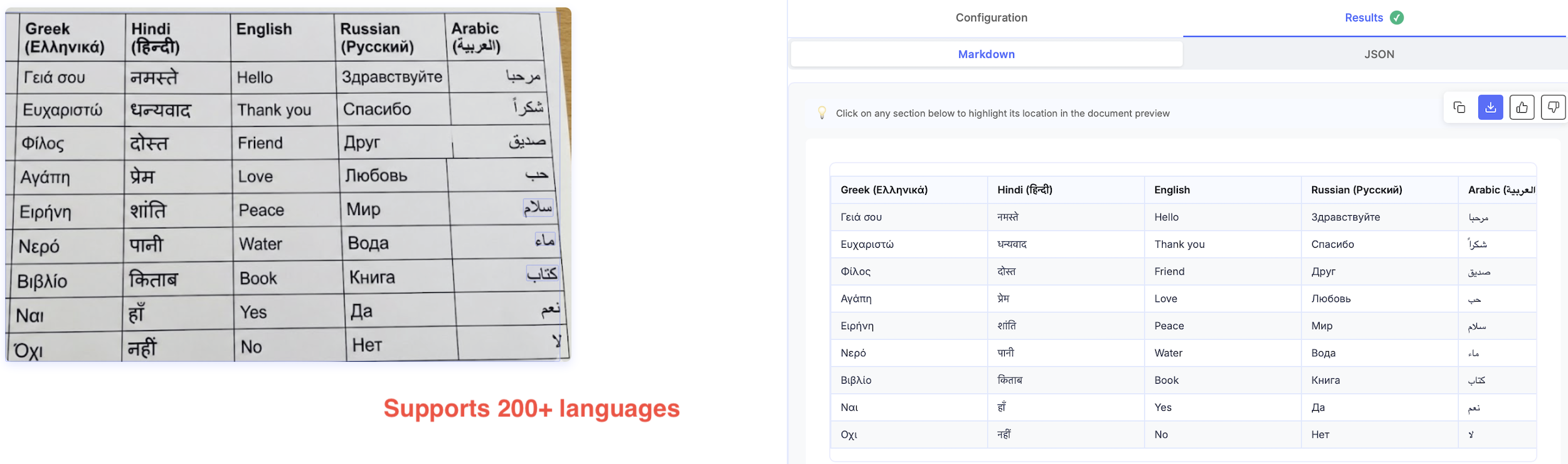
Most LLM-based APIs detect and extract documents in 200+ languages.
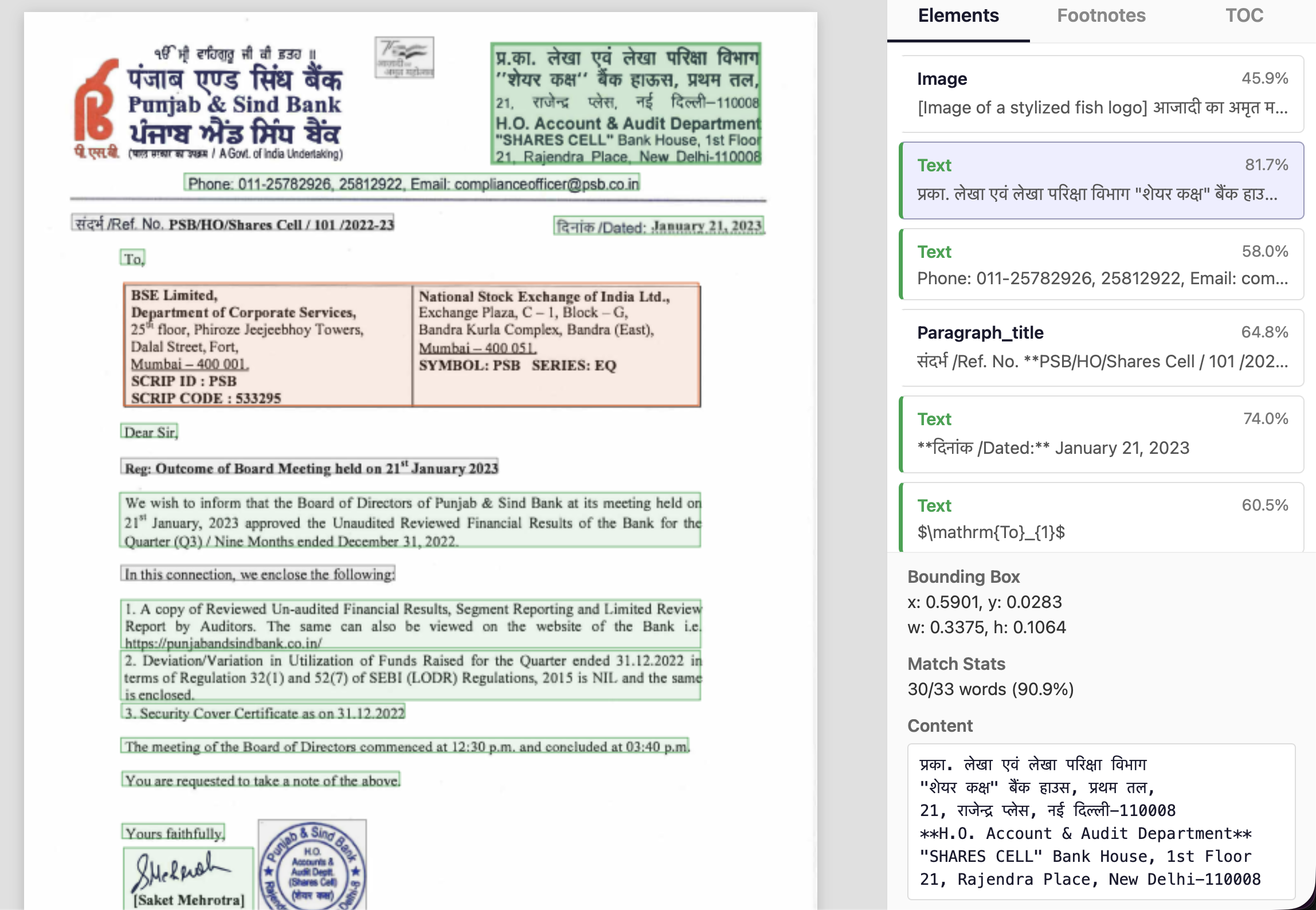
Nanonets also supports mixed-language documents.
Signatures
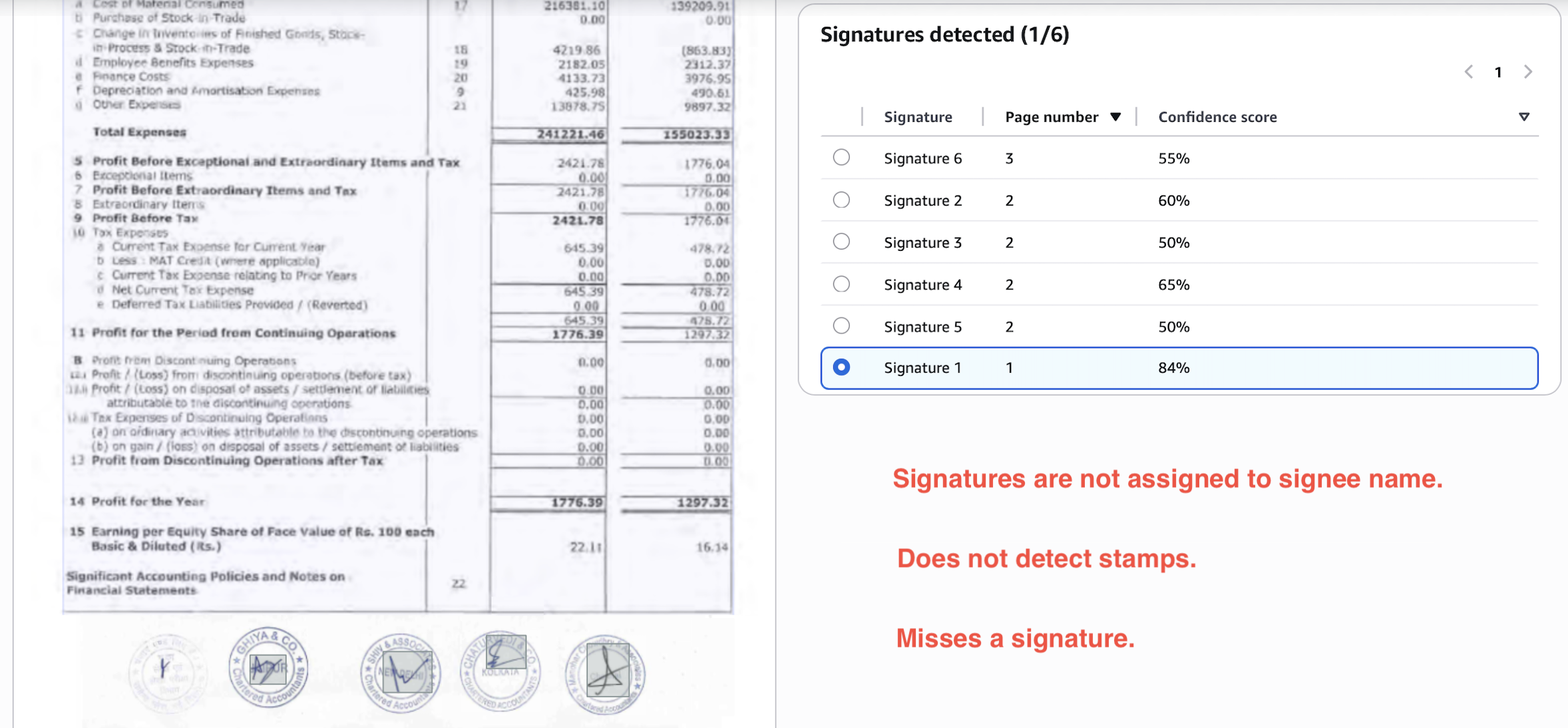
Textract signature detection seems more like a functionality added to tick off a feature list than a useful addition to its OCR outputs.
Consider the below output. It misses one signature, doesn't detect the stamps, and the 4/5 signatures detected are not linked to signees and not present in the layout portion of the output.
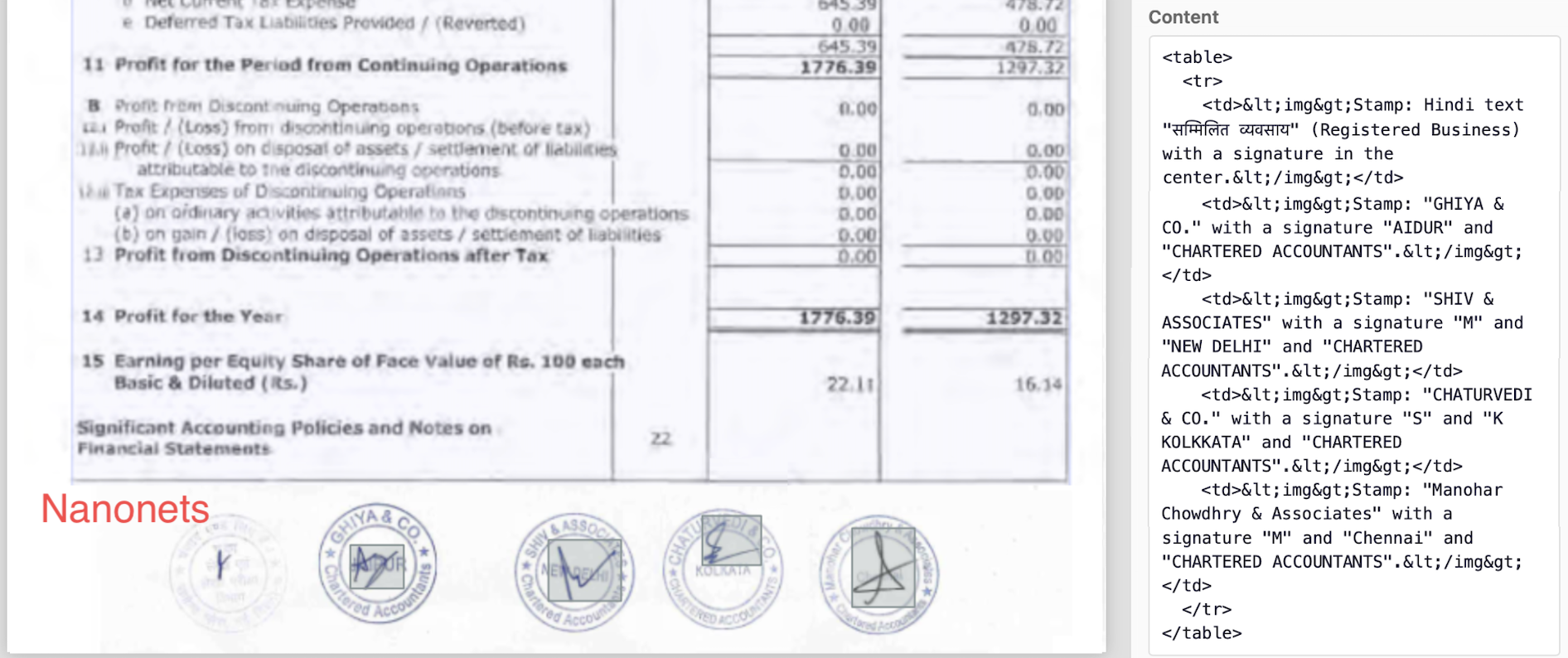
On the other hand, Nanonets detects all signatures and stamps perfectly, links them to respective signees, and includes them in the layout portion of the output.
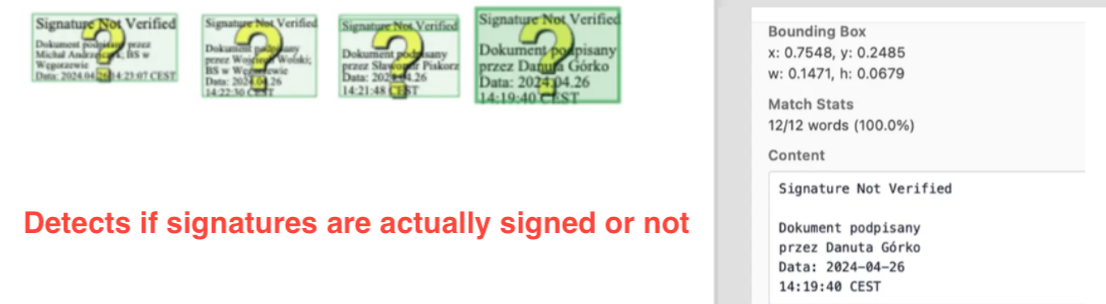
We even detect unsigned sections separately.
3. Latency
In default setting, you'll find that latency of LLM APIs and Textract is more or less equal. It will vary a lot based on document complexity, but typically you'll see numbers like 10-20 seconds per page.
If you are really sensitive about latency, you have two options -
-
Pick an LLM API that offers custom pipelines on powerful GPUs.
For example, Nanonets offers enterprise setups where we’ll run models on H100 / H200 / B100 / B200 GPUs for an added cost. You’ll see latency reduce to 2-4 seconds per page.
-
Self-host an open-source model on your own powerful GPU.
If you are sensitive to costs, and have large volumes of docs, you can justify buying your own GPUs and setting up an open-source model for document extraction on your own.
With a lot of compute, you can see latency drop below 2 seconds per page.
The only issue with open-source models is that OCR models of reasonable size (upto 12B params) are not yet capable enough to handle complex docs or give super-high accuracy, so you'll have to use a much larger general-purpose model (30B+ params) for which you'll need a lot of compute.
We have trained our own 12B OCR model for the commercial API, which is optimized for document understanding and extraction in its reasonably compact size. We are able to achieve this with in-house techniques and datasets we have built over the past 10 years.
4. Costs
Most LLM APIs for data extraction turn out to be cheaper than Textract.
This is directly correlated to the compute us vendors require to run them. Textract is based on traditional ML/DL pipelines, which are costlier to running newer LLM-based pipelines, especially when the LLMs are optimized for document parsing and extraction in compact sizes less than 12B parameters.
Textract costs between $15 to $75 per 1000 pages. $15 for basic OCR extraction, and then add-ons for layouts, tables, forms, key-value pairs, queries, adapters, signatures, etc. Nanonets costs a flat $10 per 1000 pages, which includes all the features discussed and more.
5. Data privacy
Textract keeps data within your existing VPC and compliance boundary (HIPAA, GDPR). In default settings, for LLM APIs, you'll be sending data to external servers which adds legal considerations.
Nanonets has SOC2, ISO 27001, GDPR, HIPAA, and other certifications in place to make your transition as seamless as possible. Newer LLM APIs vary in their compliance, so you'll have to check individually.
If you can't let data leave your premises, we also offer on-premise deployments, otherwise you can go for self hosting with open-source models.
6. Effort
We have indirectly touched upon this in the previous sections.
-
Textract requires training on large well-annotated docs to match accuracy of LLM-based alternatives.
-
Textract outputs a messy map of text blocks and coordinates, and you need to write post-processing code to convert these outputs into readable text, markdown, tables, key-value pairs, custom schemas.
Nanonets outputs have higher accuracy and are deeply customizable, making them usable out-of-the-box.
Choosing the right alternative
There are different kinds of alternatives you'll find in the market.
What we don't recommend
Cloud-native competitors are Azure's Document Intelligence and Google's Document AI. These perform neck-to-neck with Textract albeit few differences here and there, so we don't see any specific reason to recommend them.
Then, we have IDP platforms like Abbyy, Docparser, Docsumo, Rossum, PDF.co, etc. These perform better than Textract. But compared to newer LLM APIs,they are order of magnitudes more expensive, have lower accuracy, and offer less features.
Specifically, two extra features they do offer are approval workflows and ready-to-use export integrations with ERPs and databases. If that tickles your fancy, and you are okay with the substantially higher costs, you can consider them.
What we sort-of recommend
OpenAI, Gemini, Claude implement can parse documents to give you markdown or structured outputs. Their performance lags only slightly behind specialized LLM APIs, but the costs are higher given the size of the general purpose models behind the API calls.
For low volume and less demanding use cases, you can consider them to be on-par with specialized LLM APIs.
What we recommend
Nanonets, Reducto, Extend, Datalab, Landing.ai and few others represent the SOTA for document parsing and extraction today. Almost all of these have proprietary models specifically trained on document processing tasks. You should almost exclusively consider them, or consider self-hosting open-source models.
So which is the best LLM API? You know the answer that's coming.

But in all seriousness, the best LLM API is the one that works for you, and you get the answer only after testing these out on your own docs. We'll only vouch for ourselves by saying we give generous trial credits on our API, to help you reach the conclusion yourself.
The last alternative is to self-host open-source models if you have the expertise and bandwidth to do so. Many open-source models rival commercial LLM APIs in accuracy, which makes them a great option if -
- You have extreme document volumes to keep the GPUs that you'll need to buy busy all day. If your GPU sits idle, you lose money. So if you don't have consistently extreme volumes, stick to an API. Note that for complex documents, you'll need very large models (70B+) which require enterprise A100s/H100 GPUs.
- You don't care about latency. You can maybe process ~5000 documents at a latency of 2 minutes per page on a CPU instance at very low costs. Small models (upto 7B) very cheap to host, and can run on consumer hardware (RTX 4090) or cheap cloud instances ($0.50/hr). Breakeven is very low.
- You are paranoid about data leaving your system, and are not okay even with on-prem setups.
DeepSeek-OCR (1.1B), NanonetsOCR2 (3B), Qwen3.5-VL (72B), GLM-4.5V (106B), are the leaders in their respective model size categories.
Conclusion
Modern LLMs beat Textract in accuracy, features, ease of use - at a fraction of the cost.
If you are using Textract, it is high time you try out newer LLM APIs against your existing setup, all of which give generous trial credits. If don't have an existing solution and are considering one, you should only be looking at LLM APIs and open-source models, instead of legacy software like Textract and IDP platforms.
Subscribe to our newsletter
Updates from the LLM developer community in your inbox. Twice a month.
- Developer insights
- Latest breakthroughs
- Useful tools & techniques