OCR should return markdown, and not plaintext, JSON, XML
OCR converts documents into machine-readable formats, so that the knowledge buried within them becomes accessible and actionable. But what is the best machine-readable format for OCR outputs?
We argue markdown is a better format than plaintext, which loses structure, and other formats like JSON, XML, etc., which are verbose.
Problems with plaintext format
This is directly related to how humans read. Before we start reading a document, we see visual cues: headers, footers, paragraphs, text formatting, tables, lists, and more. These visual cues form the structure of the document, and give visual information on how to read it.
A heading is read with high focus because it anchors everything that follows. A word in bold is read with more weight. A line in a table is read as a relationship between a key and values. An ordered list is read as a collection of sequential points, and an unordered list as a collection of categorical points.
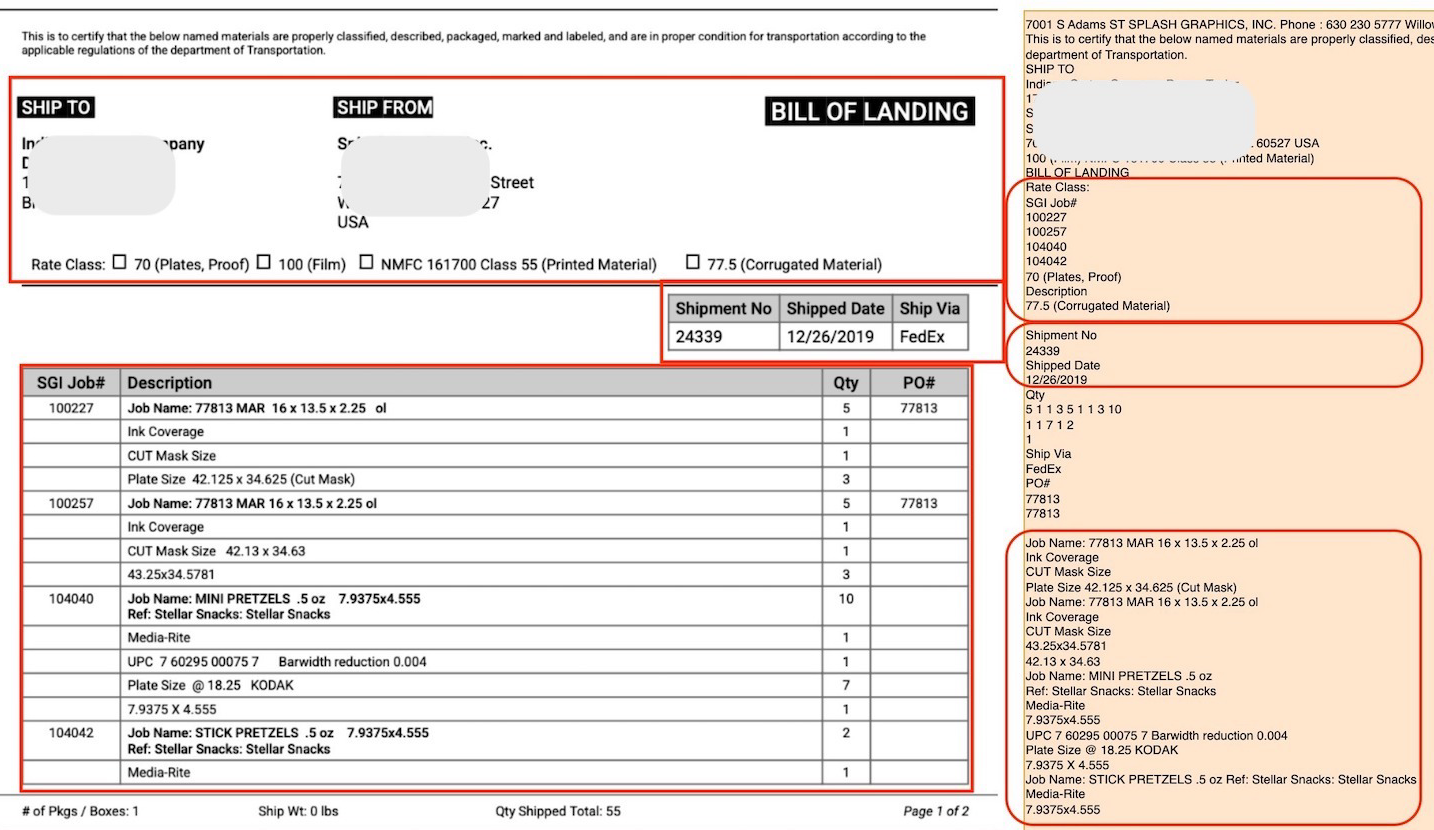
To put it more clearly, visual cues in a document contain information on how to connect different parts of the contents, to make sense of the document as a whole. When OCR returns plaintext outputs, this information is lost, as seen in the image above.
We want machines to correctly store or use the information in a document, and for this, OCR outputs need to preserve not just the text but also the visual cues and structure of the document.
Markdown preserves structure
Markdown provides a neat syntax to encode visual cues of the text, even though its creators probably weren't thinking of OCR at all when they created it.
A bit of history
Back in 2004, people were still using HTML to write blogs, ebooks, and other text content for the web. This was a chore in general for everyone, but especially so for non-technical people who had just recently started operating computers.
To encode structure, you used HTML tags <table>, <header>, <p>, <br>, <b>, <i>, <ul>, etc. Constantly seeing and managing them while writing your actual content interrupted your writing flow.
<h1>Mission Profile: Mars Transit</h1>
<h2>Phase 1: Trans-Mars Injection (TMI)</h2>
<p>
To achieve a stable <strong>Hohmann Transfer</strong>, the launch window must align with a phase angle of <em>44 degrees</em>.
Refer to <a href="https://ssd.jpl.nasa.gov">JPL Horizons</a> for ephemeris data.
</p>
<h3>Telemetry Sequence (Atlas V Profile)</h3>
<ol>
<li>T-Minus 00:00:10
<ul>
<li>RD-180 Engine Ignition</li>
<li>T/E Umbilical Release</li>
</ul>
</li>
<li>T+00:01:18: Max Q (Maximum Dynamic Pressure).</li>
<li>T+00:04:22: MECO (Main Engine Cut-Off).</li>
</ol>
<h3>Telemetry Sequence (Atlas V Profile)</h3>
<table>
<thead>
<tr>
<th>Celestial Body</th>
<th>Surface Gravity</th>
<th>Escape Velocity</th>
</tr>
</thead>
<tbody>
<tr>
<td>Earth (L2 Orbit)</td>
<td>0 m/s²</td>
<td>< 0.5 km/s</td>
</tr>
<tr>
<td>Mars (Surface)</td>
<td>3.71 m/s²</td>
<td>5.03 km/s</td>
</tr>
<tr>
<td>Moon (Surface)</td>
<td>1.62 m/s²</td>
<td>2.38 km/s</td>
</tr>
</tbody>
</table>
<figure>
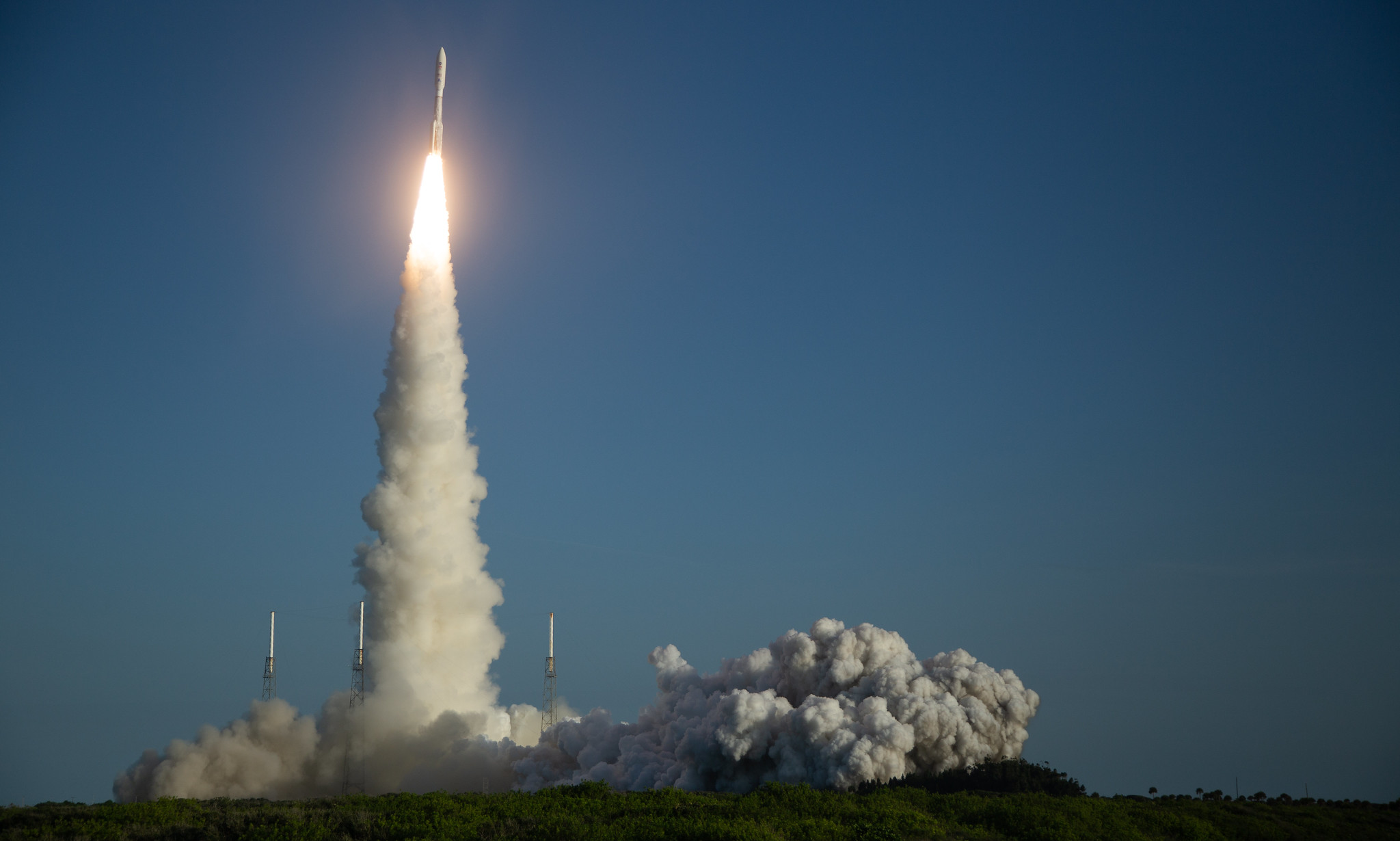
<img src="https://www.nasa.gov/wp-content/uploads/2020/07/50169630453_a7335051bf_k.jpg" alt="Atlas V Launch Configuration 541">
</figure>
<blockquote>
<p>"The Earth is the cradle of humanity, but mankind cannot stay in the cradle forever." - <em>Konstantin Tsiolkovsky</em></p>
</blockquote>
Mission Profile: Mars Transit
Phase 1: Trans-Mars Injection (TMI)
To achieve a stable Hohmann Transfer, the launch window must align with a phase angle of 44 degrees. Refer to JPL Horizons for ephemeris data.
Telemetry Sequence (Atlas V Profile)
- T-Minus 00:00:10
- RD-180 Engine Ignition
- T/E Umbilical Release
- T+00:01:18: Max Q (Maximum Dynamic Pressure).
- T+00:04:22: MECO (Main Engine Cut-Off).
Telemetry Sequence (Atlas V Profile)
| Celestial Body | Surface Gravity | Escape Velocity |
|---|---|---|
| Earth (L2 Orbit) | 0 m/s² | < 0.5 km/s |
| Mars (Surface) | 3.71 m/s² | 5.03 km/s |
| Moon (Surface) | 1.62 m/s² | 2.38 km/s |
"The Earth is the cradle of humanity, but mankind cannot stay in the cradle forever." - Konstantin Tsiolkovsky
But then, John Gruber and Aaron Swartz came up with markdown, a text-to-HTML markup language. You write in plain text and encode structure using minimal, intuitive punctuation (called markers). Under-the-hood, a parser converts these markers into corresponding HTML tags.
When you write in markdown, the source looks almost as readable as the final document, even to those who don't know the syntax.
# Mission Profile: Mars Transit
## Phase 1: Trans-Mars Injection (TMI)
To achieve a stable **Hohmann Transfer**, the launch window must align with a phase angle of *44 degrees*.
Refer to [JPL Horizons](https://ssd.jpl.nasa.gov) for ephemeris data.
### Telemetry Sequence (Atlas V Profile)
1. T-Minus 00:00:10
* RD-180 Engine Ignition
* T/E Umbilical Release
2. T+00:01:18: Max Q (Maximum Dynamic Pressure).
3. T+00:04:22: MECO (Main Engine Cut-Off).
### Planetary Delta-V Budget
| Celestial Body | Surface Gravity | Escape Velocity |
|----------------|-----------------|-----------------|
| Earth (L2 Orbit)| 0 m/s² | < 0.5 km/s |
| Mars (Surface) | 3.71 m/s² | 5.03 km/s |
| Moon (Surface) | 1.62 m/s² | 2.38 km/s |

> "The Earth is the cradle of humanity, but mankind cannot stay in the cradle forever." - *Konstantin Tsiolkovsky*
Mission Profile: Mars Transit
Phase 1: Trans-Mars Injection (TMI)
To achieve a stable Hohmann Transfer, the launch window must align with a phase angle of 44 degrees. Refer to JPL Horizons for ephemeris data.
Telemetry Sequence (Atlas V Profile)
- T-Minus 00:00:10
- RD-180 Engine Ignition
- T/E Umbilical Release
- T+00:01:18: Max Q (Maximum Dynamic Pressure).
- T+00:04:22: MECO (Main Engine Cut-Off).
Planetary Delta-V Budget
| Celestial Body | Surface Gravity | Escape Velocity |
|---|---|---|
| Earth (L2 Orbit) | 0 m/s² | < 0.5 km/s |
| Mars (Surface) | 3.71 m/s² | 5.03 km/s |
| Moon (Surface) | 1.62 m/s² | 2.38 km/s |
"The Earth is the cradle of humanity, but mankind cannot stay in the cradle forever." - Konstantin Tsiolkovsky
Markdown is a great format for OCR outputs
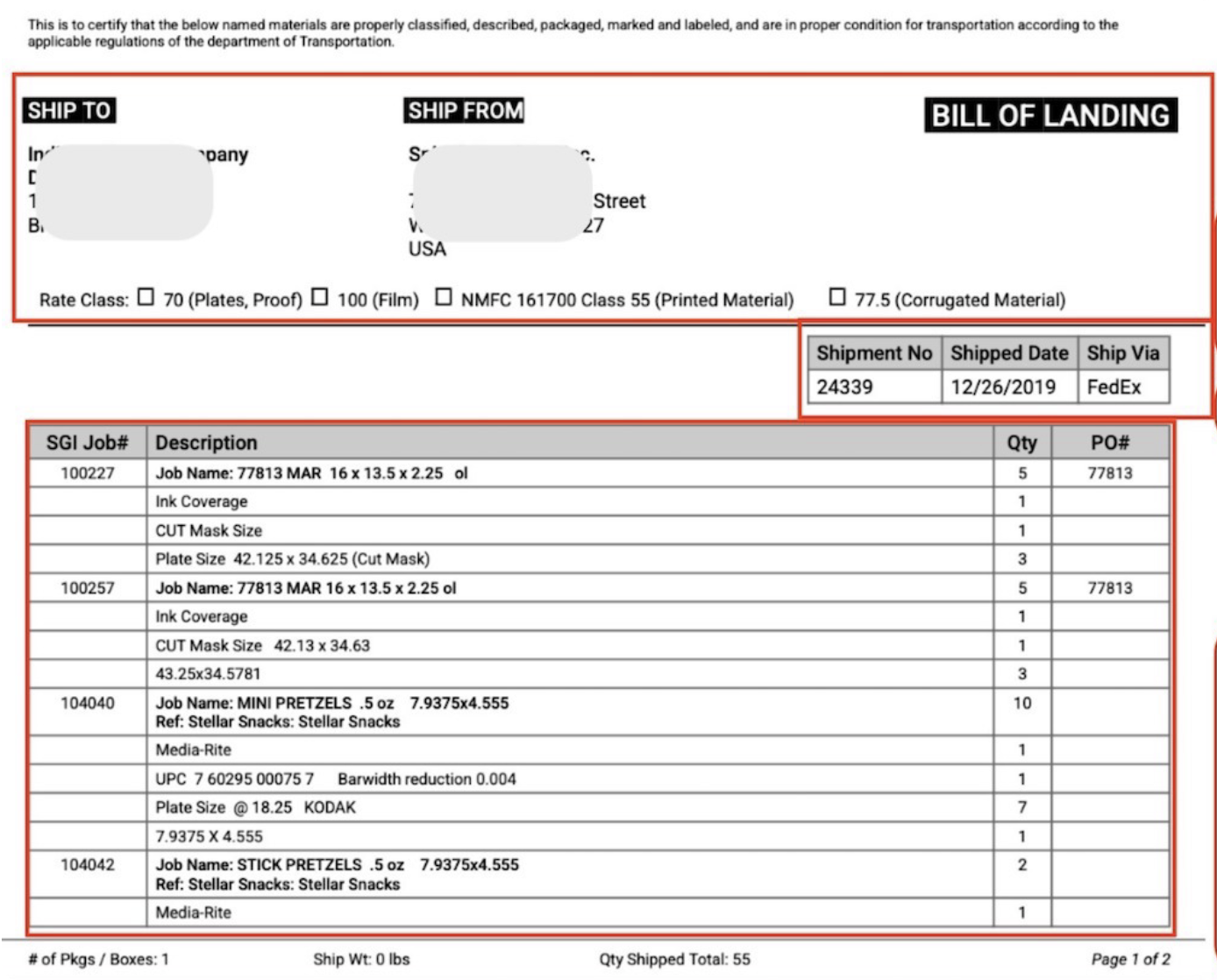
It's easy to see why markdown is a good format for OCR outputs. Look at the markdown output below. We've used the same document we earlier used to show the plaintext OCR output.
This is to certify that the below named materials are properly classified, described, packaged, marked and labeled, and are in proper condition for transportation according to the applicable regulations of the department of Transportation.

SHIP TO

SHIP FROM
# BILL OF LANDING
Rate Class: ☐ 70 (Plates, Proof) ☐ 100 (Film) ☐ NMFC 161700 Class 55 (Printed Material) ☐ 77.5 (Corrugated Material)
| Shipment No | Shipped Date | Ship Via |
| --- | --- | --- |
| 24339 | 12/26/2019 | FedEx |
| SGI Job# | Description | Qty | PO# |
| --- | --- | --- | --- |
| 100227 | Job Name: 77813 MAR 16 x 13.5 x 2.25 ol | 5 | 77813 |
| | Ink Coverage | 1 | |
| | CUT Mask Size | 1 | |
| | Plate Size 42.125 x 34.625 (Cut Mask) | 3 | |
| 100257 | Job Name: 77813 MAR 16 x 13.5 x 2.25 ol | 5 | 77813 |
| | Ink Coverage | 1 | |
| | CUT Mask Size 42.13 x 34.63 | 1 | |
| | 43.25x34.5781 | 3 | |
| 104040 | Job Name: MINI PRETZELS .5 oz 7.9375x4.555
Ref: Stellar Snacks: Stellar Snacks | 10 | |
| | Media-Rite | 1 | |
| | UPC 7 60295 00075 7 Barwidth reduction 0.004 | 1 | |
| | Plate Size @ 18.25 KODAK | 7 | |
| | 7.9375 X 4.555 | 1 | |
| 104042 | Job Name: STICK PRETZELS .5 oz 7.9375x4.555
Ref: Stellar Snacks: Stellar Snacks | 2 | |
| | Media-Rite | 1 | |
`# of Pkgs / Boxes: 1
Ship Wt: 0 lbs
Qty Shipped Total: 55
"BILL OF LANDING" is correctly the H1 heading. Checkboxes are preserved. First table is correct. Obfuscated shipping info ("SHIP TO" and "SHIP FROM") is acknowledged as unknown "images".
Overall, the markdown OCR output "looks" very much like the actual document. We'll check the output more carefully by trying to reverse engineer the actual document using the markdown.
This is to certify that the below named materials are properly classified, described, packaged, marked and labeled, and are in proper condition for transportation according to the applicable regulations of the department of Transportation.
 SHIP TO
 SHIP FROM
BILL OF LANDING
Rate Class: ☐ 70 (Plates, Proof) ☐ 100 (Film) ☐ NMFC 161700 Class 55 (Printed Material) ☐ 77.5 (Corrugated Material)
| Shipment No | Shipped Date | Ship Via |
|---|---|---|
| 24339 | 12/26/2019 | FedEx |
| SGI Job# | Description | Qty | PO# |
|---|---|---|---|
| 100227 | Job Name: 77813 MAR 16 x 13.5 x 2.25 ol | 5 | 77813 |
| Ink Coverage | 1 | ||
| CUT Mask Size | 1 | ||
| Plate Size 42.125 x 34.625 (Cut Mask) | 3 | ||
| 100257 | Job Name: 77813 MAR 16 x 13.5 x 2.25 ol | 5 | 77813 |
| Ink Coverage | 1 | ||
| CUT Mask Size 42.13 x 34.63 | 1 | ||
| 43.25x34.5781 | 3 | ||
| 104040 | Job Name: MINI PRETZELS .5 oz 7.9375x4.555 | ||
| Ref: Stellar Snacks: Stellar Snacks | 10 | ||
| Media-Rite | 1 | ||
| UPC 7 60295 00075 7 Barwidth reduction 0.004 | 1 | ||
| Plate Size @ 18.25 KODAK | 7 | ||
| 7.9375 X 4.555 | 1 | ||
| 104042 | Job Name: STICK PRETZELS .5 oz 7.9375x4.555 | ||
| Ref: Stellar Snacks: Stellar Snacks | 2 | ||
| Media-Rite | 1 |
`# of Pkgs / Boxes: 1
Ship Wt: 0 lbs
Qty Shipped Total: 55
If you hadn't spotted an issue in the raw markdown, you'll definitely spot it now. The second table is not extracted correctly.
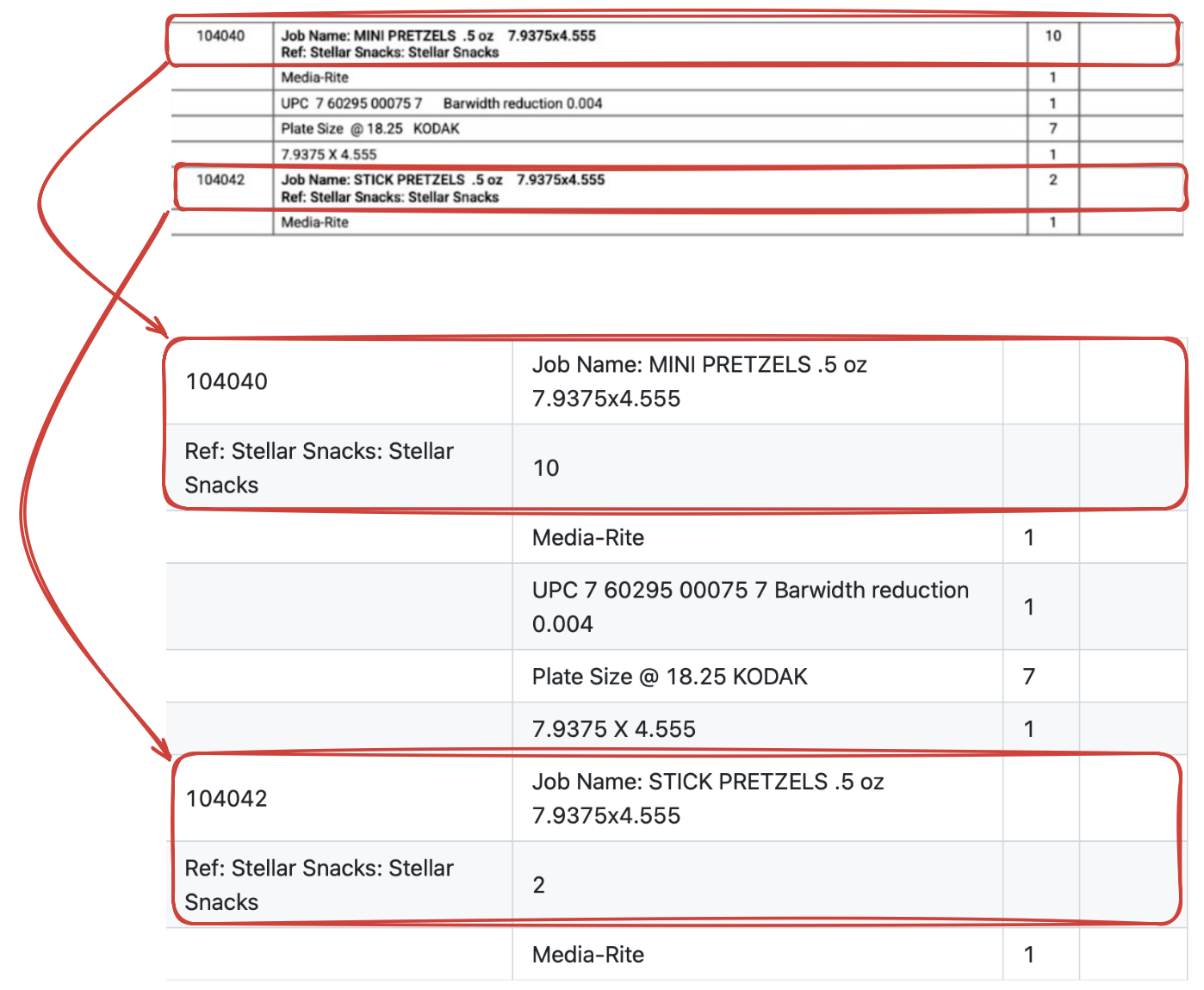
This is not the fault of the underlying OCR model. You see, the markdown format is built with the ability to preserve most of the common visual cues...
...with the exception of complex tables
Markdown has no syntax to indicate that one cell stretches across multiple columns/rows.
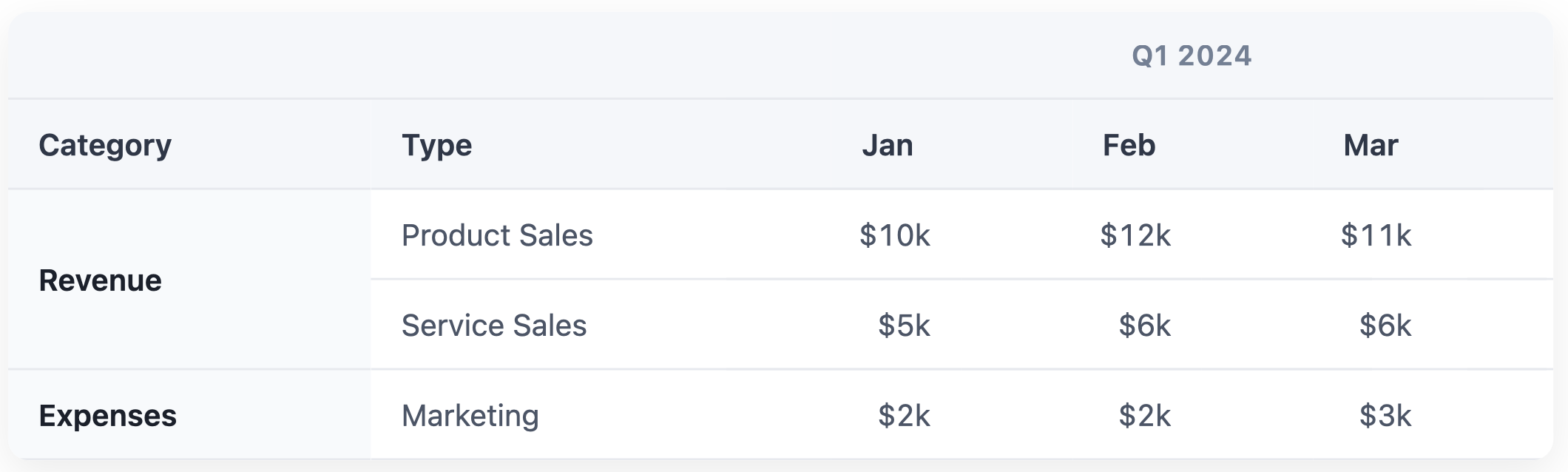
For the 'Revenue' row, we only have two bad choices: split into two rows and repeat 'Revenue' in both, or split into two rows and leave second row blank. First increases clutter, second increases ambiguity. And what do we do about the "Q1 2024" header at the top? Maybe squash it into the headers below?
| Q1 2024 - Category | Q1 2024 - Type | Q1 2024 - Jan | Q1 2024 - Feb | Q1 2024 - Mar |
| :--- | :--- | :--- | :--- | :--- |
| Revenue | Product Sales | $10k | $12k | $11k |
| | Service Sales | $5k | $6k | $6k |
| Expenses | Marketing | $2k | $2k | $3k |
| Q1 2024 - Category | Q1 2024 - Type | Q1 2024 - Jan | Q1 2024 - Feb | Q1 2024 - Mar |
|---|---|---|---|---|
| Revenue | Product Sales | $10k | $12k | $11k |
| Service Sales | $5k | $6k | $6k | |
| Expenses | Marketing | $2k | $2k | $3k |
This is still not a great output:
- You risk the machine interpreting that "Service Sales" has no category because the cell is empty.
- If you sort this table, the "Service Sales" row gets permanently disassociated from "Revenue".
- In the header, "Q1 2024" is repeated five times.
Besides this, markdown also can't capture tables which use indentation to show hierarchy.
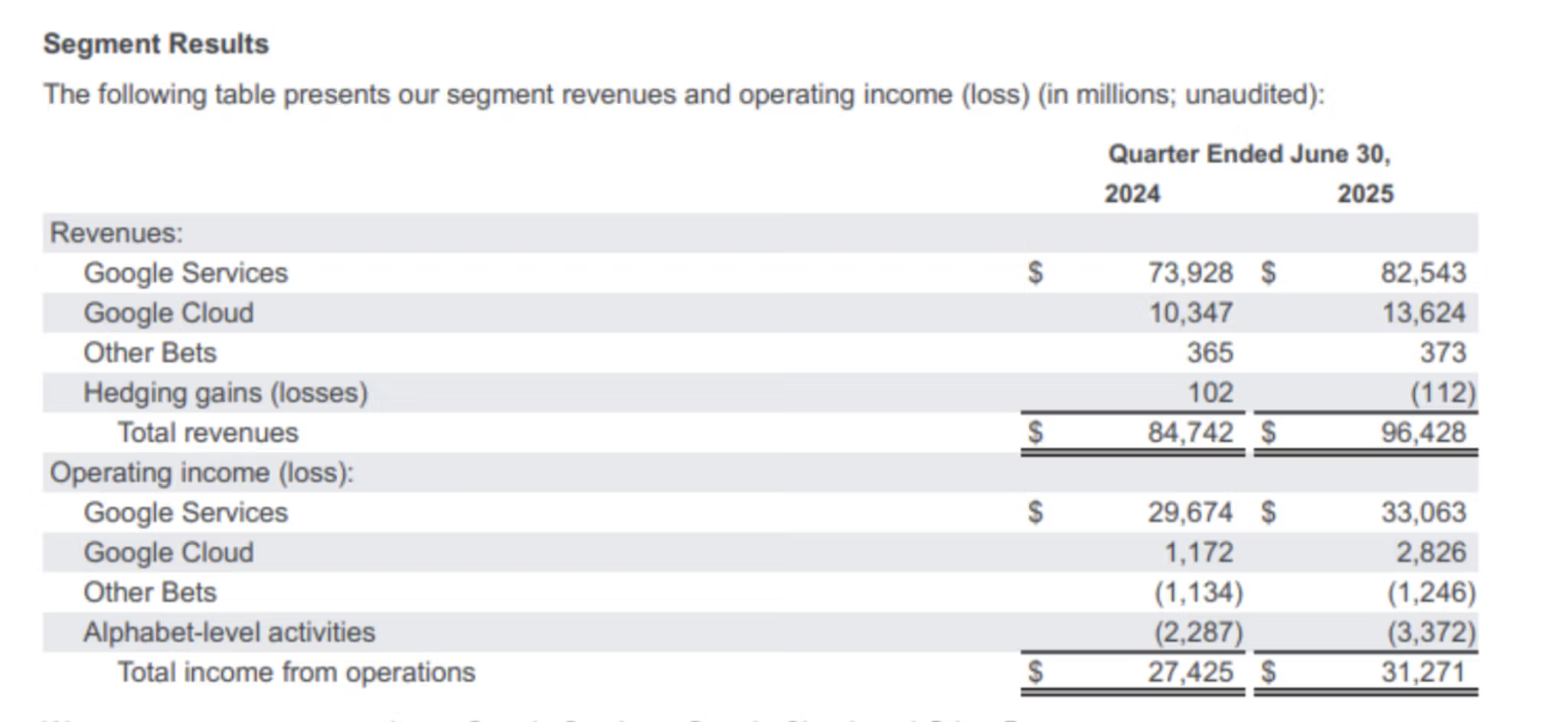
Based on the indentation, "Google Services" is clearly a child of "Revenues". Markdown output strips this whitespace, making "Revenues" look like just another data row that has no numbers.
| | Quarter Ended June 30, 2024 | Quarter Ended June 30, 2025 |
| :--- | :--- | :--- |
| **Revenues:** | | |
| Google Services | $73,928 | $82,543 |
| Google Cloud | 10,347 | 13,624 |
| Other Bets | 365 | 373 |
| Hedging gains (losses) | 102 | (112) |
| **Total revenues:** | **$84,742** | **$96,428** |
| **Operating income (loss):** | | |
| Google Services | $29,674 | $33,063 |
| Google Cloud | 1,172 | 2,826 |
| Other Bets | (1,134) | (1,246) |
| Alphabet-level activities | (2,287) | (3,372) |
| **Total income from operations:** | **$27,425** | **$31,271** |
| Quarter Ended June 30, 2024 | Quarter Ended June 30, 2025 | |
|---|---|---|
| Revenues: | ||
| Google Services | $73,928 | $82,543 |
| Google Cloud | 10,347 | 13,624 |
| Other Bets | 365 | 373 |
| Hedging gains (losses) | 102 | (112) |
| Total revenues: | $84,742 | $96,428 |
| Operating income (loss): | ||
| Google Services | $29,674 | $33,063 |
| Google Cloud | 1,172 | 2,826 |
| Other Bets | (1,134) | (1,246) |
| Alphabet-level activities | (2,287) | (3,372) |
| Total income from operations: | $27,425 | $31,271 |
This is also a bad output:
- "Revenues" and "Operating income" look like empty data rows rather than categories.
- "Hedging gains" and "Total revenues" look like adjacent data points. If you sum the revenue column, or ask an LLM to do it, you risk including the "Total revenues" row in the sum as the visual cues that convey "stop adding here, this is the result" are gone. You can get a massive double-counting error.
- Headers are repeated again, and this problem will be more pronounced in real-world financial tables which have lots of columns and rows.
So while markdown is a good format for everything else, we need something else for complex tables.
Hold up, what about HTML?
Markdown was never intended to be a complete replacement for HTML. It only wanted to cater to the web writer of the early 2000s, specifically those writing blogs, ebooks, newsletters. Complex tables don't find much use there. One could even argue they are an anti-pattern.
Regardless, the point is that markdown's creators and users have mostly agreed on this one principle: if markdown can't do something minimalistically, don't invent new markdown syntax, just use HTML. And so we shall, although not for writing but for OCR.
HTML supports complex tables using features like rowspan, colspan, and spacing inside the cells. Check out this HTML OCR output and what happens when we try to render it.
<table>
<thead>
  <tr>
    <th colspan="2"></th>
    <th colspan="3" style="text-align:center">Q1 2024</th>
  </tr>
  <tr>
    <th>Category</th>
    <th>Type</th>
    <th>Jan</th>
    <th>Feb</th>
    <th>Mar</th>
  </tr>
</thead>
<tbody>
  <tr>
    <td rowspan="2"><b>Revenue</b></td>
    <td>Product Sales</td>
    <td>$10k</td>
    <td>$12k</td>
    <td>$11k</td>
  </tr>
  <tr>
    <td>Service Sales</td>
    <td>$5k</td>
    <td>$6k</td>
    <td>$6k</td>
  </tr>
  <tr>
    <td><b>Expenses</b></td>
    <td>Marketing</td>
    <td>$2k</td>
    <td>$2k</td>
    <td>$3k</td>
  </tr>
</tbody>
</table>
| Q1 2024 | ||||
|---|---|---|---|---|
| Category | Type | Jan | Feb | Mar |
| Revenue | Product Sales | $10k | $12k | $11k |
| Service Sales | $5k | $6k | $6k | |
| Expenses | Marketing | $2k | $2k | $3k |
- "Revenue" is correctly grouping the sales types using
rowspan. - The "Q1 2024" clearly governing all three months using
colspan.
Similarily, check out this output below for the second table we discussed.
<table cellspacing="0" cellpadding="4" style="border-collapse: collapse; font-family: sans-serif; width: 100%;">
<thead>
  <tr>
    <th style="text-align:left;"></th>
    <th colspan="2" style="text-align:center; border-bottom:1px solid #000; padding-bottom: 5px;">Quarter Ended June 30,</th>
  </tr>
  <tr>
    <th></th>
    <th style="text-align:right; width: 100px; font-weight: bold;">2024</th>
    <th style="text-align:right; width: 100px; font-weight: bold;">2025</th>
  </tr>
</thead>
<tbody>
  <tr>
    <td style="background-color: #f9f9f9; font-weight: bold;">Revenues:</td>
    <td style="background-color: #f9f9f9;"></td>
    <td style="background-color: #f9f9f9;"></td>
  </tr>
  <tr>
    <td style="padding-left: 20px;">Google Services</td>
    <td style="text-align:right;">$ 73,928</td>
    <td style="text-align:right;">$ 82,543</td>
  </tr>
  <tr>
    <td style="padding-left: 20px;">Google Cloud</td>
    <td style="text-align:right;">10,347</td>
    <td style="text-align:right;">13,624</td>
  </tr>
  <tr>
    <td style="padding-left: 20px;">Other Bets</td>
    <td style="text-align:right;">365</td>
    <td style="text-align:right;">373</td>
  </tr>
  <tr>
    <td style="padding-left: 20px;">Hedging gains (losses)</td>
    <td style="text-align:right;">102</td>
    <td style="text-align:right;">(112)</td>
  </tr>
  <tr style="font-weight: bold;">
    <td style="padding-left: 40px;">Total revenues</td>
    <td style="text-align:right; border-top: 1px solid #000; border-bottom: 3px double #000;">$ 84,742</td>
    <td style="text-align:right; border-top: 1px solid #000; border-bottom: 3px double #000;">$ 96,428</td>
  </tr>
  <tr>
    <td style="background-color: #f9f9f9; font-weight: bold; padding-top: 15px;">Operating income (loss):</td>
    <td style="background-color: #f9f9f9; padding-top: 15px;"></td>
    <td style="background-color: #f9f9f9; padding-top: 15px;"></td>
  </tr>
  <tr>
    <td style="padding-left: 20px;">Google Services</td>
    <td style="text-align:right;">$ 29,674</td>
    <td style="text-align:right;">$ 33,063</td>
  </tr>
  <tr>
    <td style="padding-left: 20px;">Google Cloud</td>
    <td style="text-align:right;">1,172</td>
    <td style="text-align:right;">2,826</td>
  </tr>
  <tr>
    <td style="padding-left: 20px;">Other Bets</td>
    <td style="text-align:right;">(1,134)</td>
    <td style="text-align:right;">(1,246)</td>
  </tr>
  <tr>
    <td style="padding-left: 20px;">Alphabet-level activities</td>
    <td style="text-align:right;">(2,287)</td>
    <td style="text-align:right;">(3,372)</td>
  </tr>
  <tr style="font-weight: bold;">
    <td style="padding-left: 40px;">Total income from operations</td>
    <td style="text-align:right; border-top: 1px solid #000; border-bottom: 3px double #000;">$ 27,425</td>
    <td style="text-align:right; border-top: 1px solid #000; border-bottom: 3px double #000;">$ 31,271</td>
  </tr>
</tbody>
</table>
| Quarter Ended June 30, | ||
|---|---|---|
| 2024 | 2025 | |
| Revenues: | ||
| Google Services | $ 73,928 | $ 82,543 |
| Google Cloud | 10,347 | 13,624 |
| Other Bets | 365 | 373 |
| Hedging gains (losses) | 102 | (112) |
| Total revenues | $ 84,742 | $ 96,428 |
| Operating income (loss): | ||
| Google Services | $ 29,674 | $ 33,063 |
| Google Cloud | 1,172 | 2,826 |
| Other Bets | (1,134) | (1,246) |
| Alphabet-level activities | (2,287) | (3,372) |
| Total income from operations | $ 27,425 | $ 31,271 |
- The indentation
padding-leftcreates the parent-child relationships. - The header clearly spans both years using
colspan.
So using HTML, we can represent the original document's structure and visual cues in more detail. Which begs the question:
Why not use HTML everywhere?
We certainly can if we have to, like in our examples of complex tables. It'll add some other details too, like pixel-perfect bounding boxes, colors, margins. But in most cases, we should avoid HTML outputs if possible, and stick to markdown instead.
Two reasons for this:
- HTML syntax is a lot more verbose than markdown.
- HTML outputs don't "look" like the original document, at least not as much as markdown outputs.
We'll discuss why both these points matter later.
Markdown, with HTML for complex tables
For now, we have established:
- Markdown does a good job of preserving most visual cues and structure in a document.
- HTML works better for complex tables (which are frequently seen in documents people want to OCR).
Modern OCR pipelines have started using a hybrid format: default to markdown, but keep HTML as an escape hatch for complex tables.
What about JSON and XML?
We've sung high praises for markdown, and its only fair to talk a bit about the two formats that have carried the OCR torch for decades.
XML outputs
Historically, OCR engines like Tesseract, ABBYY FineReader, early cloud APIs were designed to digitize documents. The goal was to make a scanned PDF searchable or indexable by keyword-based search engines (like Lucene or Elasticsearch).
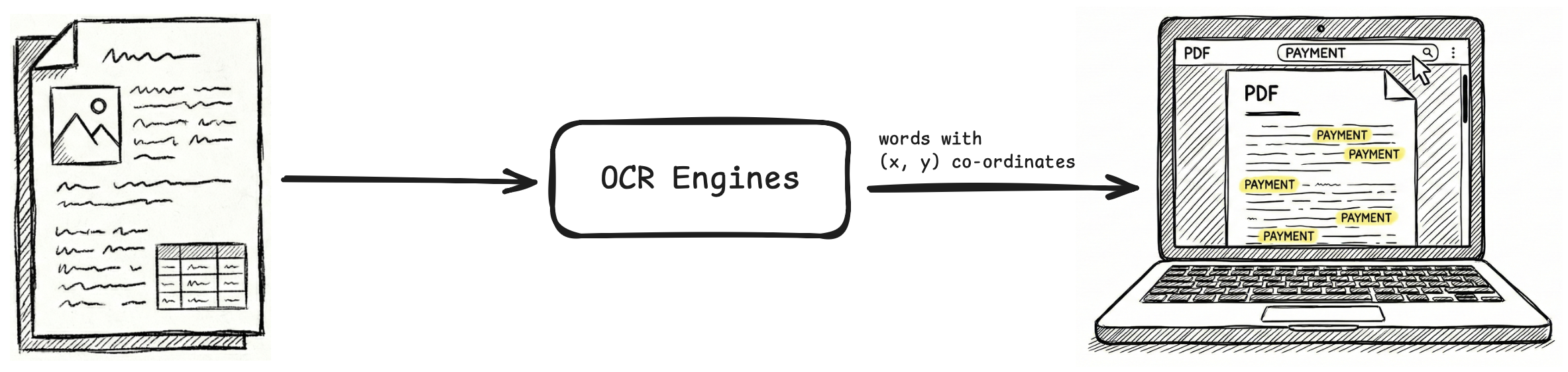
XML formats like ALTO and hOCR were ideal for this. They provided a rigorous schema for mapping every character to a specific bounding box (x, y coordinates) on the page. This was essential for highlighting search terms on a rendered PDF UI.
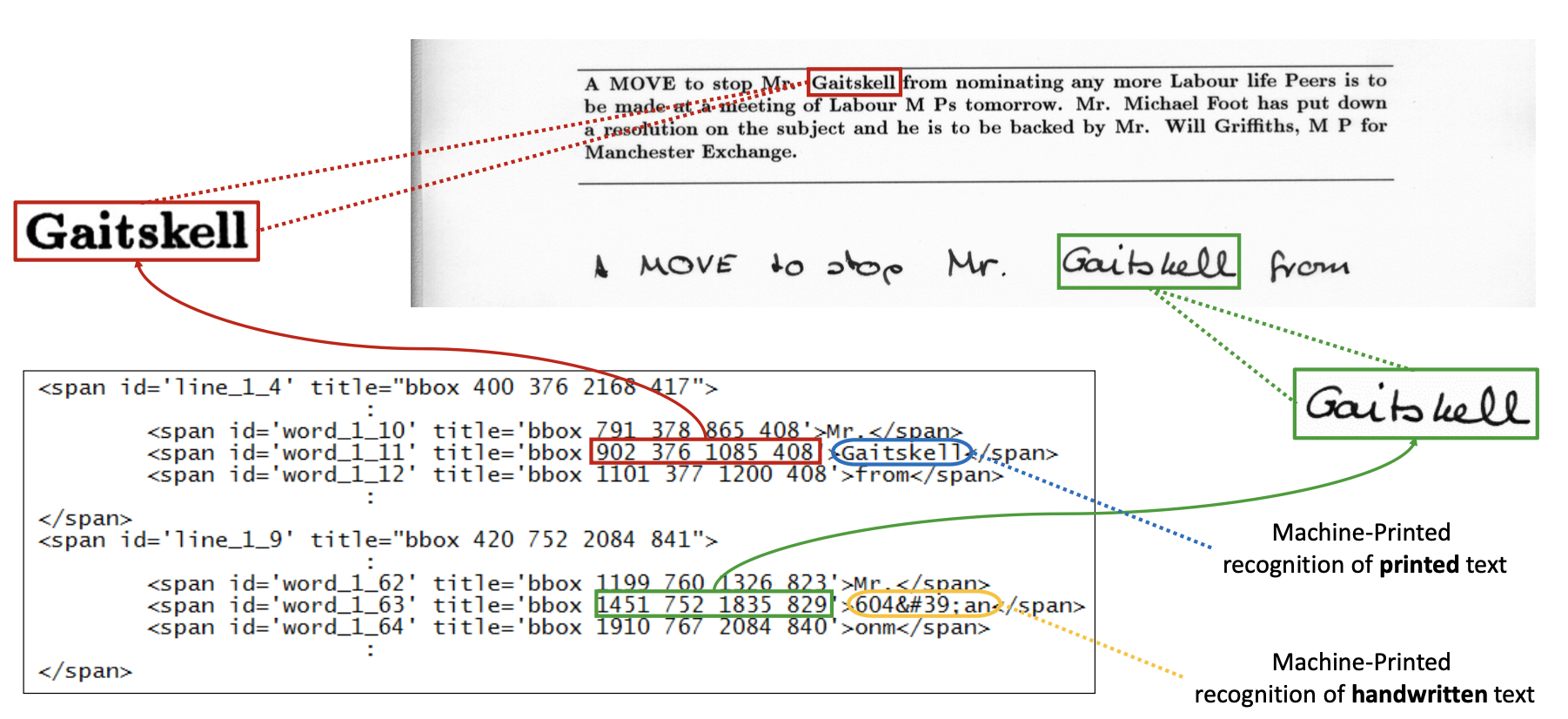
XML formats still retain niche utility for these kind of visual grounding tasks.
JSON outputs
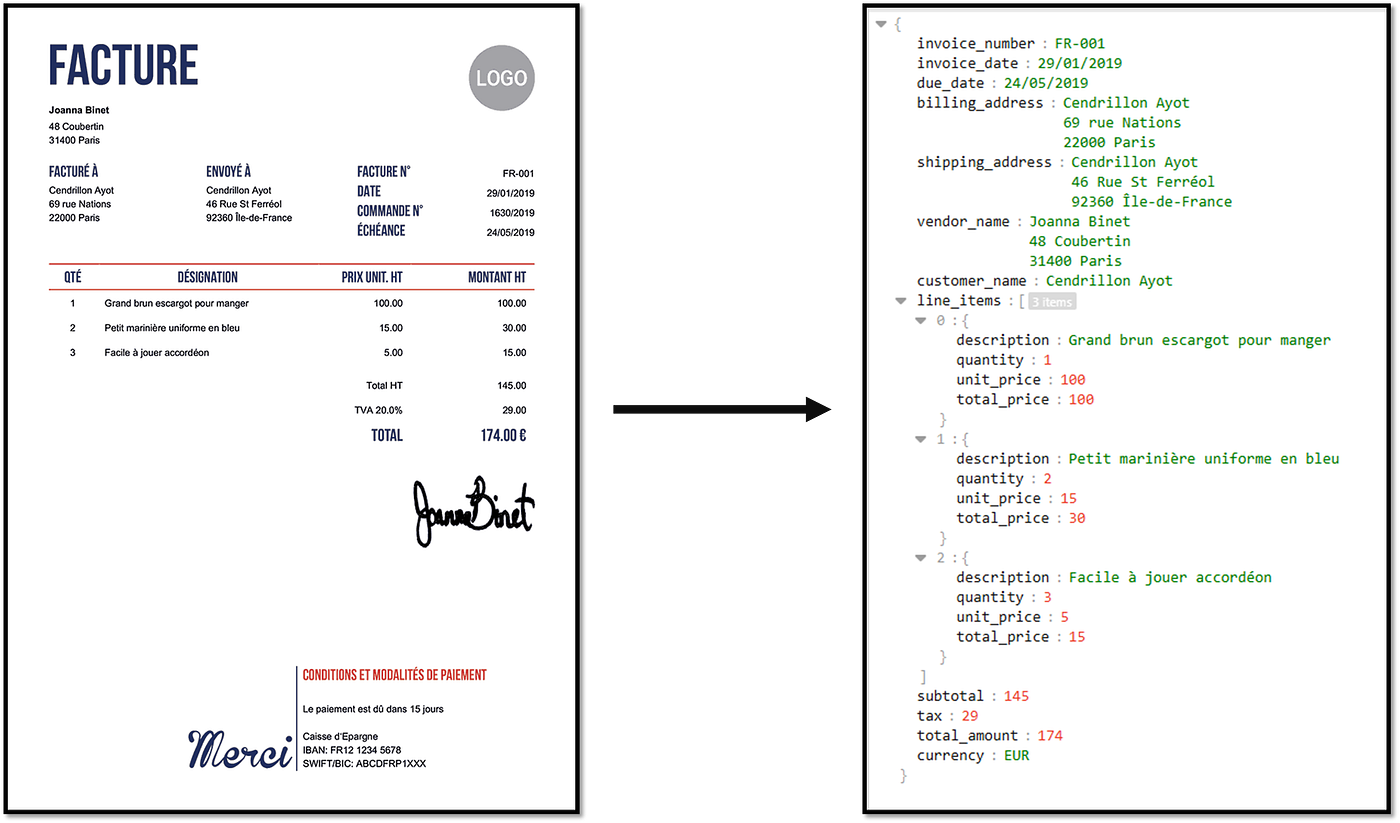
After that, OCR engines like Textract, Google Document AI, Abbyy Document AI, other cloud APIs pivoted to a new goal: extraction of fields, line items, tables.
OCR became just the first part of a larger ML pipeline, where raw OCR outputs with bounding boxes (x, y coordinates) were fed to downstream models (rule-based systems, CRF models, CNN models) to identify and extract fields, line items, rows, columns.
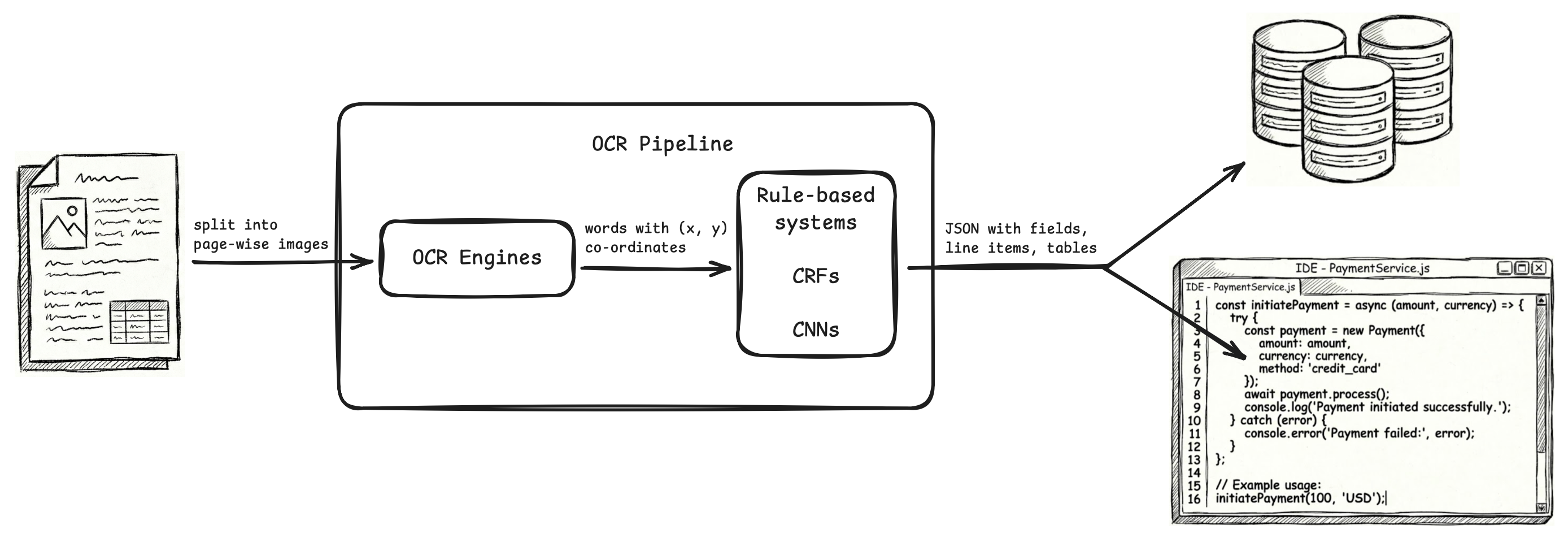
The final output of the OCR pipeline was meant to be sent to databases and applications, and these OCR pipelines used JSON as it is the standard format for data serialization and exchange.
Compatibility with modern OCR pipelines
There was nothing wrong with XML and JSON for what they did. In fact, XML is still the gold standard for visual grounding tasks, and JSON is still the gold standard for data serialization and exchange.
But modern OCR pipelines have replaced OCR engines and ML/DL models with LLMs. And with this, both the OCR pipeline, and the scope of how we use OCR outputs, has improved.
LLM-based OCR pipelines give better accuracy and more capabilities compared to ML/DL pipelines. Also, most of the times, they need zero or minimal training, while traditional ML/DL pipelines need a lot of training on good quality annotated datasets to start giving meaningful results.
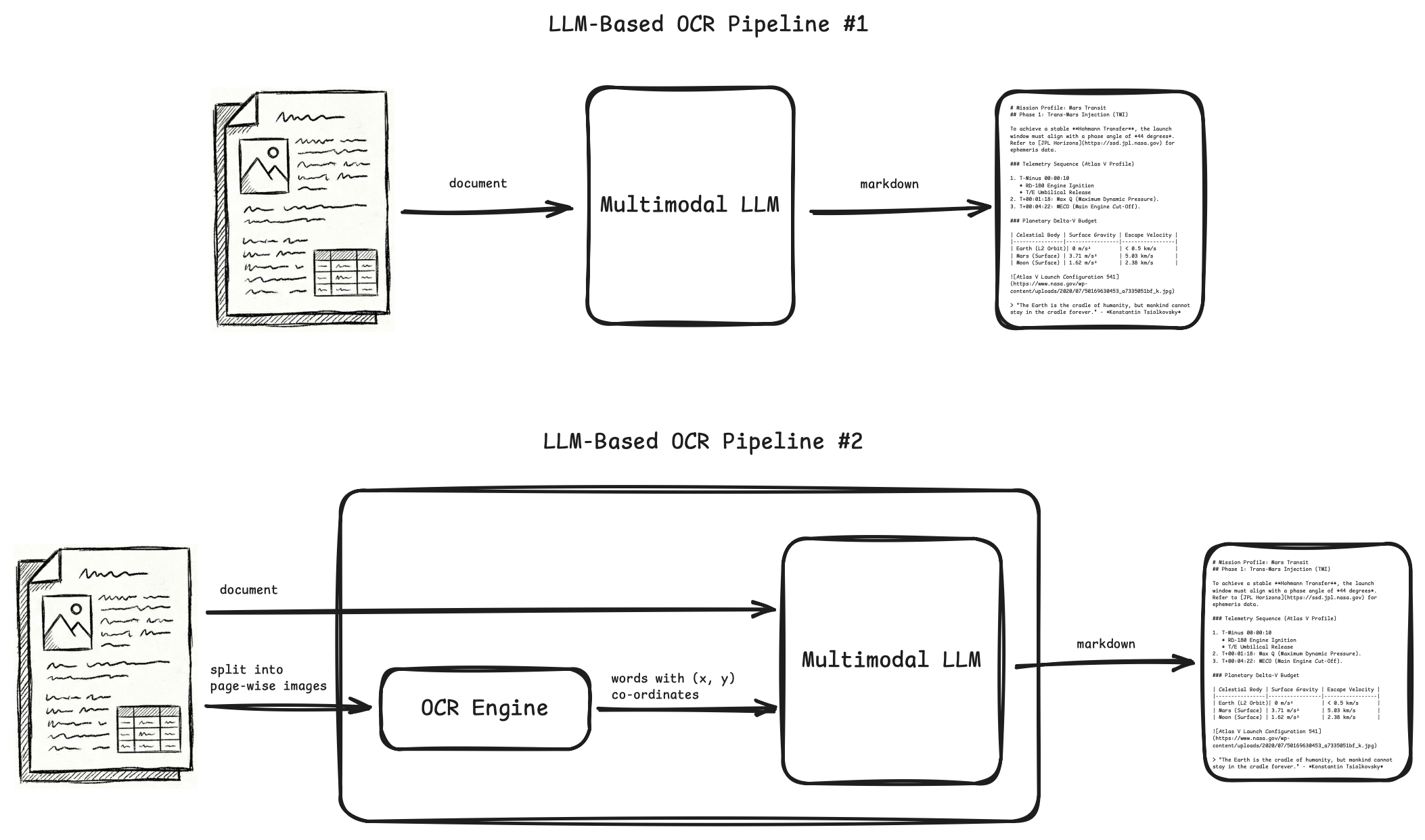
Downstream tasks (invoice payment, db writes, classification, semantics, etc.) that were earlier done by writing code or using ML/DL models on top of OCR outputs, can now be done by simply feeding OCR outputs as inputs to LLMs that do these tasks with better quality and accuracy.
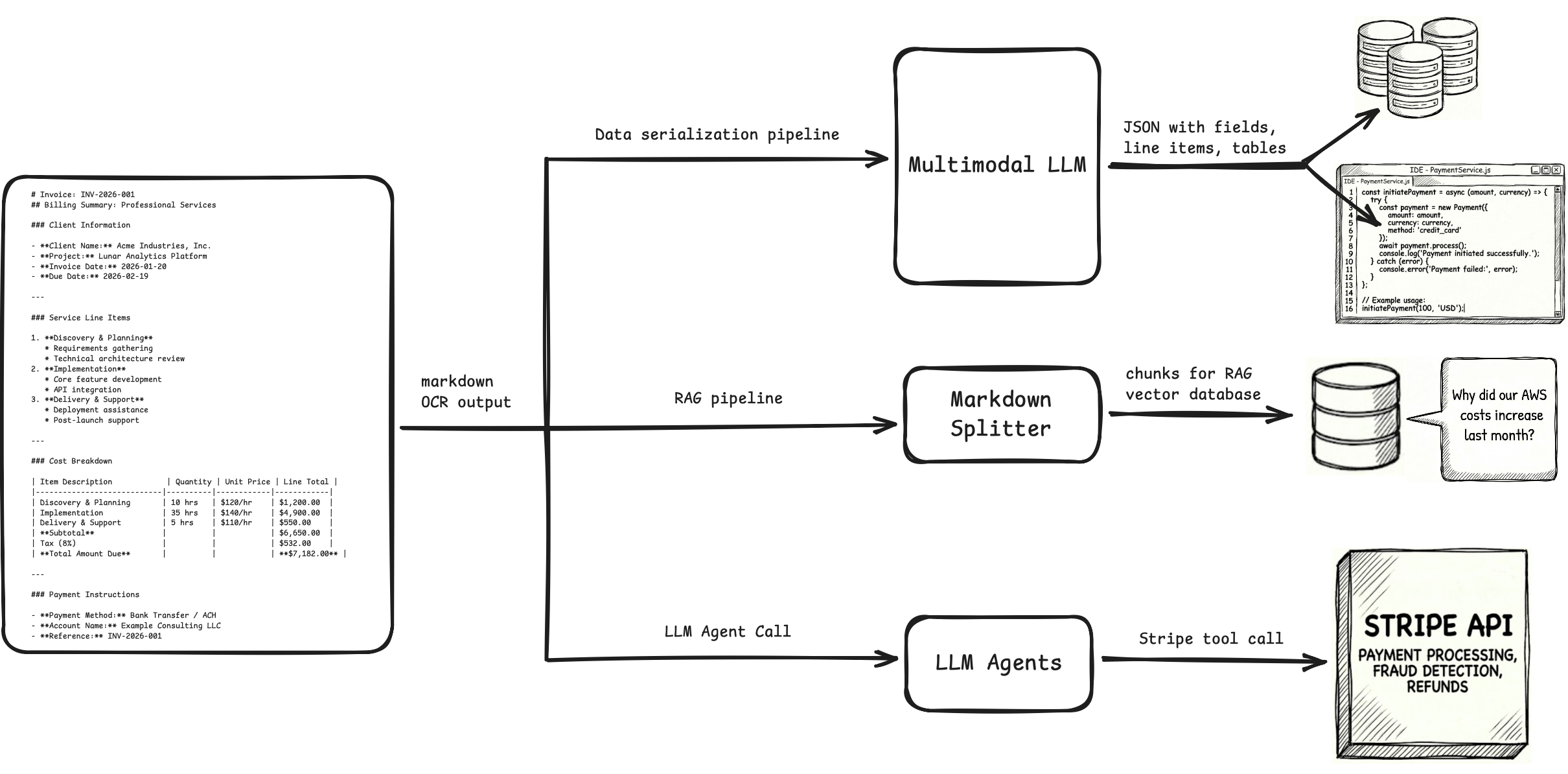
As we move to LLM-based OCR pipelines, and downstream tasks also being done by LLMs, we need to think what is the best OCR format in the context of LLMs.
The problems with JSON and XML are the same two problems we mentioned about HTML:
- They are verbose. To denote visual cues, JSON and XML outputs use a lot of syntax code.
- They don't "look" like the actual document.
Why verbosity and "looking like the document" matter?
It matters because LLMs are in the picture now.
Token tax
Whether you are generating OCR outputs with LLMs, or using those OCR outputs as inputs to downstream LLMs, you want to be careful about the number of tokens you are using:
-
LLMs have limited context window, which means you can only use limited number of tokens in inputs and outputs. You have to fit the input, context, output of your task in those limited tokens.
-
Latency and costs increase linearly with number of input and output tokens.
JSON and XML use more tokens than markdown to represent the same information.
Distance b/w related tokens
This is another important heuristic.
LLMs use an attention mechanism to generate statistical relationships between tokens. They build the output one token at a time, using the statistical relationships found in input tokens and previously generated output tokens to generate the next output token.
One of the factors used in calculating these relationships between the tokens is the relative distance between them, and almost all modern LLM architectures use a RoPE mechanism to incorporate this token distance factor in the calculations.
The problem is, as the relative distance increases, the attention mechanism decays in some cases, and is unable to create strong relationships between distant tokens even if they are closely related.
You want related tokens as close to each other as possible, so that LLMs can easily understand inputs and produce better outputs.
JSON and XML have a lot of syntax tokens in between information tokens, and the LLM is sometimes unable to relate pieces of information that are far apart. It also wastes significant compute and time in calculating statistical relationships between the syntax tokens.
The advantage of markdown is clear in this small table which doesn't have a lot of rows and columns. But in markdown, larger tables encounter a different problem. The distance between a row's values and the headers which describe these values becomes too large.
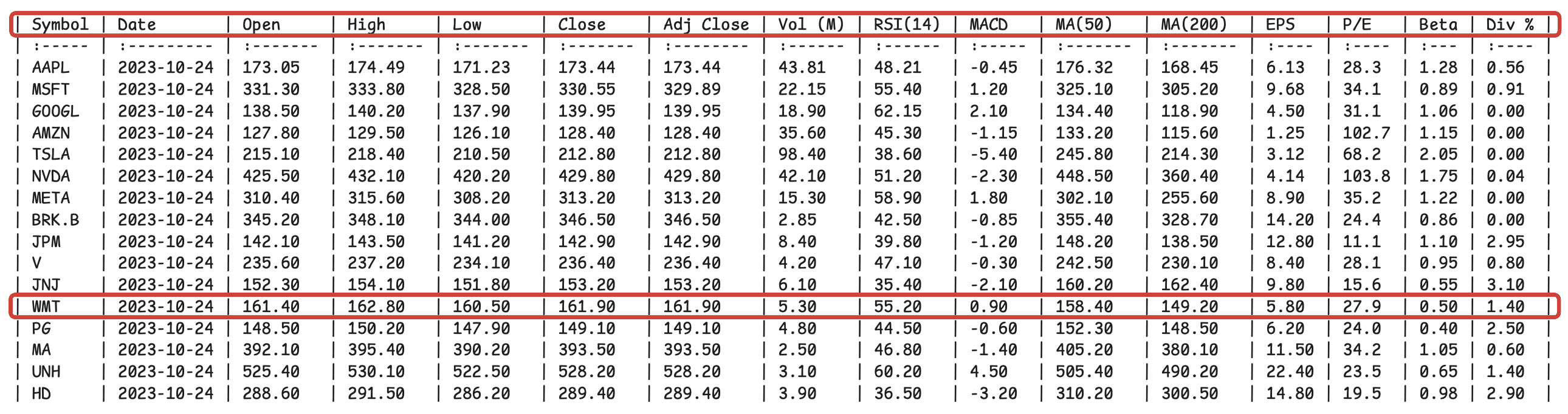
A JSON without bounding boxes, confidence scores, etc. will serve better than the above markdown, as the headers are repeated with every row value.
{
  "row_index": 12,
  "data": {
    "symbol": {
      "text": "WMT",
      "column_index": 0
    },
    "date": {
      "text": "2023-10-24",
      "column_index": 1
    },
    "open": {
      "text": "161.40",
      "column_index": 2
    },
    "high": {
      "text": "162.80",
      "column_index": 3
    },
    "low": {
      "text": "160.50",
      "column_index": 4
    },
    "close": {
      "text": "161.90",
      "column_index": 5
    },
    "adj_close": {
      "text": "161.90",
      "column_index": 6
    },
    "volume_m": {
      "text": "5.30",
      "column_index": 7
    },
    "rsi_14": {
      "text": "55.20",
      "column_index": 8
    },
    "macd": {
      "text": "0.90",
      "column_index": 9
    },
    "ma_50": {
      "text": "158.40",
      "column_index": 10
    },
    "ma_200": {
      "text": "149.20",
      "column_index": 11
    },
    "eps": {
      "text": "5.80",
      "column_index": 12
    },
    "pe_ratio": {
      "text": "27.9",
      "column_index": 13
    },
    "beta": {
      "text": "0.50",
      "column_index": 14
    },
    "div_yield": {
      "text": "1.40",
      "column_index": 15
    }
  }
}
But there is a better way to do this inherently in markdown. You create key-value pairs for each row, essentially convert your table into a dict.
# Stock Market Database

## Record 1

```
symbol: AAPL
date: 2023-10-24
open: 173.05
high: 174.49
low: 171.23
close: 173.44
adj_close: 173.44
vol_m: 43.81
rsi_14: 48.21
macd: -0.45
ma_50: 176.32
ma_200: 168.45
eps: 6.13
pe: 28.3
beta: 1.28
div_percent: 0.56
```

## Record 2

```
symbol: MSFT
date: 2023-10-24
open: 331.30
high: 333.80
low: 328.50
close: 330.55
adj_close: 329.89
vol_m: 22.15
rsi_14: 55.40
macd: 1.20
ma_50: 325.10
ma_200: 305.20
eps: 9.68
pe: 34.1
beta: 0.89
div_percent: 0.91
```

## Record 3

```
symbol: GOOGL
date: 2023-10-24
open: 138.50
high: 140.20
low: 137.90
close: 139.95
adj_close: 139.95
vol_m: 18.90
rsi_14: 62.15
macd: 2.10
ma_50: 134.40
ma_200: 118.90
eps: 4.50
pe: 31.1
beta: 1.06
div_percent: 0.00
```

## Record 4

```
symbol: AMZN
date: 2023-10-24
open: 127.80
high: 129.50
low: 126.10
close: 128.40
adj_close: 128.40
vol_m: 35.60
rsi_14: 45.30
macd: -1.15
ma_50: 133.20
ma_200: 115.60
eps: 1.25
pe: 102.7
beta: 1.15
div_percent: 0.00
```

## Record 5

```
symbol: TSLA
date: 2023-10-24
open: 215.10
high: 218.40
low: 210.50
close: 212.80
adj_close: 212.80
vol_m: 98.40
rsi_14: 38.60
macd: -5.40
ma_50: 245.80
ma_200: 214.30
eps: 3.12
pe: 68.2
beta: 2.05
div_percent: 0.00
```

## Record 6

```
symbol: NVDA
date: 2023-10-24
open: 425.50
high: 432.10
low: 420.20
close: 429.80
adj_close: 429.80
vol_m: 42.10
rsi_14: 51.20
macd: -2.30
ma_50: 448.50
ma_200: 360.40
eps: 4.14
pe: 103.8
beta: 1.75
div_percent: 0.04
```

## Record 7

```
symbol: META
date: 2023-10-24
open: 310.40
high: 315.60
low: 308.20
close: 313.20
adj_close: 313.20
vol_m: 15.30
rsi_14: 58.90
macd: 1.80
ma_50: 302.10
ma_200: 255.60
eps: 8.90
pe: 35.2
beta: 1.22
div_percent: 0.00
```

## Record 8

```
symbol: BRK.B
date: 2023-10-24
open: 345.20
high: 348.10
low: 344.00
close: 346.50
adj_close: 346.50
vol_m: 2.85
rsi_14: 42.50
macd: -0.85
ma_50: 355.40
ma_200: 328.70
eps: 14.20
pe: 24.4
beta: 0.86
div_percent: 0.00
```

## Record 9

```
symbol: JPM
date: 2023-10-24
open: 142.10
high: 143.50
low: 141.20
close: 142.90
adj_close: 142.90
vol_m: 8.40
rsi_14: 39.80
macd: -1.20
ma_50: 148.20
ma_200: 138.50
eps: 12.80
pe: 11.1
beta: 1.10
div_percent: 2.95
```

## Record 10

```
symbol: V
date: 2023-10-24
open: 235.60
high: 237.20
low: 234.10
close: 236.40
adj_close: 236.40
vol_m: 4.20
rsi_14: 47.10
macd: -0.30
ma_50: 242.50
ma_200: 230.10
eps: 8.40
pe: 28.1
beta: 0.95
div_percent: 0.80
```

## Record 11

```
symbol: JNJ
date: 2023-10-24
open: 152.30
high: 154.10
low: 151.80
close: 153.20
adj_close: 153.20
vol_m: 6.10
rsi_14: 35.40
macd: -2.10
ma_50: 160.20
ma_200: 162.40
eps: 9.80
pe: 15.6
beta: 0.55
div_percent: 3.10
```

## Record 12

```
symbol: WMT
date: 2023-10-24
open: 161.40
high: 162.80
low: 160.50
close: 161.90
adj_close: 161.90
vol_m: 5.30
rsi_14: 55.20
macd: 0.90
ma_50: 158.40
ma_200: 149.20
eps: 5.80
pe: 27.9
beta: 0.50
div_percent: 1.40
```

## Record 13

```
symbol: PG
date: 2023-10-24
open: 148.50
high: 150.20
low: 147.90
close: 149.10
adj_close: 149.10
vol_m: 4.80
rsi_14: 44.50
macd: -0.60
ma_50: 152.30
ma_200: 148.50
eps: 6.20
pe: 24.0
beta: 0.40
div_percent: 2.50
```

## Record 14

```
symbol: MA
date: 2023-10-24
open: 392.10
high: 395.40
low: 390.20
close: 393.50
adj_close: 393.50
vol_m: 2.50
rsi_14: 46.80
macd: -1.40
ma_50: 405.20
ma_200: 380.10
eps: 11.50
pe: 34.2
beta: 1.05
div_percent: 0.60
```

## Record 15

```
symbol: UNH
date: 2023-10-24
open: 525.40
high: 530.10
low: 522.50
close: 528.20
adj_close: 528.20
vol_m: 3.10
rsi_14: 60.20
macd: 4.50
ma_50: 505.40
ma_200: 490.20
eps: 22.40
pe: 23.5
beta: 0.65
div_percent: 1.40
```

## Record 16

```
symbol: HD
date: 2023-10-24
open: 288.60
high: 291.50
low: 286.20
close: 289.40
adj_close: 289.40
vol_m: 3.90
rsi_14: 36.50
macd: -3.20
ma_50: 310.20
ma_200: 300.50
eps: 14.80
pe: 19.5
beta: 0.98
div_percent: 2.90
```
An excellent blog from improvingagents.com tested which table format LLMs understand best, and markdown key-value pairs topped the accuracy charts on various tasks.
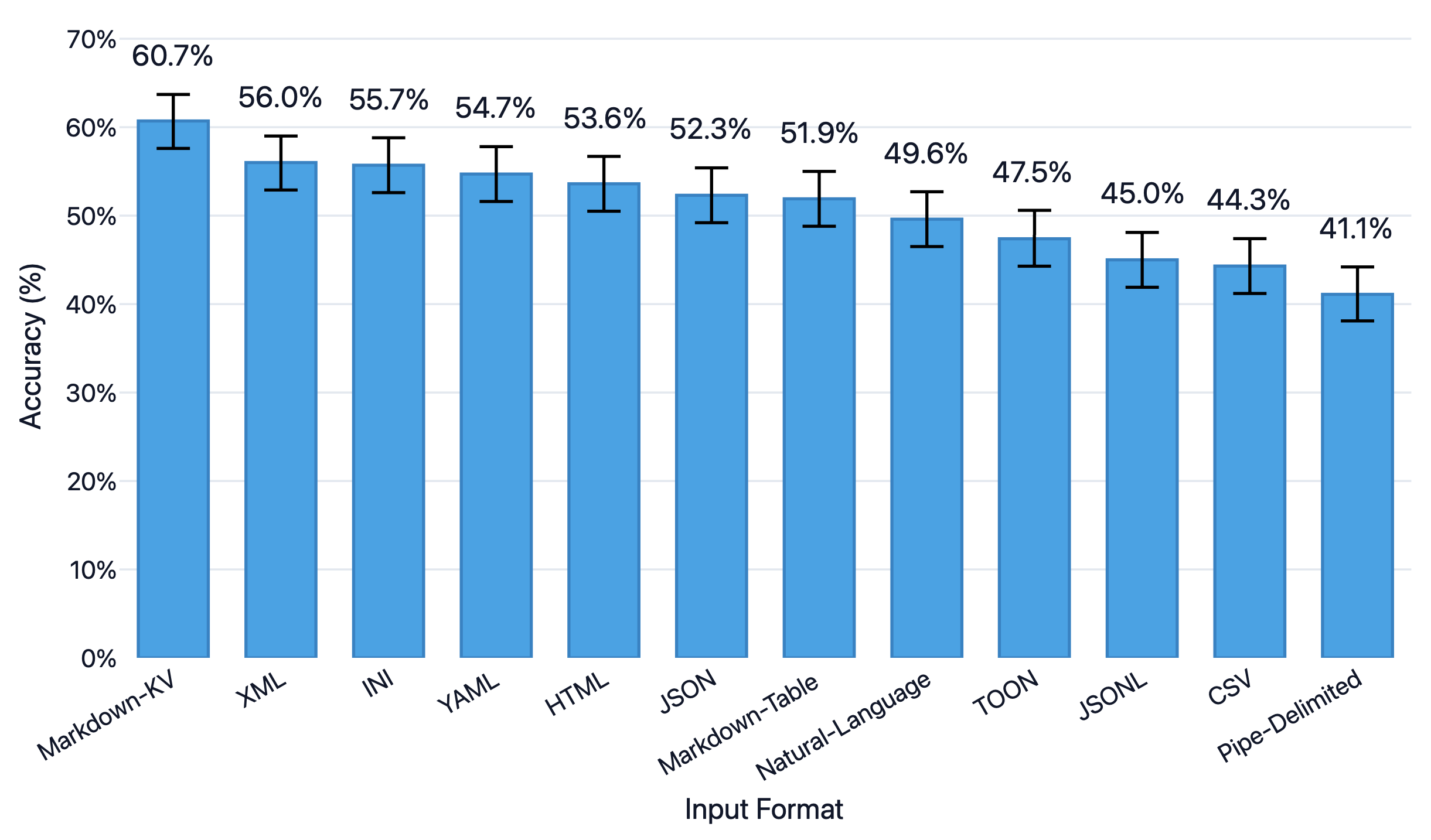
The same researchers point out another caveat. For deeply nested data (6-7 levels of nesting), markdown comes out second best to YAML. However, for most OCR tasks, document data isn't really that deeply nested, and markdown will work just fine.
Natural language syntax
JSON and XML are not aligned with the natural language (books, articles, websites) that LLMs are predominantly trained on. Markdown, on the other hand, closely mirrors natural language.
# Mission Profile: Mars Transit
## Phase 1: Trans-Mars Injection (TMI)
To achieve a stable **Hohmann Transfer**, the launch window must align with a phase angle of *44 degrees*.
Refer to [JPL Horizons](https://ssd.jpl.nasa.gov) for ephemeris data.
### Telemetry Sequence (Atlas V Profile)
1. T-Minus 00:00:10
* RD-180 Engine Ignition
* T/E Umbilical Release
2. T+00:01:18: Max Q (Maximum Dynamic Pressure).
3. T+00:04:22: MECO (Main Engine Cut-Off).
### Planetary Delta-V Budget
| Celestial Body | Surface Gravity | Escape Velocity |
|----------------|-----------------|-----------------|
| Earth (L2 Orbit)| 0 m/s² | < 0.5 km/s |
| Mars (Surface) | 3.71 m/s² | 5.03 km/s |
| Moon (Surface) | 1.62 m/s² | 2.38 km/s |

> "The Earth is the cradle of humanity, but mankind cannot stay in the cradle forever." - *Konstantin Tsiolkovsky*
Mission Profile: Mars Transit
Phase 1: Trans-Mars Injection (TMI)
To achieve a stable Hohmann Transfer, the launch window must align with a phase angle of 44 degrees. Refer to JPL Horizons for ephemeris data.
Telemetry Sequence (Atlas V Profile)
- T-Minus 00:00:10
- RD-180 Engine Ignition
- T/E Umbilical Release
- T+00:01:18: Max Q (Maximum Dynamic Pressure).
- T+00:04:22: MECO (Main Engine Cut-Off).
Planetary Delta-V Budget
| Celestial Body | Surface Gravity | Escape Velocity |
|---|---|---|
| Earth (L2 Orbit) | 0 m/s² | < 0.5 km/s |
| Mars (Surface) | 3.71 m/s² | 5.03 km/s |
| Moon (Surface) | 1.62 m/s² | 2.38 km/s |
"The Earth is the cradle of humanity, but mankind cannot stay in the cradle forever." - Konstantin Tsiolkovsky
We'll use examples to build intuition for why this matters. Consider an invoice OCR pipeline. In theory, we can use a multimodal LLM to directly generate JSON from the invoice. How do we benefit from a two-step pipeline where we convert Document→Markdown→JSON?
When the model generates markdown first, it serializes the invoice linearly, i.e., it reads or writes the line items, subtotals, taxes, totals in natural reading order, before it is forced to commit to strict JSON.
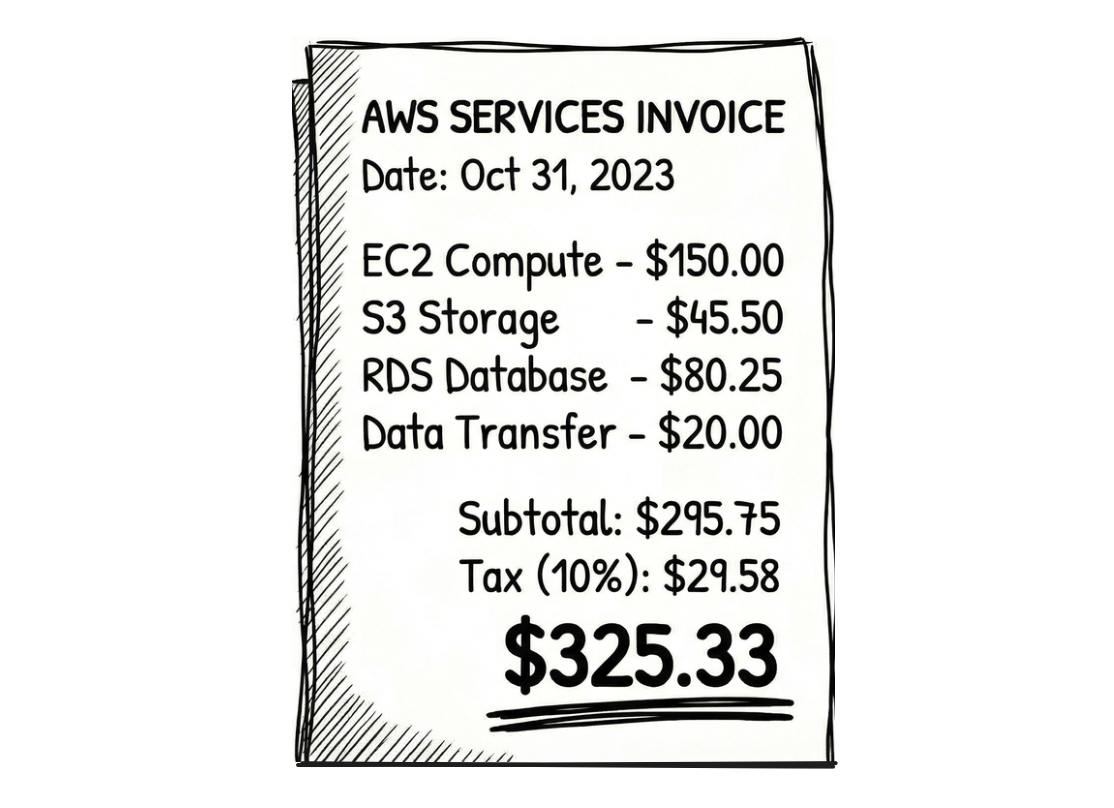
Most LLMs are trained on enough internet blogs, documentation pages, ebooks, etc. to understand how visual cues work in markdown, and they know how to read, understand, write them.
This is essentially chain-of-thought. You are giving the LLM a "scratchpad" to write tokens that shift its internal probability distributions in the right direction. When the LLM generates the JSON in the next step, these distributions improve chances of the JSON being semantically correct.
Similarly, for another example, consider a bank statement. You have sparse tables in them, where one of the credit and debit columns is empty. Let's say a row looks like this:
Date        Description       Debit       Credit       Balance
01/15       Salary                        $25,000      $37,000
If you convert this directly into JSON, it is possible that the LLM assumes the first number it encounters belongs to the first numerical column.
{
  "date": "01/15",
  "description": "Salary",
  "debit": 25000,   // <--- This should be Credit
  "credit": 0,
  "balance": 37000
}
When the OCR pipeline outputs markdown in-between, it draws the table using pipes.
| Date        | Description       | Debit       | Credit      | Balance     |
| ----------- | ----------------- | ----------- | ----------- | ----------- |
| 01/15       | Tech Corp Salary  |             | $5,000      | $12,000     |
This is a hard syntax signal, and there are more chances you get the right JSON in the next step.
Markdown can chunk for RAG
One of the main downstream tasks of OCR today is RAG, which needs chunking at right places so that context is not split between chunks. Ideally, each chunk should be independently sufficient to use.
Let's say we have this employee handbook.
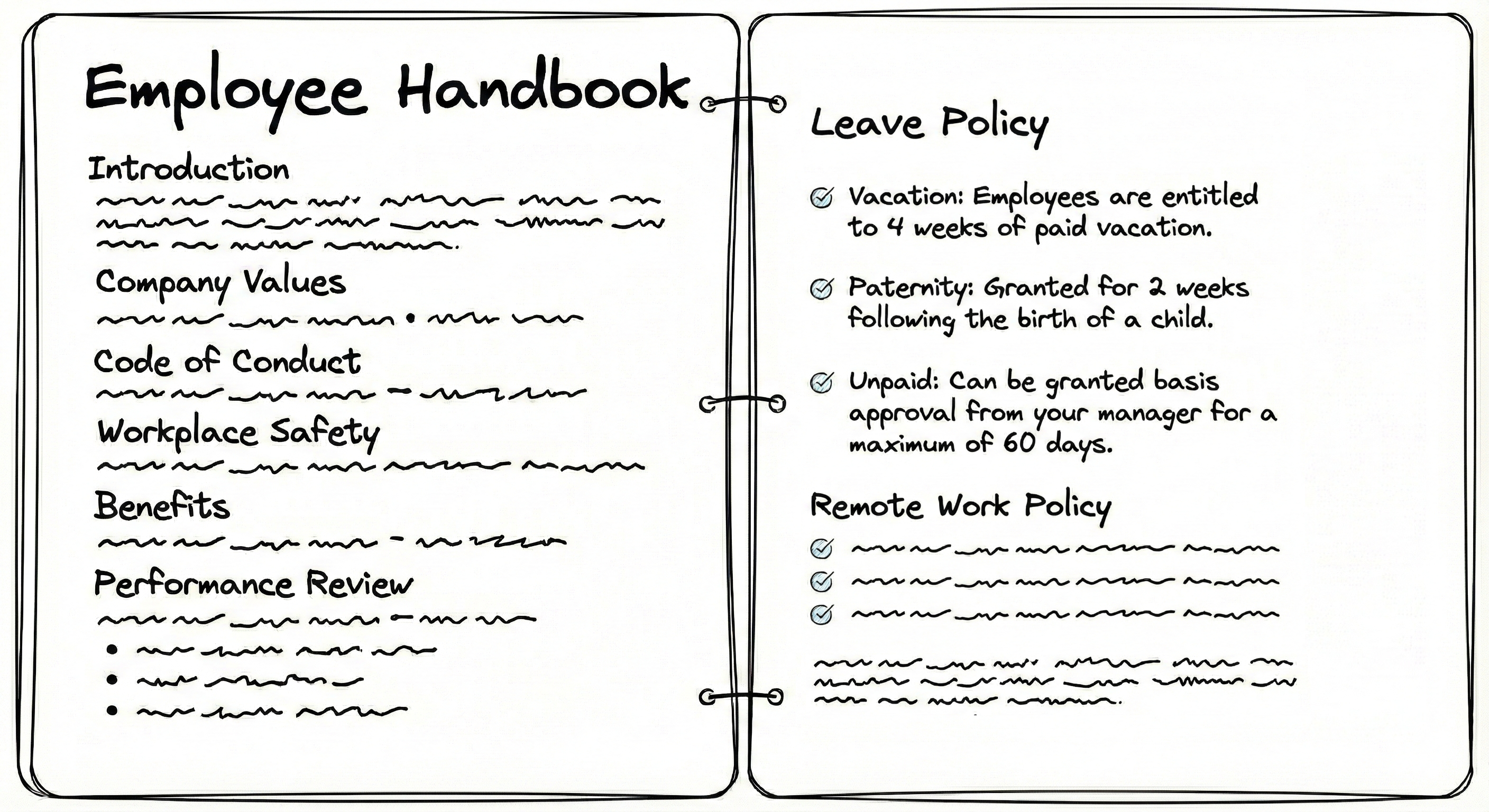
Plaintext OCR contains no structure, so you have to use random chunking strategies, like splitting text after every n tokens or characters. In these strategies, you risk splitting context into multiple chunks:
...employees are entitled to 4 weeks of paid vacation. Paternity: granted for
2 weeks following the birth of a child. Unpaid: can be granted basis approval from your manager for a maximum of 60 days.
Broken context leads to poor retrieval outcomes. The LLM may misinterpret data, miss relationships, fail to reconstruct original meaning, and retrieve chunks inefficiently.
Unlike plaintext, markdown chunking can use ## as the splitting string to keep each of the sections including the "Leave Policy" intact.
# Employee Handbook
## Leave Policy
* **Vacation:** Employees are entitled to 4 weeks of paid vacation.
* **Paternity:** Granted for 2 weeks following the birth of a child.
* **Unpaid:** Can be granted basis approval from your manager for a maximum of 60 days.
# Employee Handbook in this case) to make the chunk more meaningful.Similarly, consider this invoice with a large number of rows (say 60 rows of SKUs).
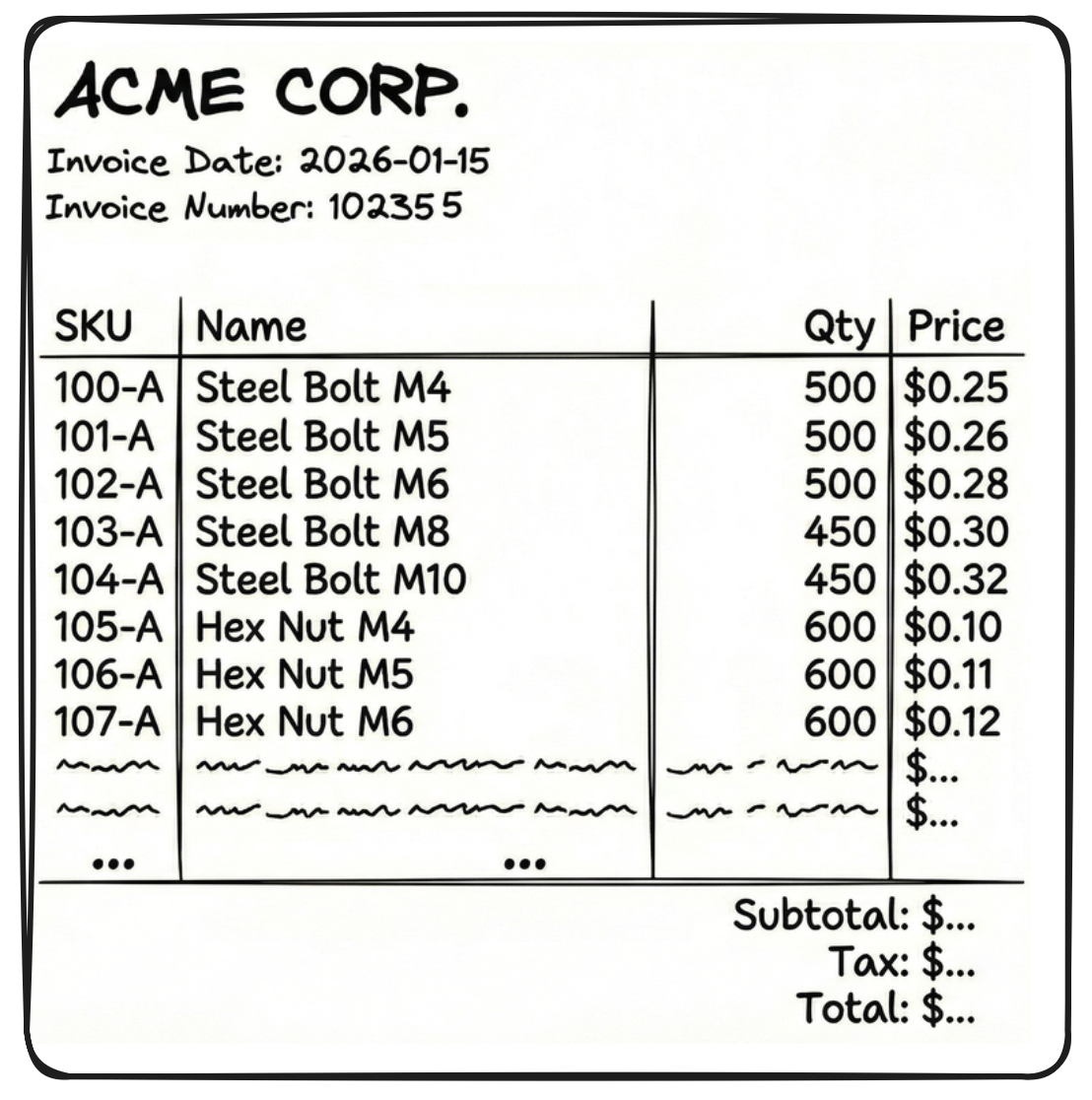
If we get OCR outputs in JSON or XML format, we cannot chunk randomly in-between those outputs as the LLM will be left with incomplete context. But JSON and XML are structured, so we chunk them at the right places to try and retain context.
[
  { "SKU": "104-A", "Name": "Steel Bolt", "Qty": 500, "Price": 0.25 },
  { "SKU": "104-B", "Name": "Steel Nut",  "Qty": 500, "Price": 0.10 }
  ... (18 more times)
]
But there are two problems with the above chunk:
- It doesn't know who sent the invoice, when it is due, what is the invoice number, etc. These details are in a separate chunk
{"fields": {"sender": "Acme corp", "date": "2026-01-15"... - JSON and XML are so verbose that a single chunk (like the 20 table rows above) becomes very large.
If we get the same OCR outputs in markdown, these issues are solved. Look at the chunks below.
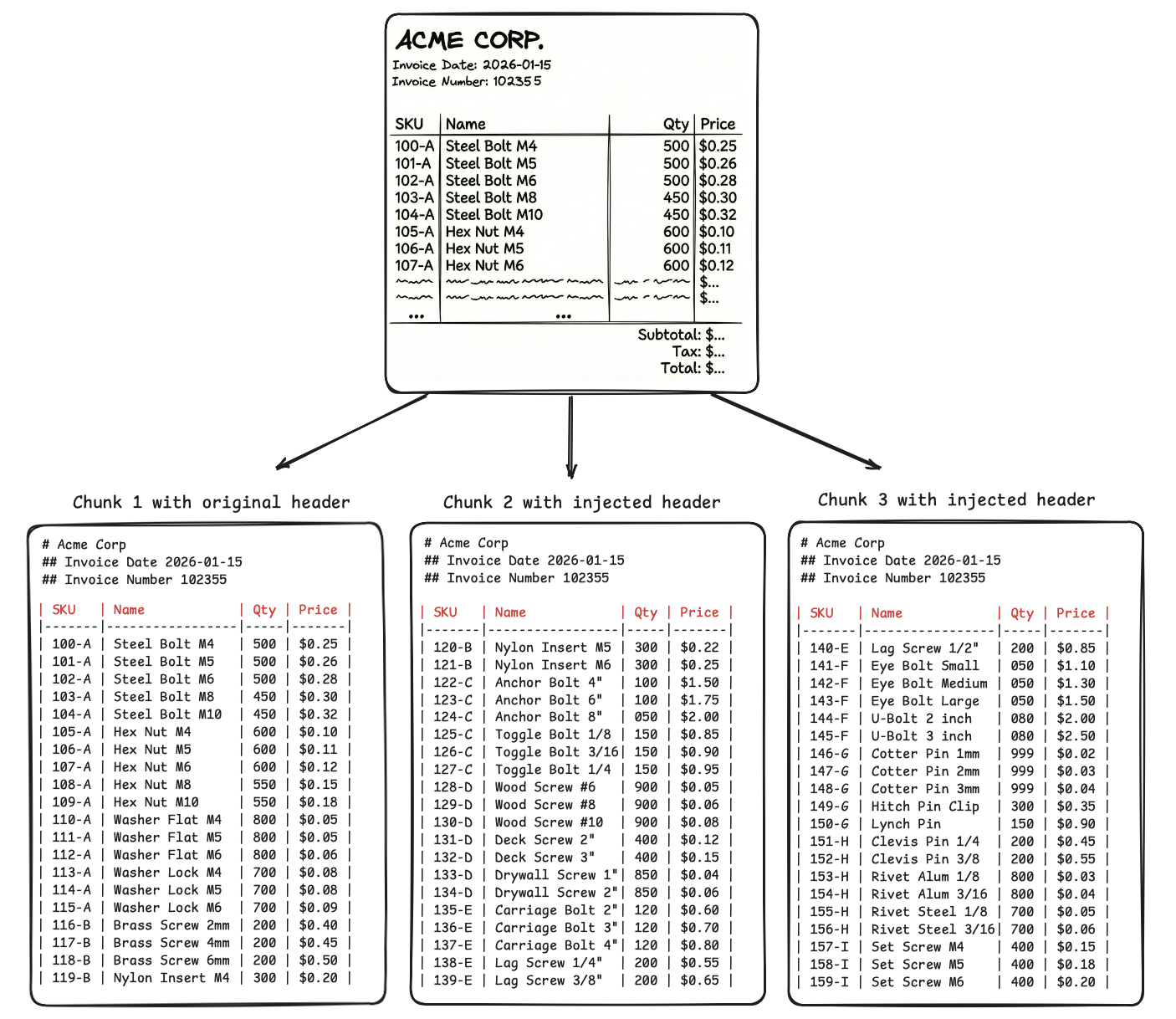
-
We use visual cues to chunk at boundaries of tables, lists, paragraphs and retain a reference to parent context, so that the LLM connects and make sense of all the chunks when retrieving them.
-
Even if we split one visual cue (like a large table) into multiple chunks, the parent context at the top of the chunk helps the LLM connect the dots.
-
JSON repeats the headers in every single row, i.e., 20 times for 20 SKUs present in each chunk, but markdown will repeat headers only once per 20 SKUs.
Similarly, parent context can be preserved and prove useful for other visual cues.
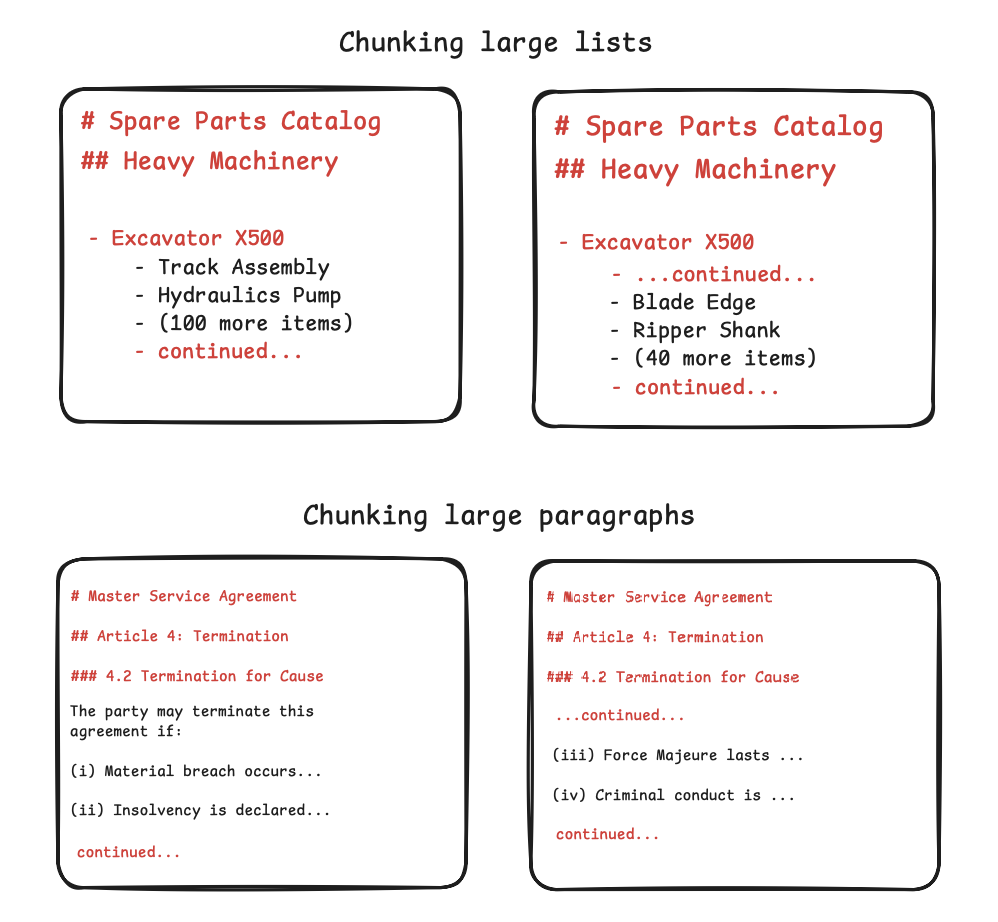
Observability in agents
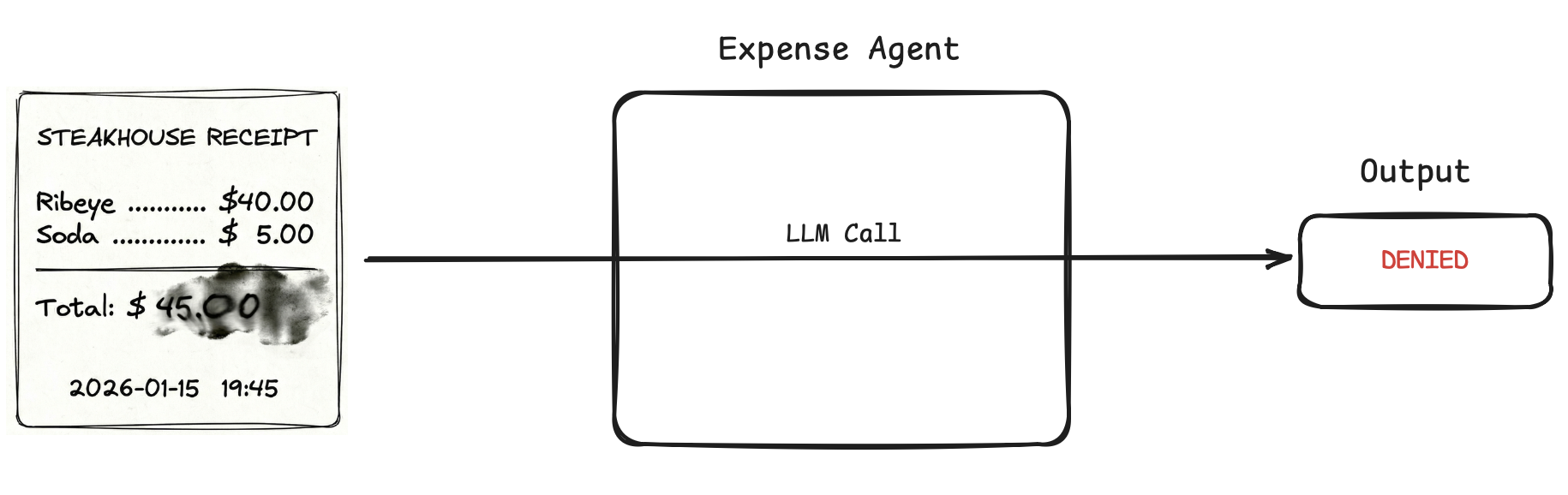
If we feed a document directly to an agent and it fails, there is no visibility into the process as the OCR and the reasoning happened in the same pass.
Say we have an expense approval agent. We add a rule to auto-approve any meal expense under $50. User uploads a scanned receipt for a steak dinner that cost $45, and the agent returns "Denied".
We have no audit trail: Did the OCR part hallucinate extra zeroes and read $4500? Did it read the currency symbol $ as a 4? Did it fail at math and think 45 > 50? Did the reciept invoke a flag?
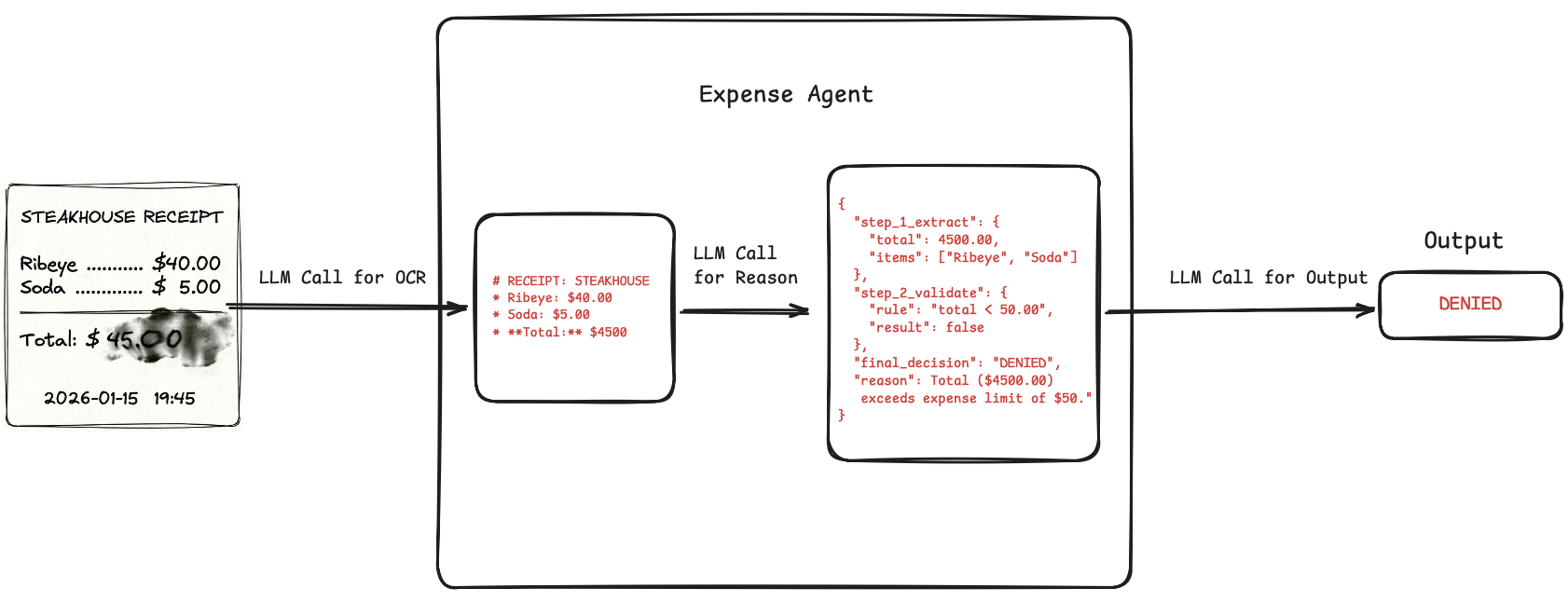
But if we markdown in-between, we can get a searchable trace. Say we use a Doc → Markdown → Reason → Decision pipeline for the above agent. Two scenarios out of the many possible:
- OCR misread the total amount as $4500 because the uploaded receipt scan was blurry or smudged. We immediately see this in the initial markdown output. Fix can be to add some image preprocessing.
- The markdown is flawless. But the reasoning output states an alcoholic beverage was detected, and our prompt states any receipt containing alcohol should be denied. Our agent hallucinated that "Soda" implies a whiskey soda mixer and wrongly triggered the clause. Fix can be to simply add a clarification to the prompt: "Clarification: Soda is a non-alcoholic beverage. Do not flag as alcohol."
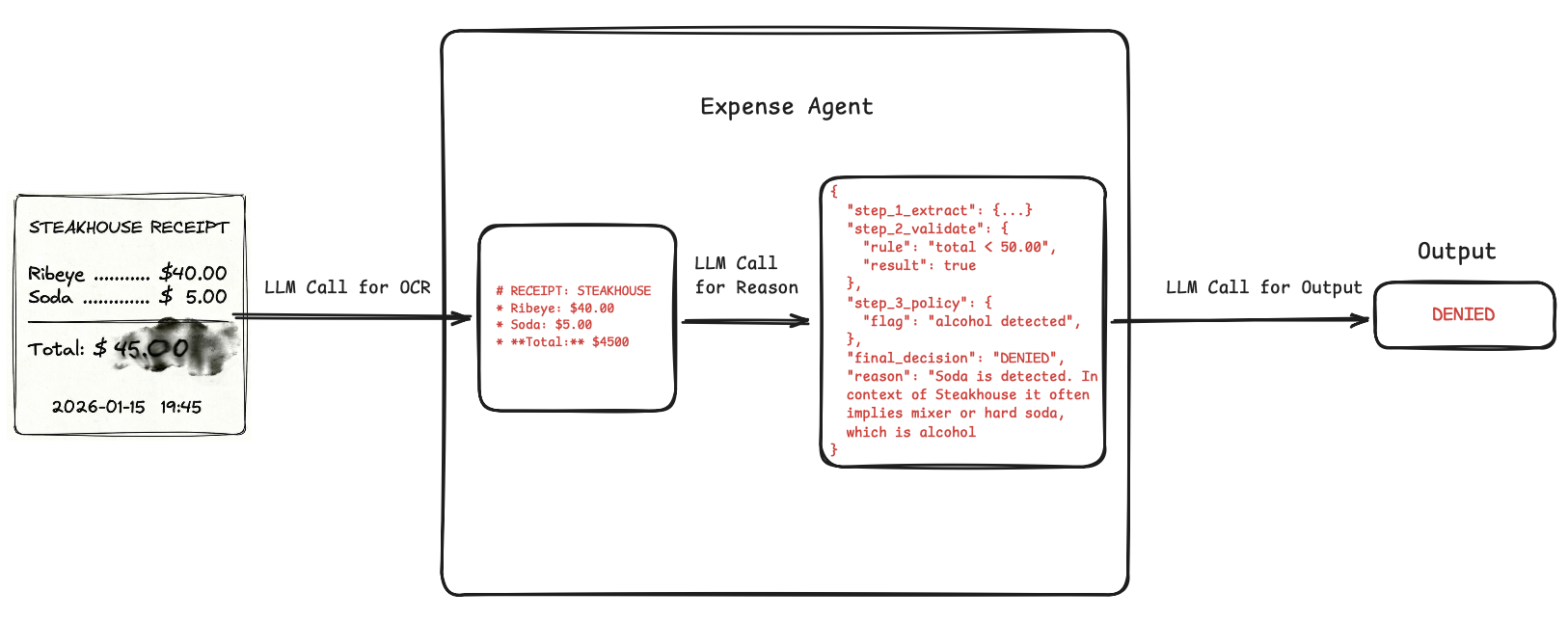
Thus, markdown outputs can improve observability and human moderation in agents.
Conclusion
At least for the foreseeable future, markdown, or some format which emulates markdown's principles, is going to be the de-facto format for document pipelines, OCR or otherwise.
And just before signing off, it is also worth mentioning that while we discussed it here in the context of OCR and document understanding, markdown's principles are also discussed constantly in our search of a common language for both humans and machines, the one true lingua franca of the machine age.
Subscribe to our newsletter
Updates from the LLM developer community in your inbox. Twice a month.
- Developer insights
- Latest breakthroughs
- Useful tools & techniques